> For the complete documentation index, see [llms.txt](https://docs.cw.crisisworks.com/llms.txt). Markdown versions of documentation pages are available by appending `.md` to page URLs; this page is available as [Markdown](https://docs.cw.crisisworks.com/modules/dashboard.md).
# Dashboard
This section outlines the dashboard module which provides key widgets for real-time management of the system.
## Overview
The dashboard provides a snapshot of key information on system operation including a near real-time feed of updates.
### Benefits
The Dashboard helps teams prioritise actions quickly by surfacing critical information in one place, specifically it:
* Provides real-time situational awareness
* Live feeds updates across the system so teams can quickly understand what’s happening
* Acts as a central noticeboard for promoted information and key updates during operations
* Reduces information lag and keeps everyone aligned with the latest operational picture
### Features
Dashboards can be customised and configured based on the requirements for a project.
The standard dashboard includes:
* Announcements
* Recent Activity
View of the Dashboard
## Functions
### Announcements
Announcements are used by coordinators to broadcast important information. They appear in yellow sections including the Event that they are from.
### Recent Activity
The Recent Activity feed includes information such as:
* **User** - Sign ins and Duty Status reporting
* **Events** - New, Open and Closed incidents
* **Activities** - Requests, Information, Offers and Cases
* **Log Messages** - brief messages entered from the dashboard
#### Moving between pages
The Activity Feed shows only the most recent 25 or so actions. To show more, use the Next button to navigate between pages.
#### Filtering Recent Activity
Recent Activity feed is automatically filtered based on your permissions.
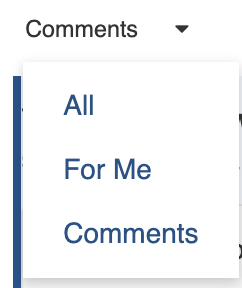
To increase signal to noise you can filter the feed using the 'Comments' dropdown. This has three options:
* **All** - show all activity
* **For me** - only show activities involving yourself
* **Comments** - activities with accompanying notes
Comments filter
#### Sorting Recent Activity
Recent Activity can be sorted to show newest or oldest activities first. To toggle the sorting drop down the list at the top right of the feed.
Sorting options
---
# Agent Instructions
This documentation is published with GitBook. GitBook is the documentation platform designed so that both humans and AI agents can read, navigate, and reason over technical content effectively. Learn more at gitbook.com.
## Querying This Documentation
If you need additional information that is not directly available in this page, you can query the documentation dynamically by asking a question.
Perform an HTTP GET request on the current page URL with the `ask` query parameter, and the optional `goal` query parameter:
```
GET https://docs.cw.crisisworks.com/modules/dashboard.md?ask=&goal=
```
`ask` is the immediate question: it should be specific, self-contained, and written in natural language.
`goal` is optional and describes the broader end goal you are ultimately trying to accomplish on behalf of the user. GitBook uses it to tailor the answer towards what is most useful for that goal.
The response will contain a direct answer to the question and relevant excerpts and sources from the documentation.
Use this mechanism when the answer is not explicitly present in the current page, you need clarification or additional context, or you want to retrieve related documentation sections.

 to navigate between pages.
#### Filtering Recent Activity
Recent Activity feed is automatically filtered based on your permissions.
To increase signal to noise you can filter the feed using the 'Comments' dropdown. This has three options:
* **All** - show all activity
* **For me** - only show activities involving yourself
* **Comments** - activities with accompanying notes
to navigate between pages.
#### Filtering Recent Activity
Recent Activity feed is automatically filtered based on your permissions.
To increase signal to noise you can filter the feed using the 'Comments' dropdown. This has three options:
* **All** - show all activity
* **For me** - only show activities involving yourself
* **Comments** - activities with accompanying notes