> For the complete documentation index, see [llms.txt](https://docs.cw.crisisworks.com/llms.txt). Markdown versions of documentation pages are available by appending `.md` to page URLs; this page is available as [Markdown](https://docs.cw.crisisworks.com/modules/gerf.md).

# GERF

This section outlines use of the Gippsland Emergency Relief Fund (GERF) solution.

## Overview

The Gippsland Emergency Relief Fund distributes relief funding to Gippsland residents after emergencies. They collaborate closely with local government on impact data.

GERF use their own Crisisworks instance to review, approve and pay relief payments to eligible residents referred by participating Councils via their own Crisisworks instance.

### How this works

Participating Gippsland councils use the [Recovery Case](broken://pages/Sfj9Pht3MY5OyzcTaJAs) and [Recovery Task](broken://pages/cbvxkWADYBnySUMuIgVf) features to provide a way to record the immediate need. A Recovery Task category, called “GERF Payment” is available to councils when they wish to refer eligible residents to GERF to be considered for a relief payment.

Once the application is raised in GERF’s Crisisworks instance, GERF will run through the following assessment workflow and payment process to issue relief payments to eligible residents.

![](https://3923904090-files.gitbook.io/~/files/v0/b/gitbook-x-prod.appspot.com/o/spaces%2FNy7IznbrPLUq6GJDDQDk%2Fuploads%2Fgit-blob-093125b8f38da55a507133b74efad8888a586342%2F2e946726-8eb9-45b0-a0c4-9316e68915a4.png?alt=media)

At each step in the workflow process, the application status, record if any payment amount is sent back to the Council and the appropriate Recovery Task update accordingly.

![](https://3923904090-files.gitbook.io/~/files/v0/b/gitbook-x-prod.appspot.com/o/spaces%2FNy7IznbrPLUq6GJDDQDk%2Fuploads%2Fgit-blob-be25a61603e41cb05fbc08281f33ea3e0e9df1c8%2FScreen%20Shot%202021-12-07%20at%2011.51.29%20am.png?alt=media)

### Players

| **Role**                         | **Organisation** | **Description**                                                                                                                                                                                                                                 |
| -------------------------------- | ---------------- | ----------------------------------------------------------------------------------------------------------------------------------------------------------------------------------------------------------------------------------------------- |
| Recovery Officer (RO)            | Council          | Council Recovery Officer, can create GERF-Payment Recovery Tasks, but can not approve and trigger the integration into GERF.                                                                                                                    |
| Municipal Recovery Manager (MRM) | Council          | The Municipal Recovery Manager provides overall management of the recovery, and will be a point of leadership in the event. The have the authority and ability to approve a payment request and trigger the creation of an application in GERF. |
| Payment Officer (PO)             | GERF             | Access to the Assessment workflow. Can create and approve applications ready for Coordinator review and payment processing.                                                                                                                     |
| Payment Coordinator (PC)         | GERF             | Access to both Assessment and Payment workflow. Primarily task is to review approved applications, and progress the application through the Payment workflow. This includes access to the Payment File (ABA) report.                            |

### Setup and Configuration <a href="#setup-and-configuration" id="setup-and-configuration"></a>

{% hint style="info" %}
For each new emergency incident, a new event should be created in GERF.
{% endhint %}

First, **set up the GERF event** for the incident.

1. [Create an event](/system-administration/managing-events.md#creating-a-new-event) for the incident using the `Payment Applications Template` template option. This will automatically include all the required registers and user positions into the event. In most cases there is no need to use the advanced options when creating the event.
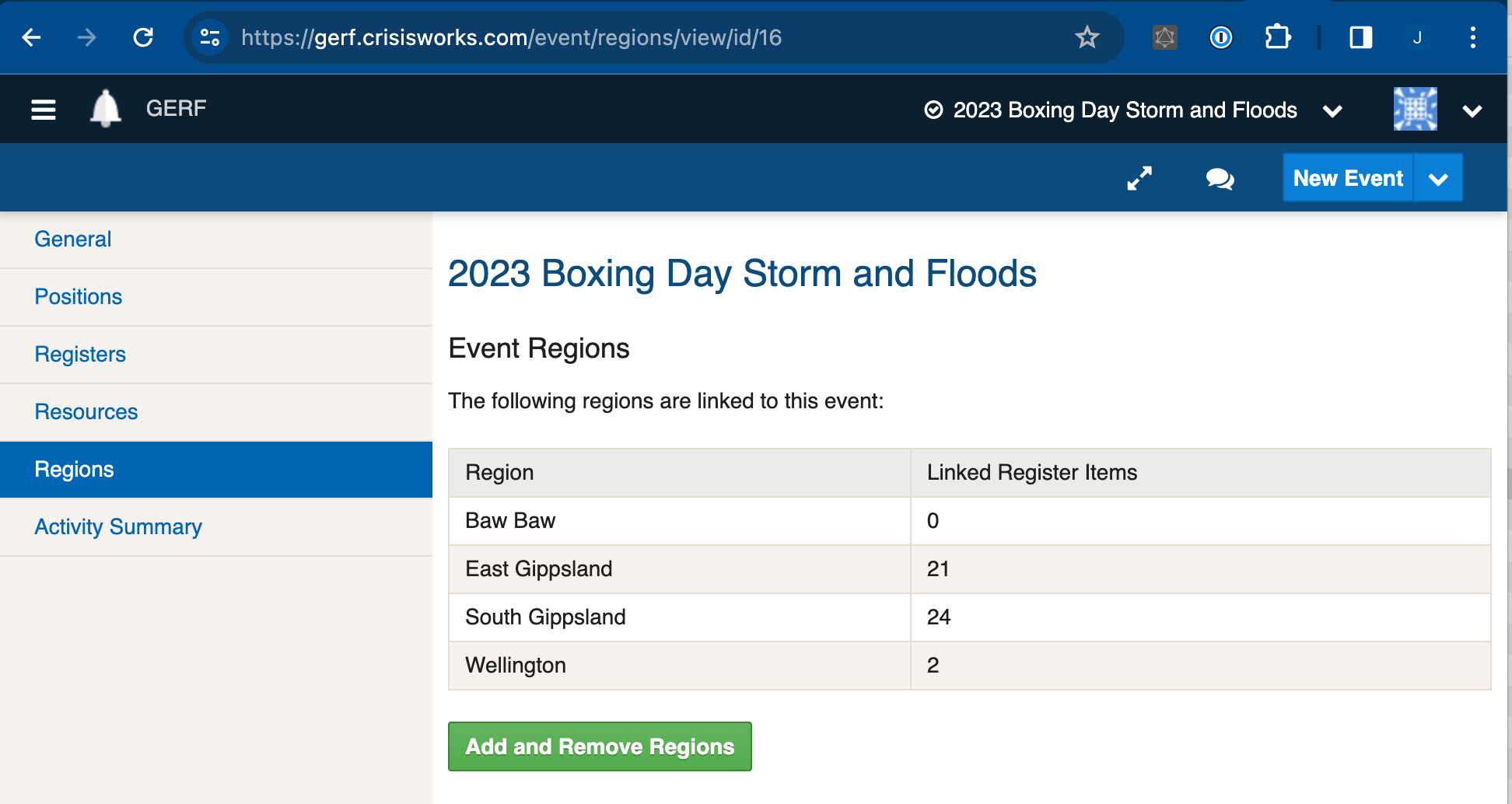
2. Ensure that the specific Councils who can apply for payments on behave of their residents are set up as a regions in the new event. To do this, view the Event (via the “**Administration**” > “**Events** “ in the top menu) , and then select the “**Regions**” option in the left hand side menu, then select the “**Add and Remove Regions**” button and update accordingly.\ <br>

   <figure><img src="https://3923904090-files.gitbook.io/~/files/v0/b/gitbook-x-prod.appspot.com/o/spaces%2FNy7IznbrPLUq6GJDDQDk%2Fuploads%2Fgit-blob-1b90ed6959f7cb1776c209955e86744ac46db4a4%2FScreen%20Shot%202024-01-15%20at%203.08.07%20pm.png?alt=media" alt="" width="563"><figcaption></figcaption></figure>
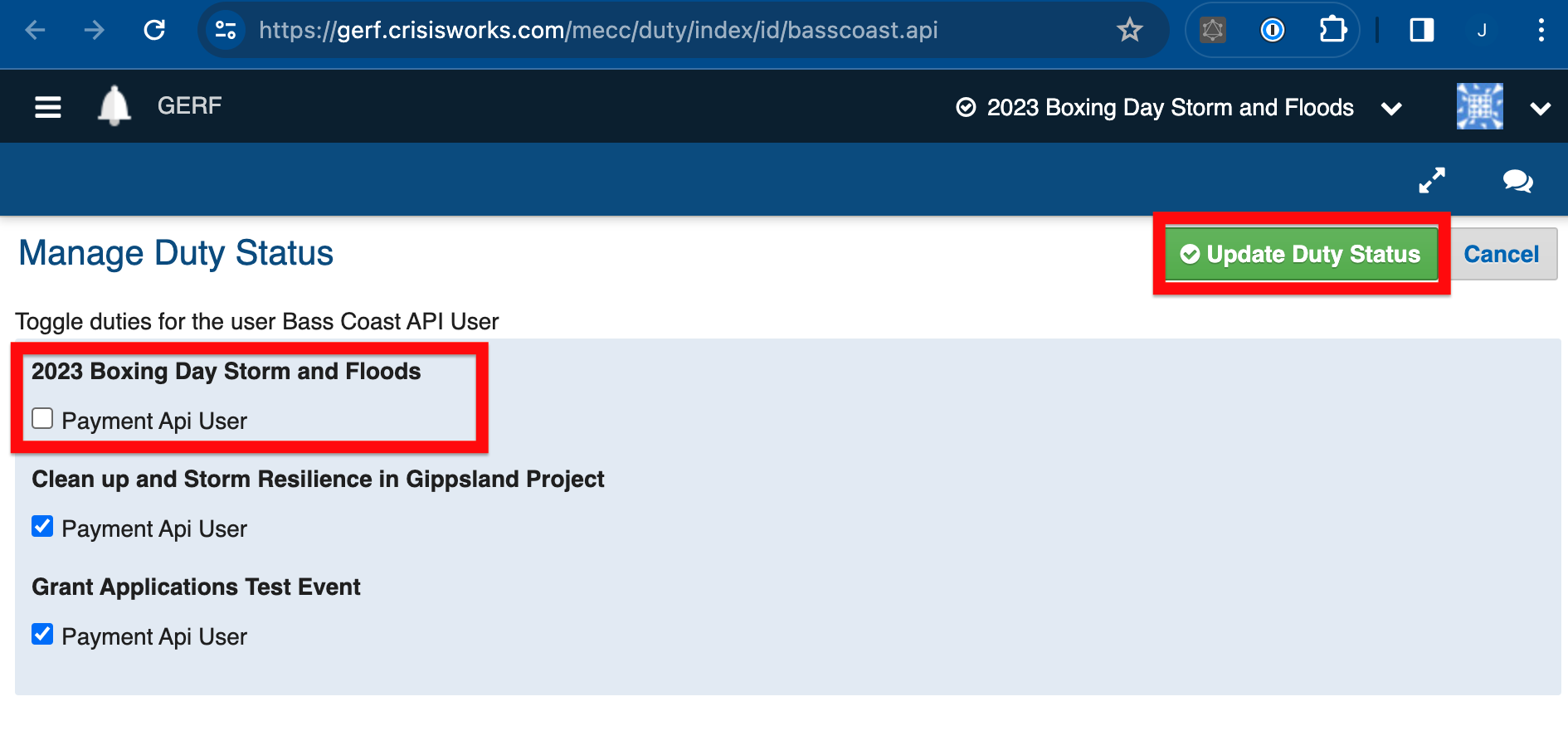
3. Ensure all the participating council API users are on-duty in the new event.\
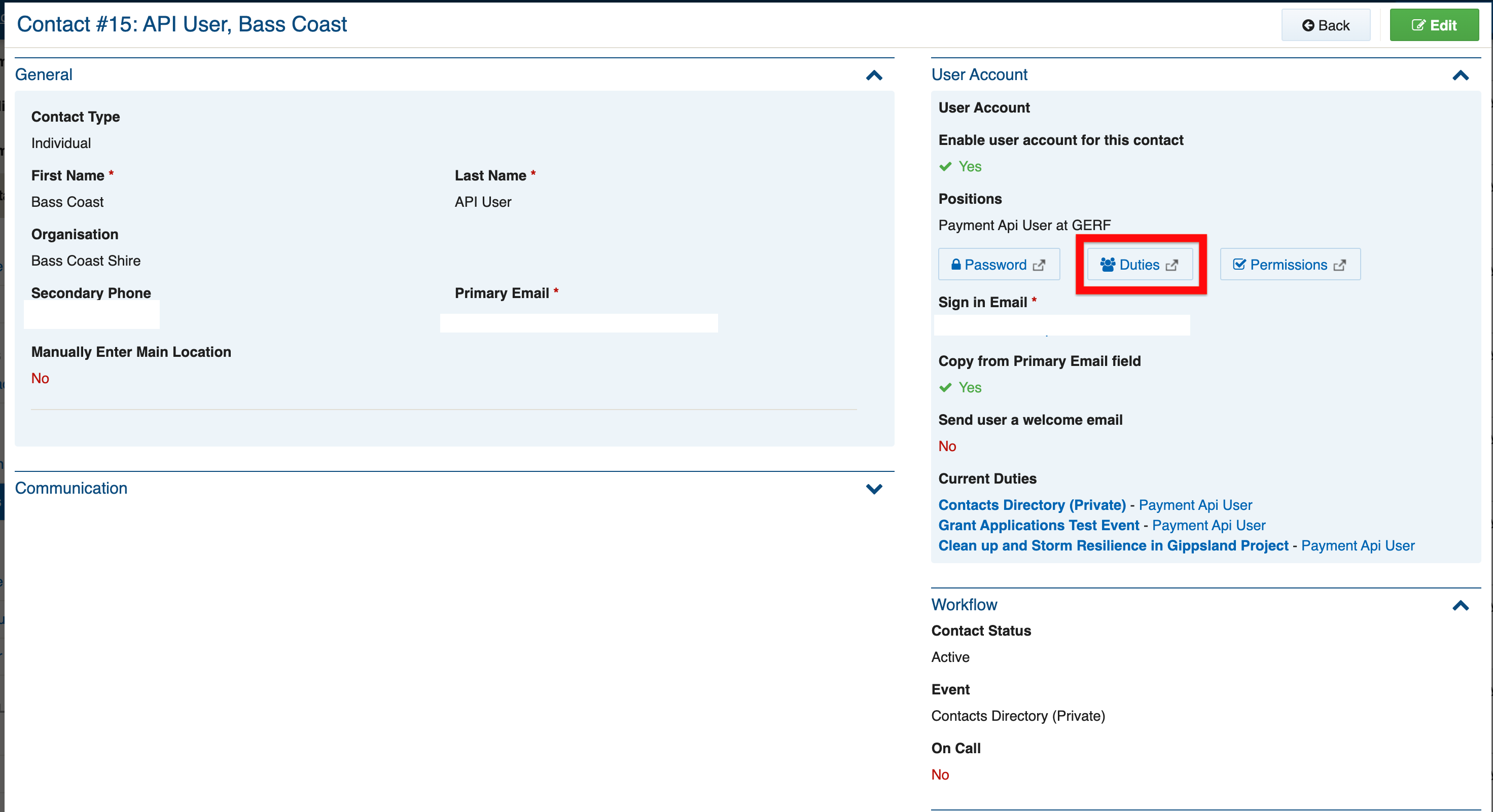
   To place the relevant users on-duty, go to “**Administration**” > “**Users** “, and select the participating councils API user, for example “[API User, Bass Coast](https://gerf.crisisworks.com/register/item/view/id/15)”. Then select the “Duties” button.<br>

   <figure><img src="https://3923904090-files.gitbook.io/~/files/v0/b/gitbook-x-prod.appspot.com/o/spaces%2FNy7IznbrPLUq6GJDDQDk%2Fuploads%2Fgit-blob-182af2458564488f279fb3871eb055a4317bf691%2FScreen%20Shot%202024-01-15%20at%203.16.33%20pm.png?alt=media" alt="" width="563"><figcaption></figcaption></figure>

Then ensure that all the event/s that are currently accepting applications are ticked for this user and the select the update button.<br>

<figure><img src="https://3923904090-files.gitbook.io/~/files/v0/b/gitbook-x-prod.appspot.com/o/spaces%2FNy7IznbrPLUq6GJDDQDk%2Fuploads%2Fgit-blob-edce7b8248d4c9b611d8ef23e82a3cc21b40fe99%2FScreen%20Shot%202024-01-15%20at%203.16.50%20pm.png?alt=media" alt="" width="563"><figcaption></figcaption></figure>

This needs to be done for each API user whose council that is participating in the particular event.

4\. (Optional) Identify the key users (Payment Officers and Coordinators) who require access to the event and place them on duty

5\. Next, determine and create the Payment Types that are being offered for this incident. These Payment Types will become available on the Recovery Task for selection by the council.

6\. Update the list of payment eligibility criteria listed on the GERF site. A link to this is shown on the Council Recovery Task for and enabled the council to check GERFs eligibility criteria for payments.

#### Security Policies <a href="#security-policies" id="security-policies"></a>

Refer to: [Positions: Security Policies](/system-administration/configuring-the-system/positions.md#security-policies)

<details>

<summary><strong>Security Policy explanations</strong></summary>

The following security policies apply to GERF:

<table><thead><tr><th width="239.546875">Security Policy</th><th>Use</th></tr></thead><tbody><tr><td>GERF API Access</td><td>Can approve tasks of category 'GERF Payment' in <a href="broken://pages/cbvxkWADYBnySUMuIgVf">Recovery Needs &#x26; Tasks</a>. This triggers integration of the case details into GERF's grant payment system for processing.</td></tr><tr><td>Recovery Task Approve GERF Payments</td><td>Can approve tasks of category 'GERF Payment' in <a href="broken://pages/cbvxkWADYBnySUMuIgVf">Recovery Needs &#x26; Tasks</a>. This triggers integration of the case details into GERF's grant payment system for processing.</td></tr></tbody></table>

</details>

### **Process Overview**

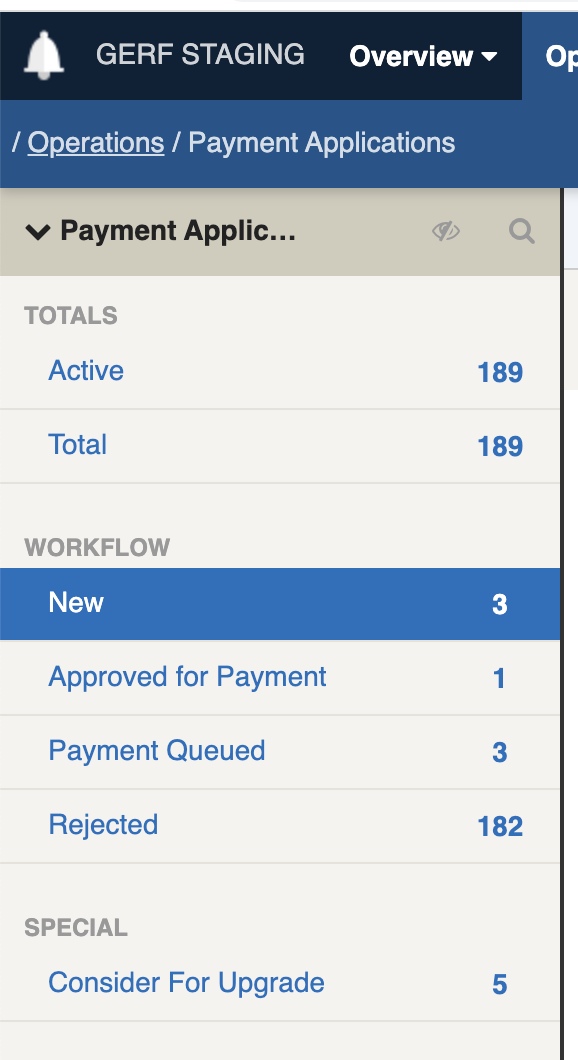
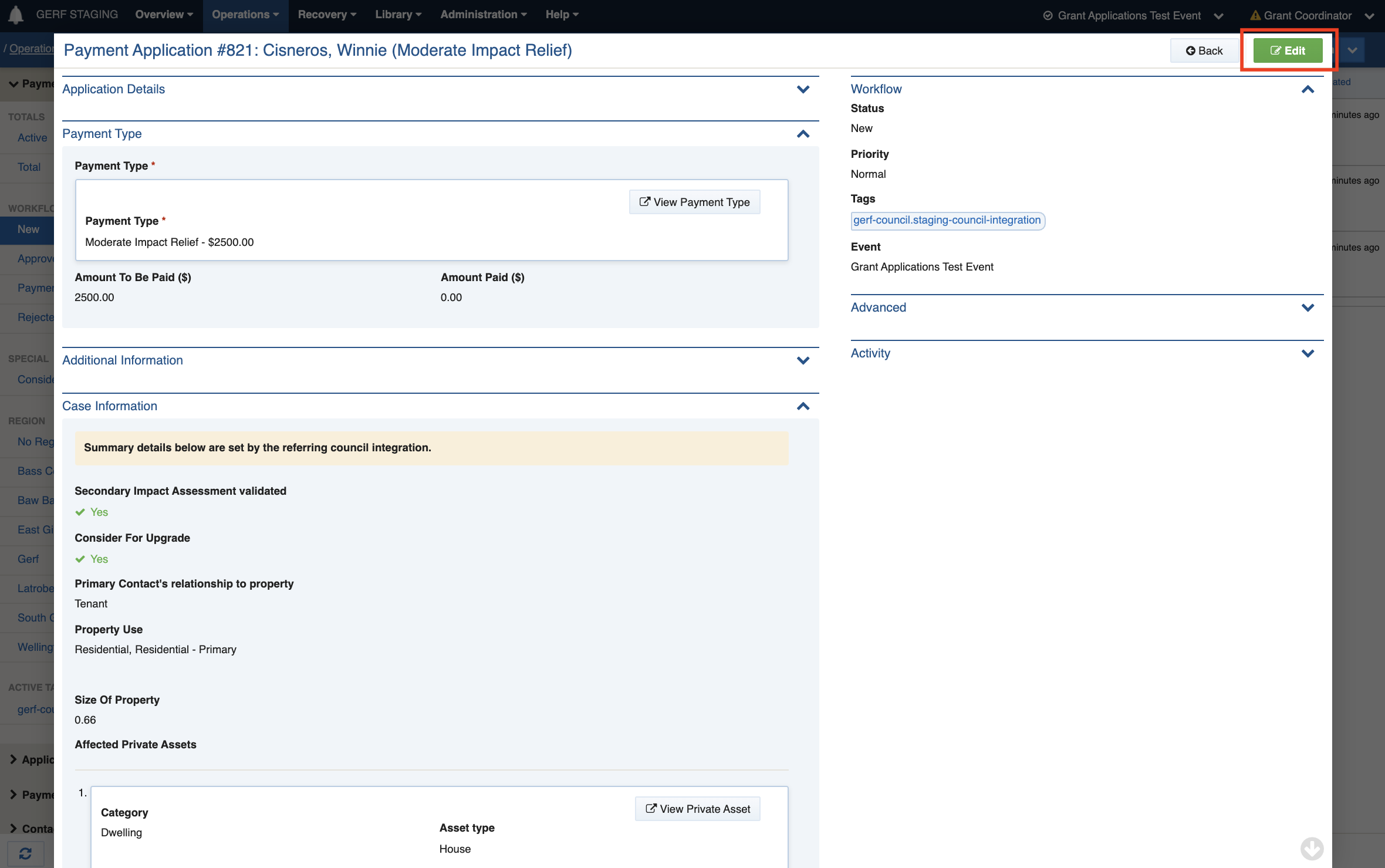
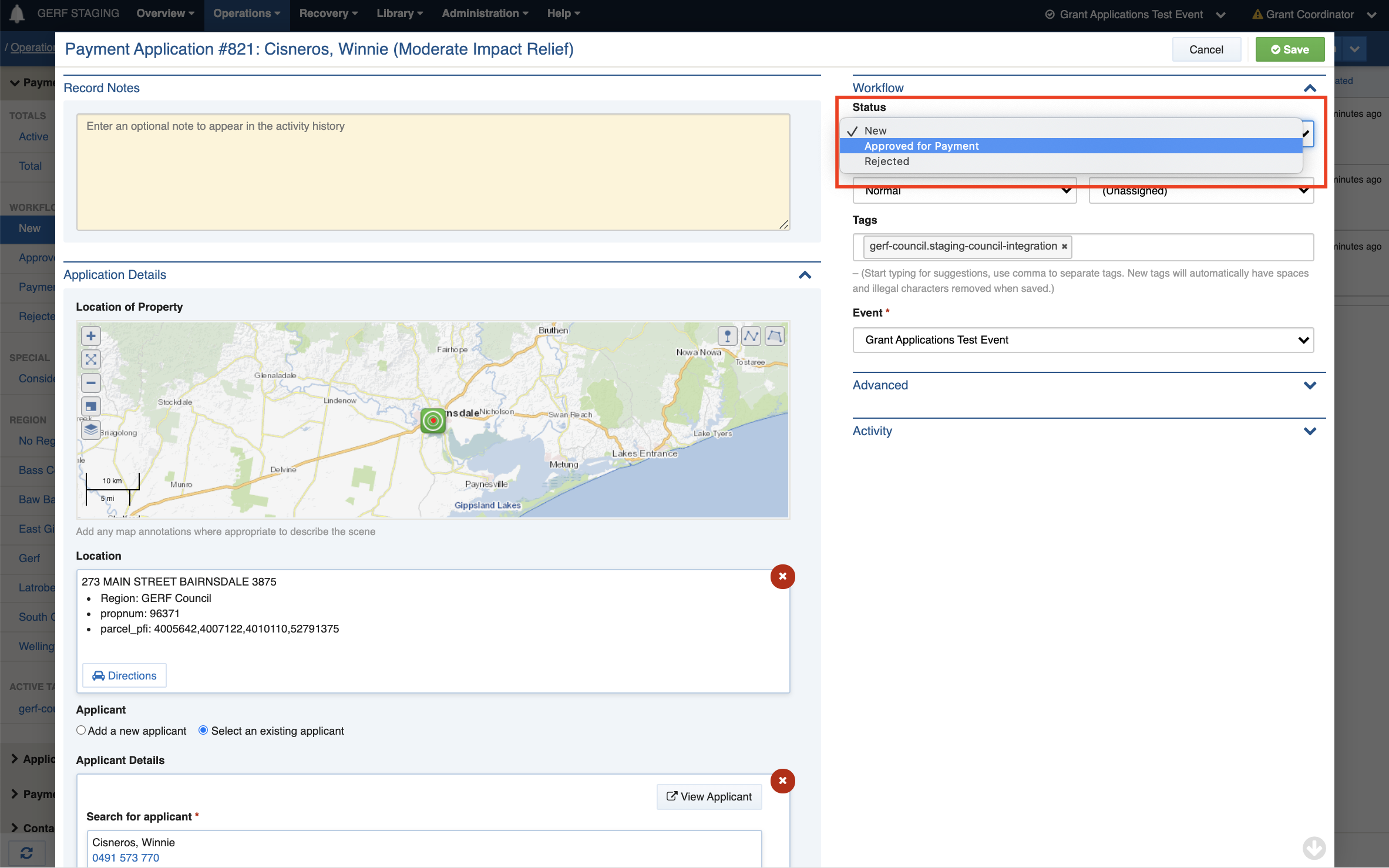
#### The Payment Officer Approves/Rejects new GERF Payment Applications

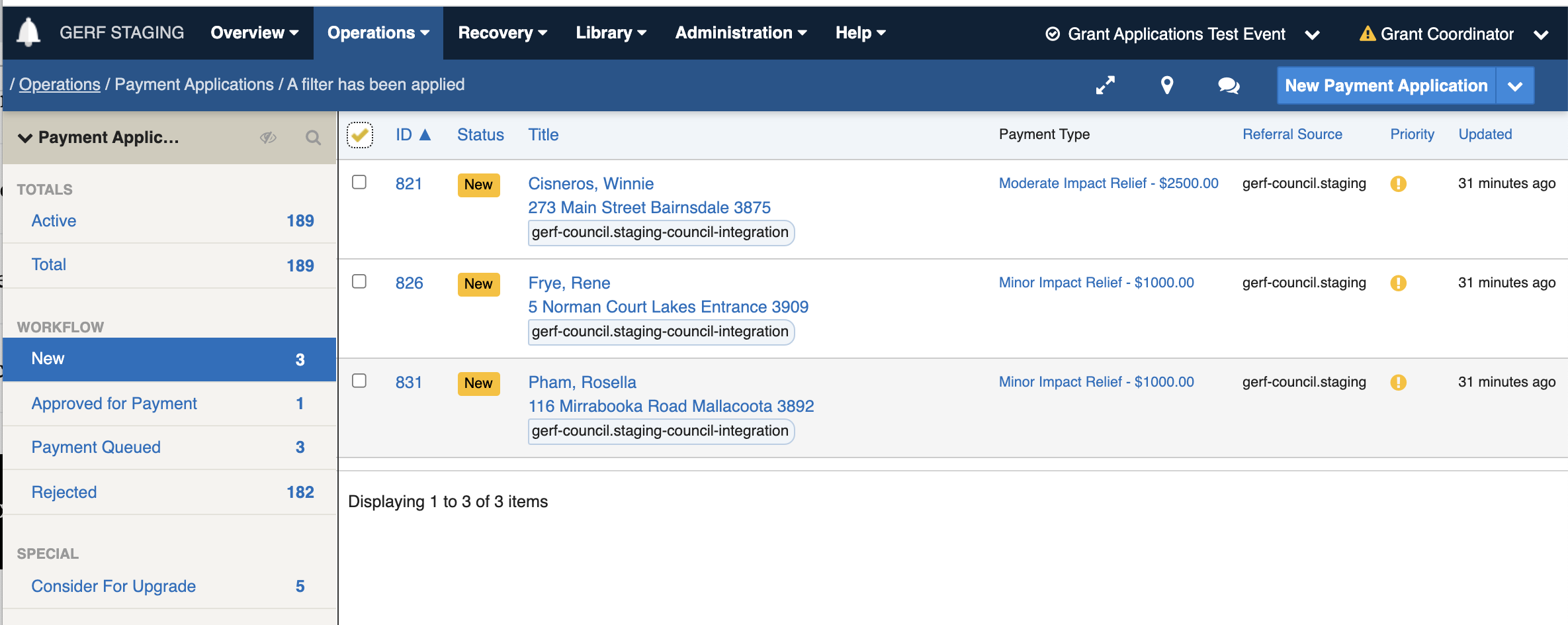
1. New Payment Applications are pooled into the NEW status.
2. Periodically, the Payment Officers (PO) can assess these new applications.
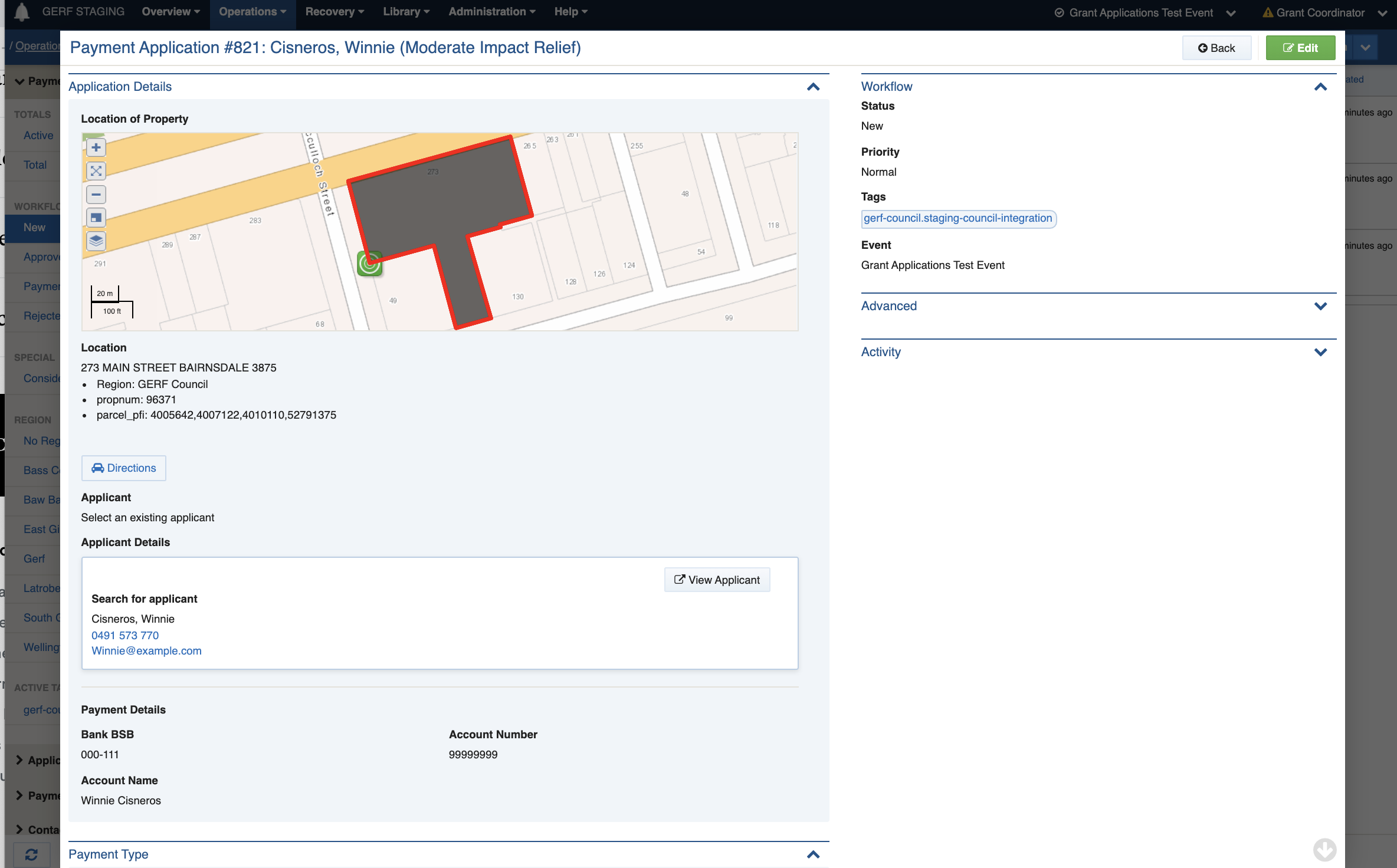
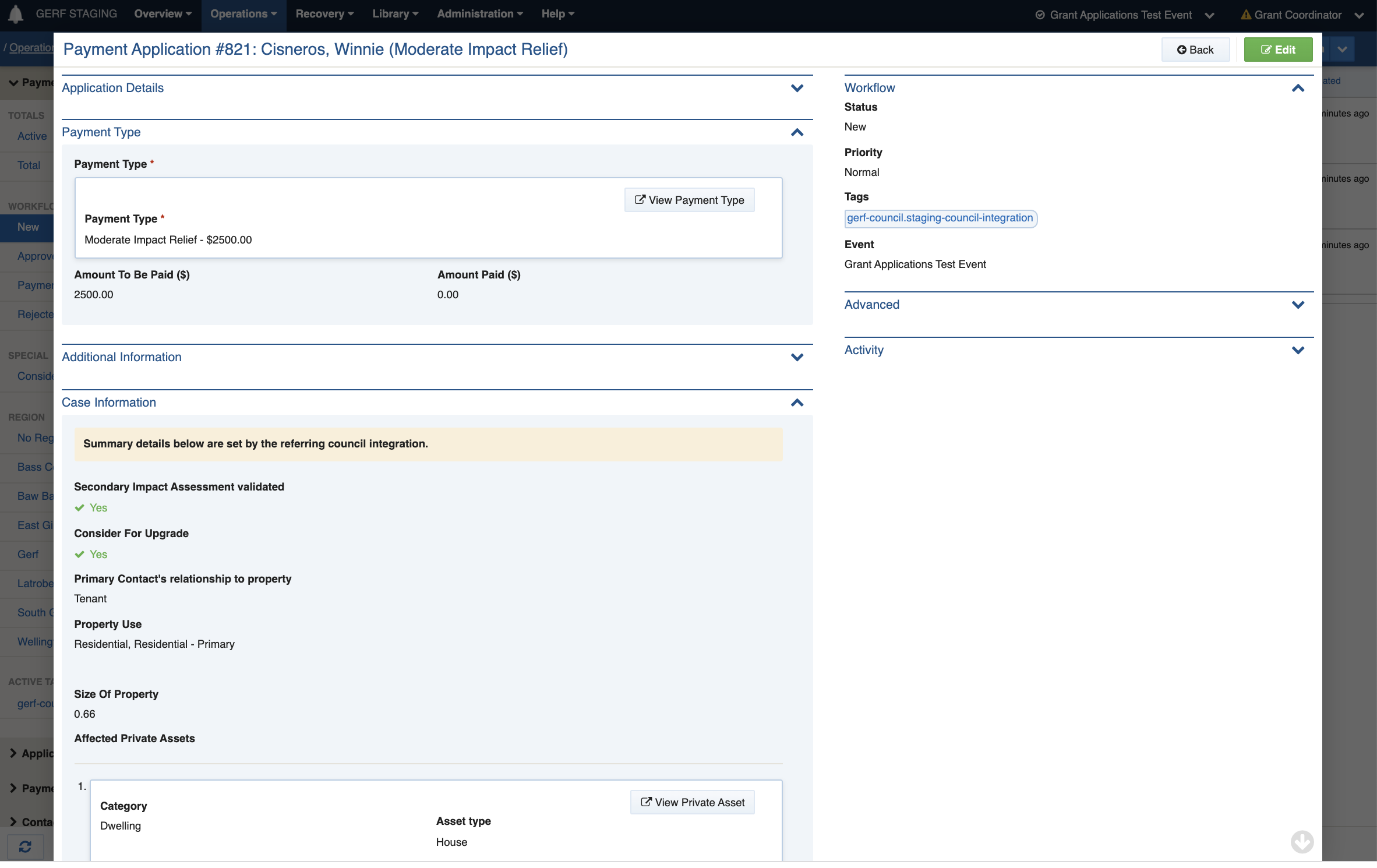
3. The assessment process involves:
4. review application data and verifying against the GERF assessment criteria
5. checking for duplicates or other anomalies
6. upgrading/downgrading the allocated payment type where needed.
7. approving or reject the application by setting the Payment Application to APPROVED FOR PAYMENT or REJECTED

#### In Practice

<img src="https://3923904090-files.gitbook.io/~/files/v0/b/gitbook-x-prod.appspot.com/o/spaces%2FNy7IznbrPLUq6GJDDQDk%2Fuploads%2Fgit-blob-f049c32bed5e609179778810d224c7b8eb32a8c2%2Fimage-20211207-121610.png?alt=media" alt="Click to workflow filter labelled &#x27;New&#x27; to only show new applications." width="289">

<img src="https://3923904090-files.gitbook.io/~/files/v0/b/gitbook-x-prod.appspot.com/o/spaces%2FNy7IznbrPLUq6GJDDQDk%2Fuploads%2Fgit-blob-e42a673a9640babd9c4ef3aae426c0a1cb0548b5%2FScreen%20Shot%202021-12-07%20at%2011.46.05%20pm.png?alt=media" alt="" width="563">

<img src="https://3923904090-files.gitbook.io/~/files/v0/b/gitbook-x-prod.appspot.com/o/spaces%2FNy7IznbrPLUq6GJDDQDk%2Fuploads%2Fgit-blob-dfae383db941dcce941fb577f2aa54fe3a84445e%2FScreen%20Shot%202021-12-07%20at%2011.46.56%20pm.png?alt=media" alt="" width="563">

<img src="https://3923904090-files.gitbook.io/~/files/v0/b/gitbook-x-prod.appspot.com/o/spaces%2FNy7IznbrPLUq6GJDDQDk%2Fuploads%2Fgit-blob-f9a59a77c99f6bdb937ea558ed2898a4606de0e2%2FScreen%20Shot%202021-12-07%20at%2011.47.23%20pm.png?alt=media" alt="" width="563">

<img src="https://3923904090-files.gitbook.io/~/files/v0/b/gitbook-x-prod.appspot.com/o/spaces%2FNy7IznbrPLUq6GJDDQDk%2Fuploads%2Fgit-blob-b750bf1a2eefa706ebbd4a463b56ce3c7959a2ab%2FScreen%20Shot%202021-12-07%20at%2011.52.47%20pm.png?alt=media" alt="" width="563">

<img src="https://3923904090-files.gitbook.io/~/files/v0/b/gitbook-x-prod.appspot.com/o/spaces%2FNy7IznbrPLUq6GJDDQDk%2Fuploads%2Fgit-blob-3244b726e0e097e7145c03c839f6f28648937b81%2FScreen%20Shot%202021-12-07%20at%2011.53.09%20pm.png?alt=media" alt="" width="563">

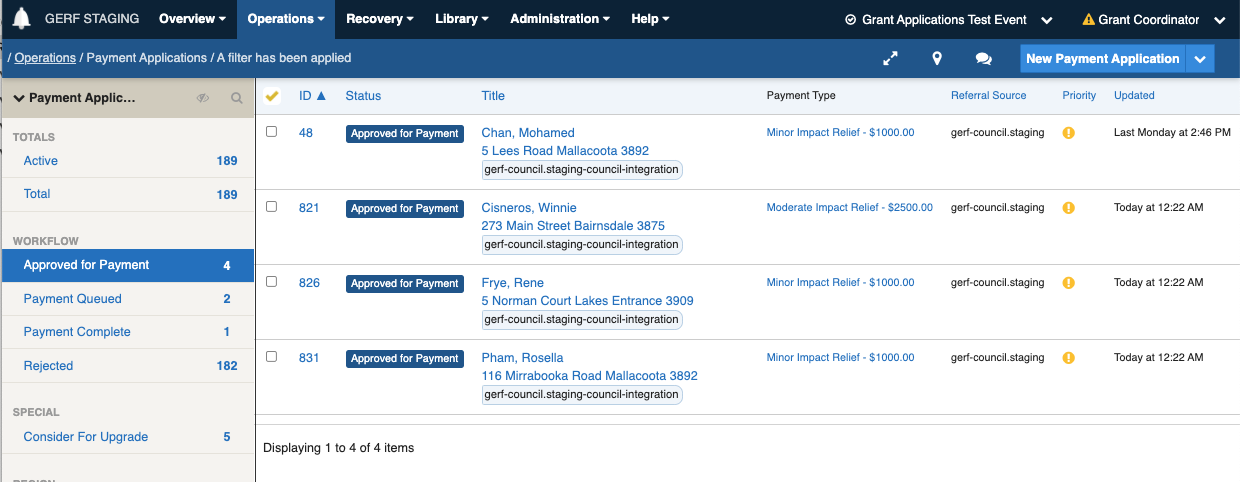
## Processing Payments for Approved GERF Payment Applications
<img src="https://3923904090-files.gitbook.io/~/files/v0/b/gitbook-x-prod.appspot.com/o/spaces%2FNy7IznbrPLUq6GJDDQDk%2Fuploads%2Fgit-blob-017883a12f101c1a76cc3ff53c870d9f1c8f8818%2FScreen%20Shot%202021-12-08%20at%2012.08.41%20pm.png?alt=media" alt="" width="563">

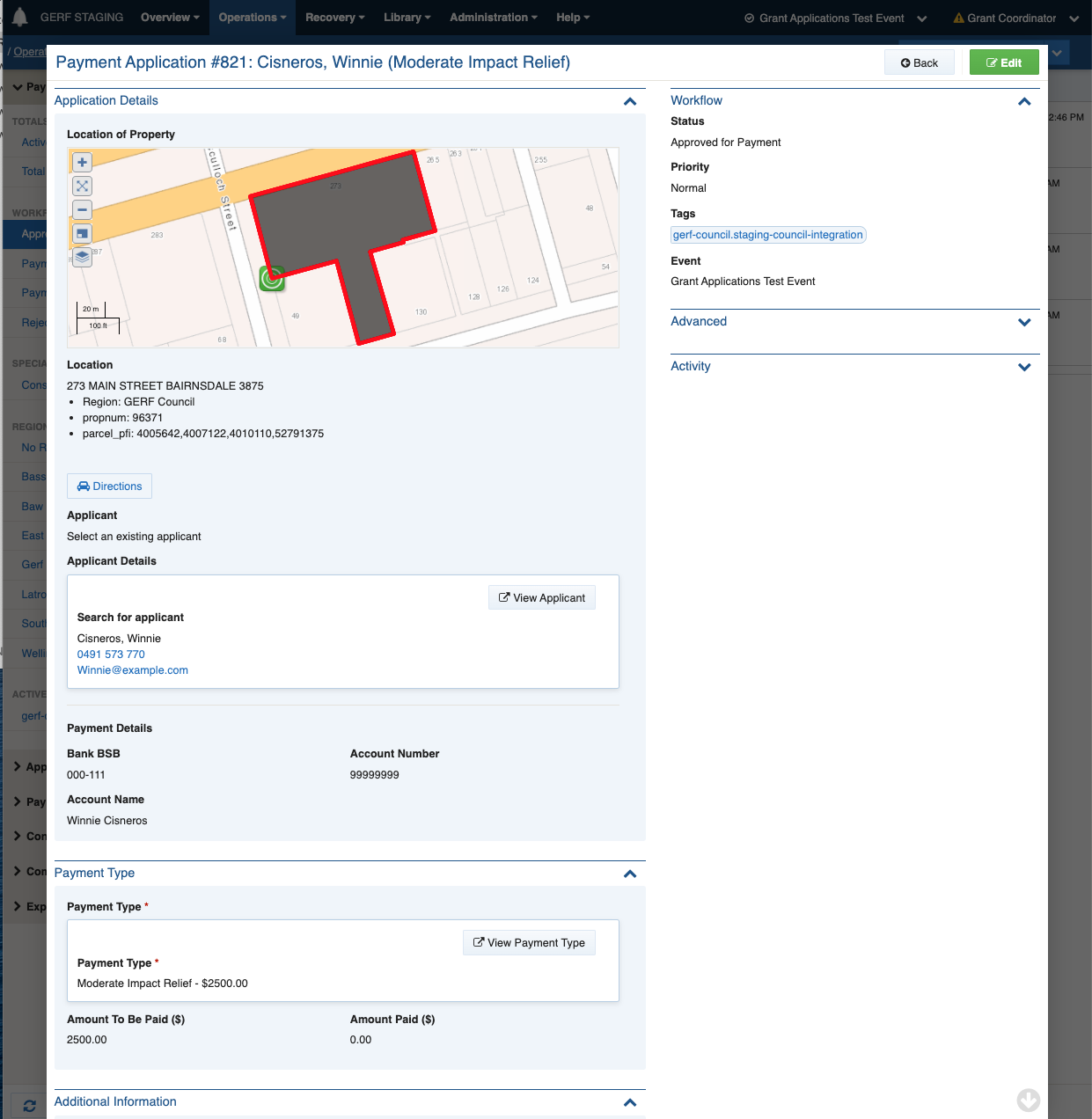
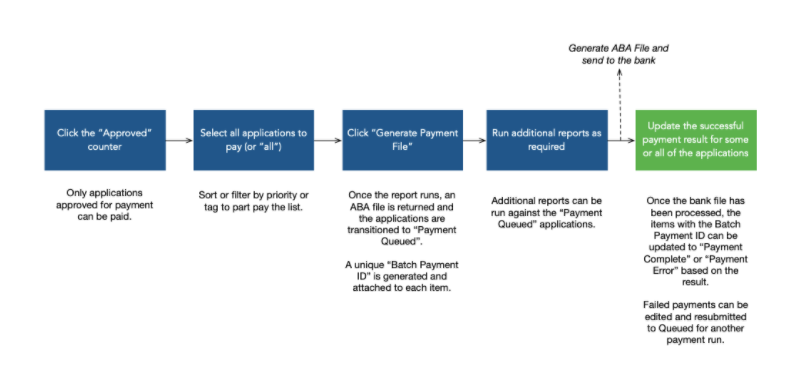
1. Applications that have been approved by the POs are pooled into the APPROVED FOR PAYMENT status.
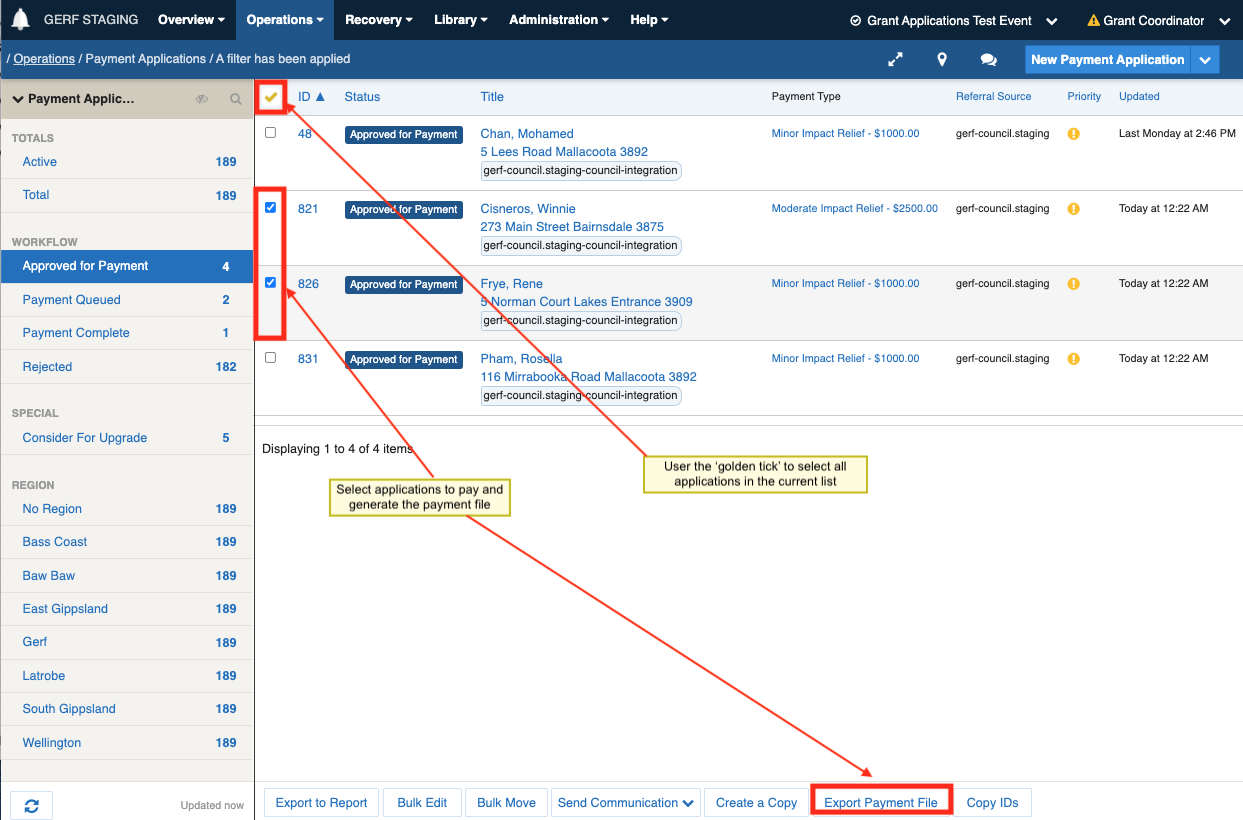
2. Periodically, the Payment Coordinators (PC) review these approved applications and prepare applications for payment.
3. The review process involves:
4. review application data and verifying against the GERF assessment criteria
5. checking for duplicates or other anomalies
6. upgrading/downgrading the allocated payment type where needed.
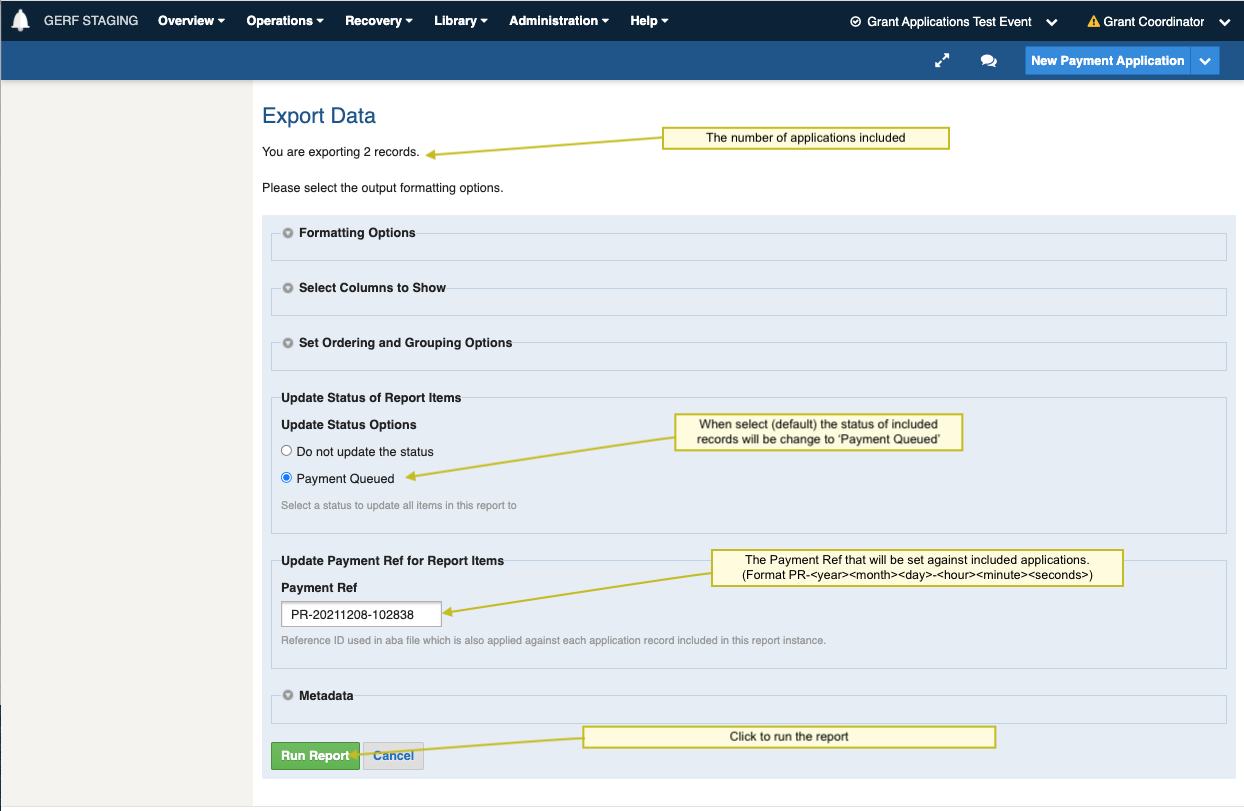
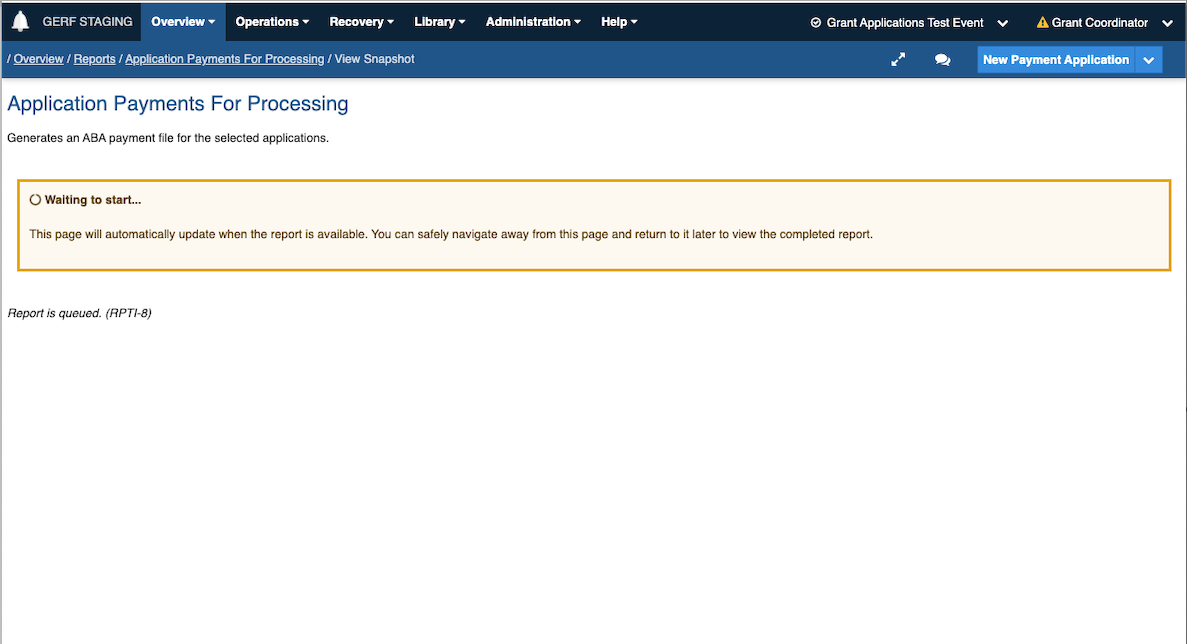
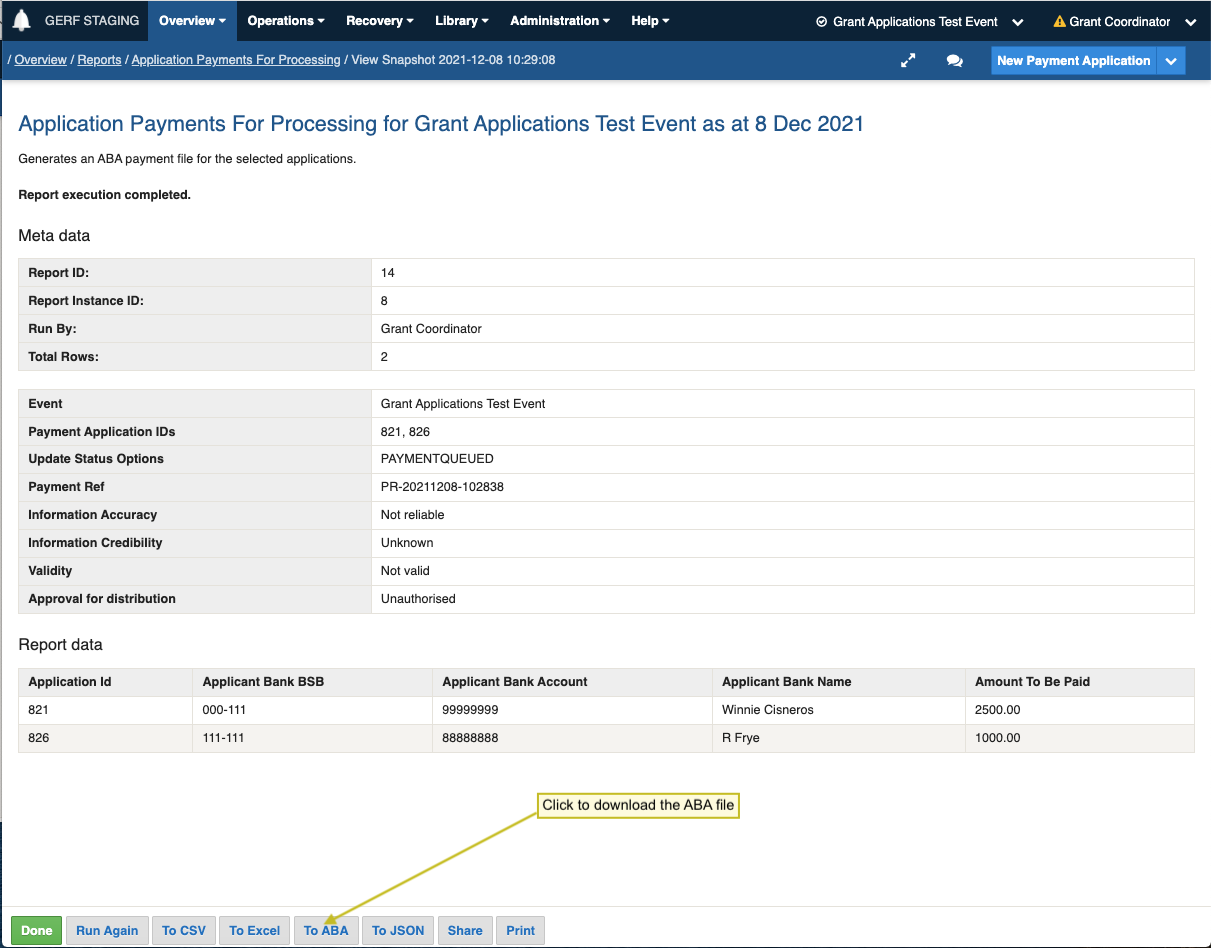
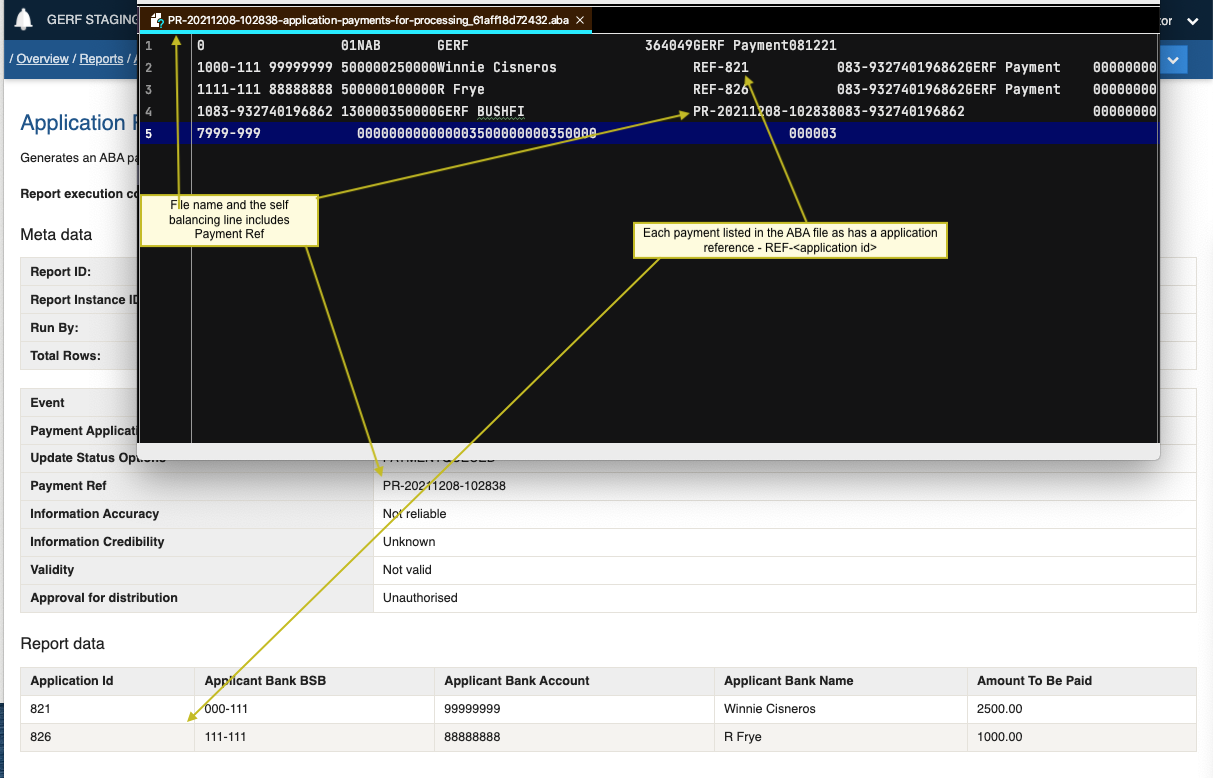
7. Once reviewed and okayed, a payment report is generated and once complete the ABA file downloaded for manual bank upload and processing via the NAB Connect web portal.
8. The generation of this payment report data sets the status toPAYMENT QUEUED and applies a batch number (Payment Ref) to the selected Payment Applications includedin the report.
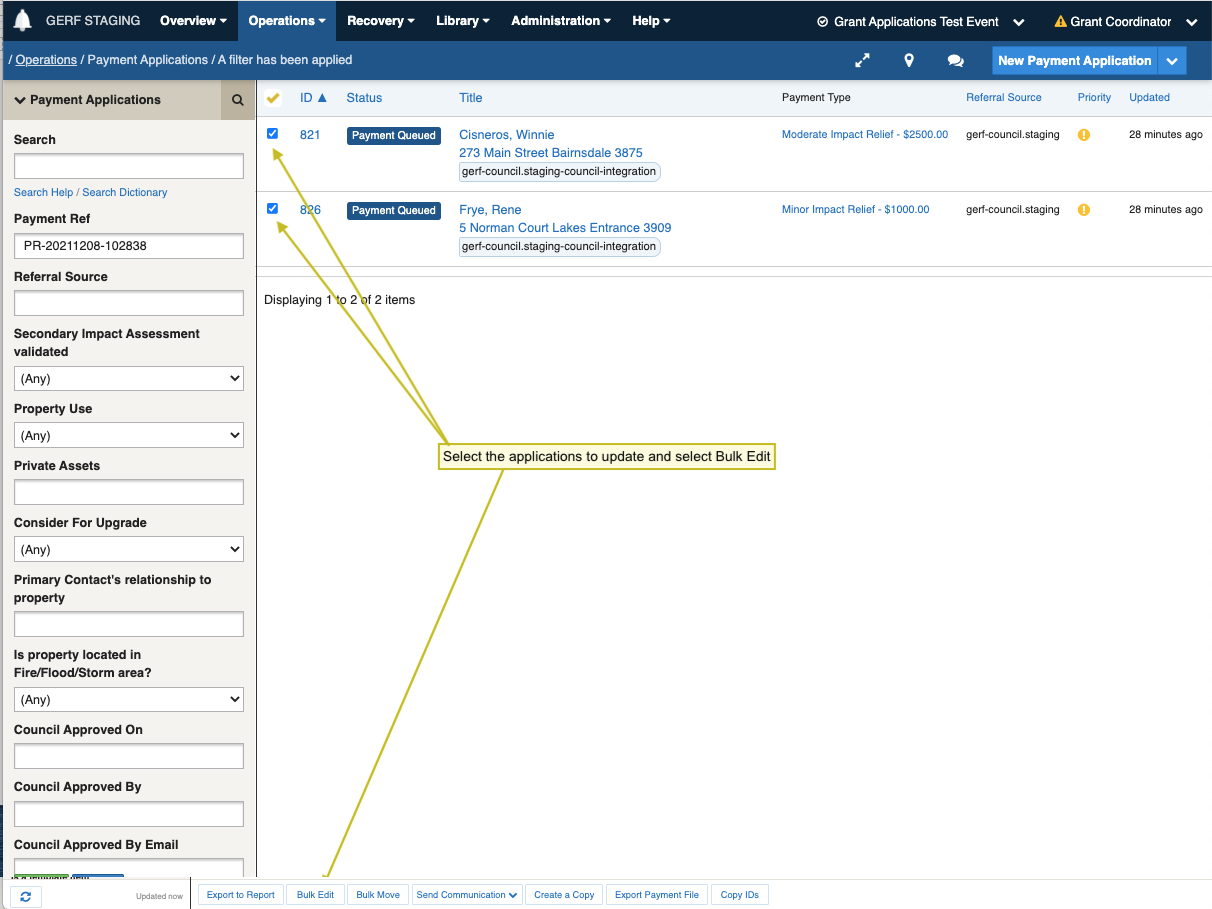
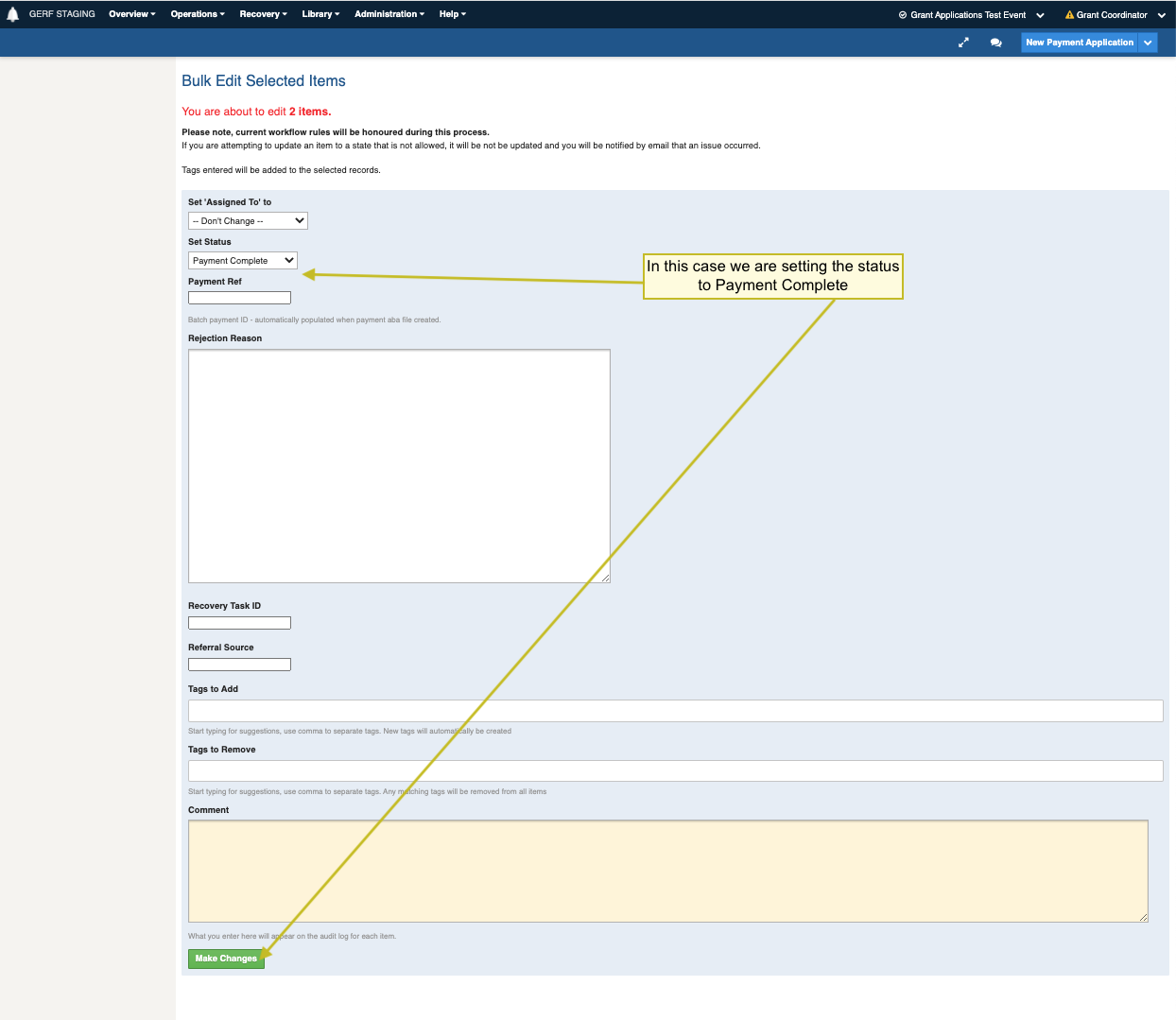
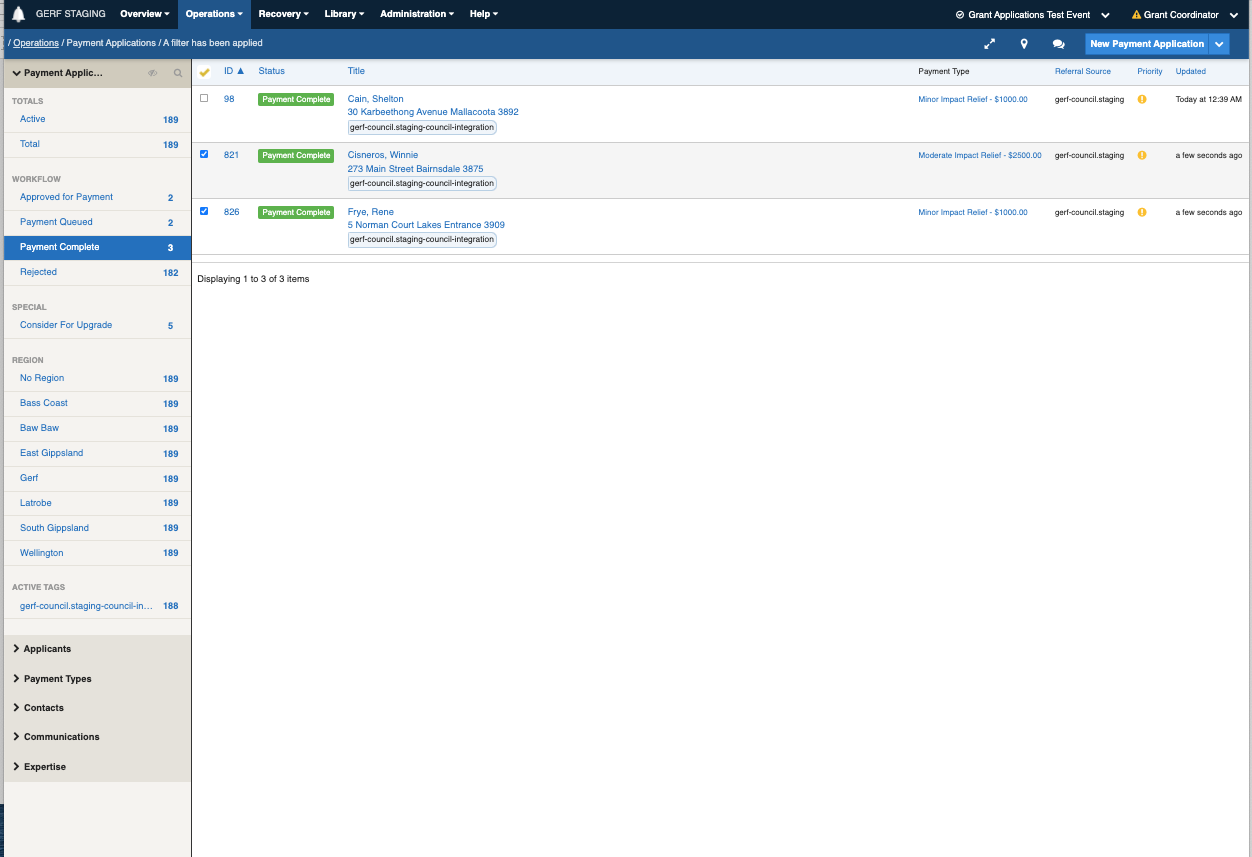
9. Based on the bank payment results received from NAB Connect, the Payment Ref can be used to search for the applications and either individually edit the applications or use the bulk edit option to flag failed payments to PAYMENT ERROR , and successful ones to PAYMENT COMPLETE.

### **In Practice**

![](https://3923904090-files.gitbook.io/~/files/v0/b/gitbook-x-prod.appspot.com/o/spaces%2FNy7IznbrPLUq6GJDDQDk%2Fuploads%2Fgit-blob-705bbc4cfc8678912cac8d7fcd765903247bc820%2FScreen%20Shot%202021-12-08%20at%2010.09.40%20am.png?alt=media)

<img src="https://3923904090-files.gitbook.io/~/files/v0/b/gitbook-x-prod.appspot.com/o/spaces%2FNy7IznbrPLUq6GJDDQDk%2Fuploads%2Fgit-blob-b8b45aa54858635a9b79311130804ed73026819c%2FScreen%20Shot%202021-12-08%20at%2010.14.49%20am.png?alt=media" alt="" width="563">

<img src="https://3923904090-files.gitbook.io/~/files/v0/b/gitbook-x-prod.appspot.com/o/spaces%2FNy7IznbrPLUq6GJDDQDk%2Fuploads%2Fgit-blob-70cac7f70169152114cf30c46c88a2c2d7962b9a%2FScreen%20Shot%202021-12-08%20at%2010.14.22%20am.png?alt=media" alt="" width="563">

<img src="https://3923904090-files.gitbook.io/~/files/v0/b/gitbook-x-prod.appspot.com/o/spaces%2FNy7IznbrPLUq6GJDDQDk%2Fuploads%2Fgit-blob-75b6948d745daab9c160127b2772ac8f8cbc590d%2FScreen%20Shot%202021-12-08%20at%2010.15.49%20am.png?alt=media" alt="" width="563">

<img src="https://3923904090-files.gitbook.io/~/files/v0/b/gitbook-x-prod.appspot.com/o/spaces%2FNy7IznbrPLUq6GJDDQDk%2Fuploads%2Fgit-blob-24a1ffa638dc3241b8893dc85e3563305ccb2450%2FScreen%20Shot%202021-12-08%20at%2010.28.51%20am.png?alt=media" alt="" width="563">

<img src="https://3923904090-files.gitbook.io/~/files/v0/b/gitbook-x-prod.appspot.com/o/spaces%2FNy7IznbrPLUq6GJDDQDk%2Fuploads%2Fgit-blob-92cab854a1db5b1b015ff091603d8cb5fa8c0ed7%2FScreen%20Shot%202021-12-08%20at%2010.37.20%20am.png?alt=media" alt="" width="563">

<img src="https://3923904090-files.gitbook.io/~/files/v0/b/gitbook-x-prod.appspot.com/o/spaces%2FNy7IznbrPLUq6GJDDQDk%2Fuploads%2Fgit-blob-72c52abacbbb09d1d5c4a184bca0cd8b76c6a7a4%2FScreen%20Shot%202021-12-08%20at%2010.37.39%20am.png?alt=media" alt="" width="563">

<img src="https://3923904090-files.gitbook.io/~/files/v0/b/gitbook-x-prod.appspot.com/o/spaces%2FNy7IznbrPLUq6GJDDQDk%2Fuploads%2Fgit-blob-068b786b89a89c799d14e1e6ad441b16a88bb775%2FScreen%20Shot%202021-12-08%20at%2010.51.09%20am.png?alt=media" alt="" width="563">

![](https://3923904090-files.gitbook.io/~/files/v0/b/gitbook-x-prod.appspot.com/o/spaces%2FNy7IznbrPLUq6GJDDQDk%2Fuploads%2Fgit-blob-9a37b07d3dc3b3d40a6bbe05f7f06da9502c685a%2FScreen%20Shot%202021-12-08%20at%2012.00.57%20pm.png?alt=media)

<img src="https://3923904090-files.gitbook.io/~/files/v0/b/gitbook-x-prod.appspot.com/o/spaces%2FNy7IznbrPLUq6GJDDQDk%2Fuploads%2Fgit-blob-8c9bd396b646815a1f5eb16c82a0a5181ae7f4e3%2FScreen%20Shot%202021-12-08%20at%2010.57.44%20am.png?alt=media" alt="" width="563">

<img src="https://3923904090-files.gitbook.io/~/files/v0/b/gitbook-x-prod.appspot.com/o/spaces%2FNy7IznbrPLUq6GJDDQDk%2Fuploads%2Fgit-blob-6636b67bddbbec7823a2a0bb10bcd5b0e6c466b9%2FScreen%20Shot%202021-12-08%20at%2010.58.20%20am.png?alt=media" alt="" width="563">

<img src="https://3923904090-files.gitbook.io/~/files/v0/b/gitbook-x-prod.appspot.com/o/spaces%2FNy7IznbrPLUq6GJDDQDk%2Fuploads%2Fgit-blob-4e192bcb0373219f8060361902a72d85b49c3479%2FScreen%20Shot%202021-12-08%20at%2010.58.44%20am.png?alt=media" alt="" width="563">

## Creating new Payment Types

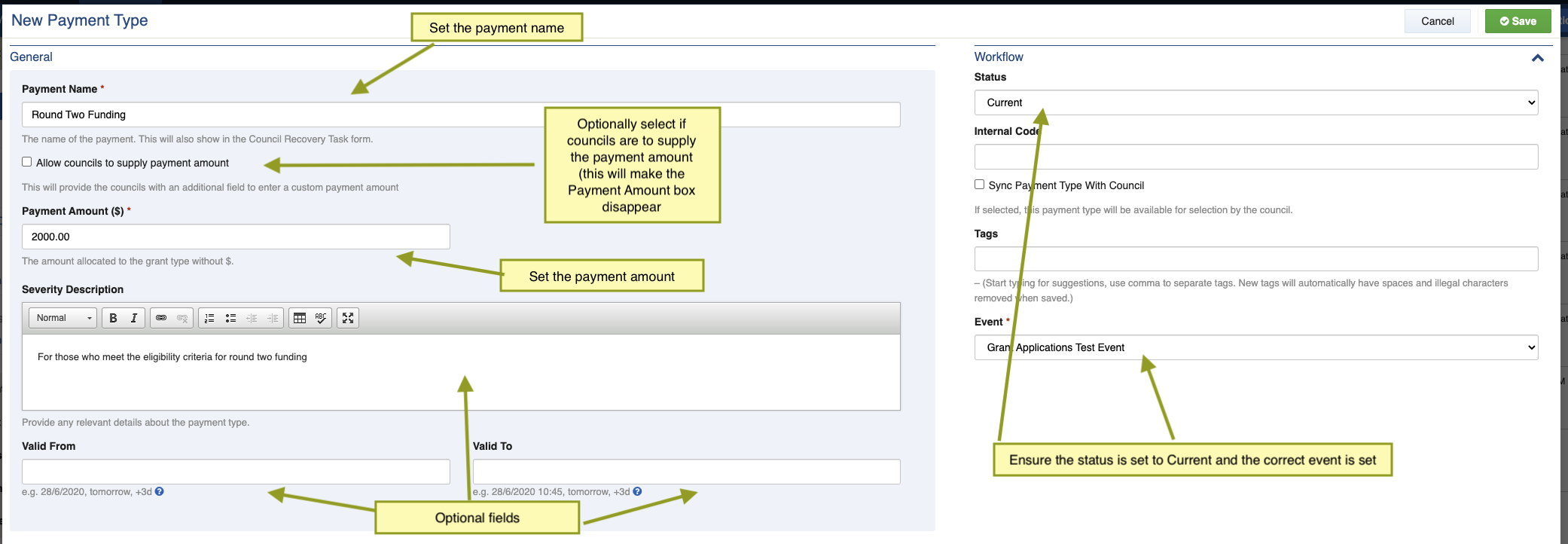
The payments available to residents can vary for each event, whether that is the dollar amount and criteria set for the initial payments, or the subsequent allocation of additional funding rounds.

1. The payment amounts and criteria are determined by the GERF team for the specific emergency event.
2. The 'Payment Eligibility Criteria' listed on the GERF website is updated accordingly. This acts as a reference for councils.
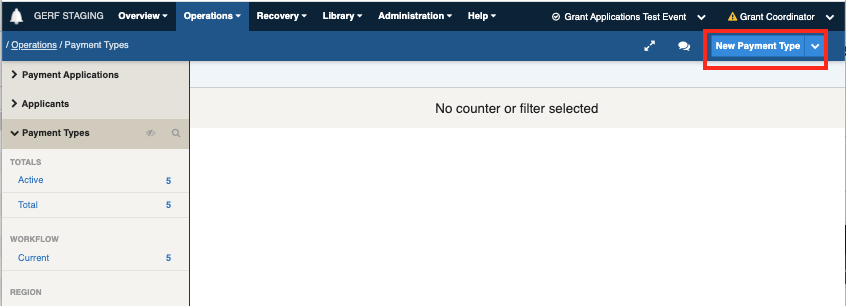
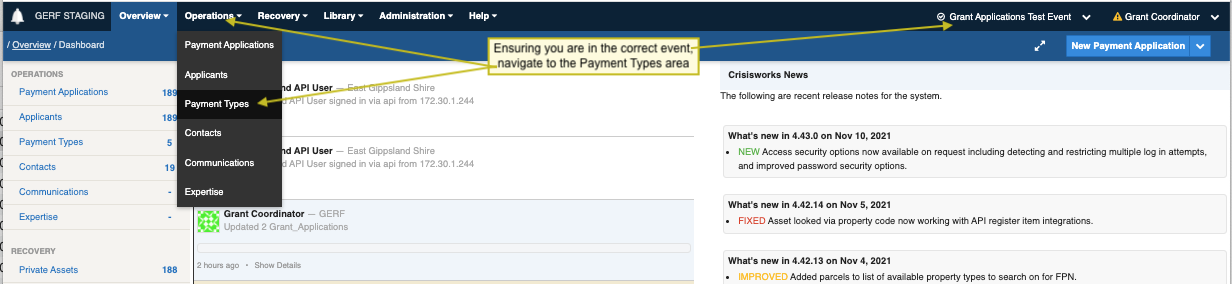
3. Payment Types are set up in Crisisworks under the new event that has been created for the emergency event.
4. Payment Types GERF sync to the participating Councils every hour so they are available for selection when creating a GERF-Payment Recovery Task.

### **In Practice**
<img src="https://3923904090-files.gitbook.io/~/files/v0/b/gitbook-x-prod.appspot.com/o/spaces%2FNy7IznbrPLUq6GJDDQDk%2Fuploads%2Fgit-blob-16419dd570411183a8f21fa5721cde157a6b3b8c%2FScreen%20Shot%202021-12-08%20at%2012.42.31%20pm.png?alt=media" alt="" width="563">

<img src="https://3923904090-files.gitbook.io/~/files/v0/b/gitbook-x-prod.appspot.com/o/spaces%2FNy7IznbrPLUq6GJDDQDk%2Fuploads%2Fgit-blob-fcdc270498cc12486d99e53d9ecd8ac02a3c4e39%2FScreen%20Shot%202021-12-08%20at%2012.47.22%20pm.png?alt=media" alt="" width="563">

<img src="https://3923904090-files.gitbook.io/~/files/v0/b/gitbook-x-prod.appspot.com/o/spaces%2FNy7IznbrPLUq6GJDDQDk%2Fuploads%2Fgit-blob-d18735e90b1464d1e00283060812d9dff821b7c9%2FScreen%20Shot%202022-09-26%20at%203.20.31%20pm.png?alt=media" alt="" width="563">

<img src="https://3923904090-files.gitbook.io/~/files/v0/b/gitbook-x-prod.appspot.com/o/spaces%2FNy7IznbrPLUq6GJDDQDk%2Fuploads%2Fgit-blob-62925e718450b0806f35bf560a4e607c7154c7c9%2FScreen%20Shot%202022-09-26%20at%203.20.48%20pm.png?alt=media" alt="" width="563">

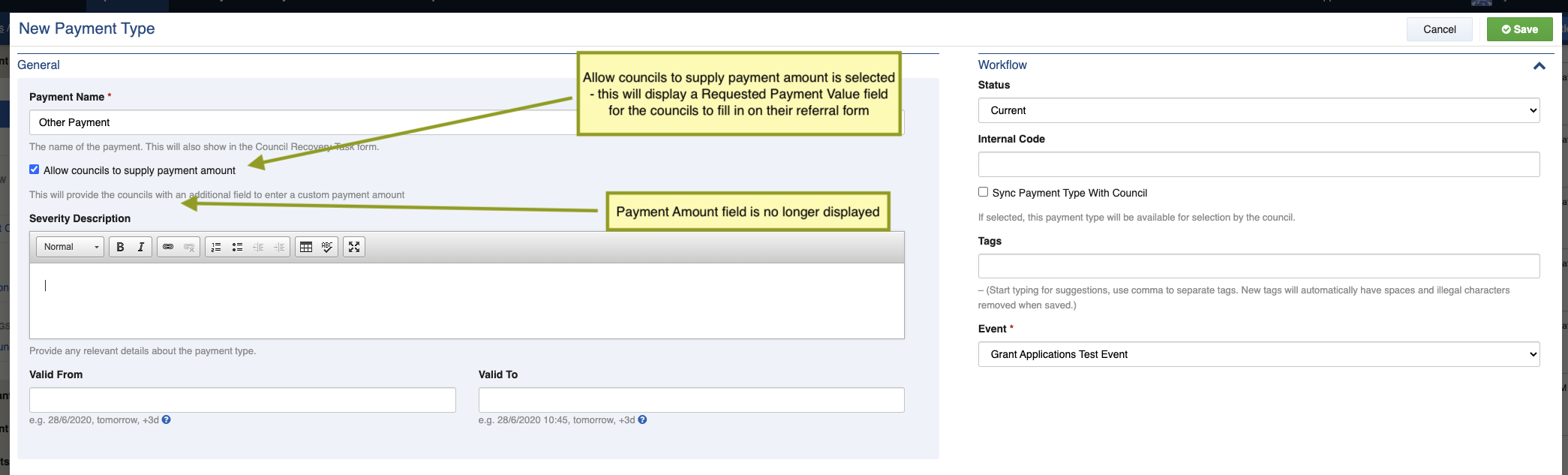
A new “Allow councils to supply payment amount” checkbox has been added which will remove the Payment Amount field.

This will create a new field on the Council referral form called Requested Payment Value for the councils to enter the payment amount.

### Issuing additional Payments

On occasion, when extra funding becomes available, GERF may issue additional payments to applicants. When additional funding is available:

1. Create new Payment Types in the event for any new payments to be allocated.
2. GERF can identify existing applications that the Council has flagged for additional funding. This can be aided by the the `Consider For Upgrade` filter that flags applications the council has marked for consideration for extra funding.
3. From this list they can identify applicants they wish to provide additional funding, then select the application/s and use the create copy option.
4. The selected applications are copied and placed in DRAFT mode.
5. Use the DRAFT workflow filter to view all the copied applications.
6. The bulk edit function can be used to bulk apply the appropriate status (either NEW or APPROVED FOR PAYMENT ) and payment type.
7. The application can then proceed via the standard assessment and payment workflow.

## Creating new GERF Crisisworks Users.

{% embed url="<https://www.loom.com/share/d8d22035593f47649144741f5c24d782>" %}

[**https://www.loom.com/share/d8d22035593f47649144741f5c24d782**](https://www.loom.com/share/d8d22035593f47649144741f5c24d782)

## **Removing a GERF Crisisworks Users.**

{% embed url="<https://www.loom.com/share/2f3f757ddb964048bcb7f2fe2b7a3a11>" %}

<https://www.loom.com/share/2f3f757ddb964048bcb7f2fe2b7a3a11>


---

# Agent Instructions
This documentation is published with GitBook. GitBook is the documentation platform designed so that both humans and AI agents can read, navigate, and reason over technical content effectively. Learn more at gitbook.com.

## Querying This Documentation
If you need additional information that is not directly available in this page, you can query the documentation dynamically by asking a question.

Perform an HTTP GET request on the current page URL with the `ask` query parameter, and the optional `goal` query parameter:

```
GET https://docs.cw.crisisworks.com/modules/gerf.md?ask=<question>&goal=<endgoal>
```

`ask` is the immediate question: it should be specific, self-contained, and written in natural language.
`goal` is optional and describes the broader end goal you are ultimately trying to accomplish on behalf of the user. GitBook uses it to tailor the answer towards what is most useful for that goal.

The response will contain a direct answer to the question and relevant excerpts and sources from the documentation.

Use this mechanism when the answer is not explicitly present in the current page, you need clarification or additional context, or you want to retrieve related documentation sections.