# Volunteer
## Overview
**Volunteer** is a Resource type used to record in-kind assistance in the form of human resources from individuals and organisations.
This includes offers such as cleaning services, aged care etc.
You can [find](#finding-volunteer-resources), [add](#adding-volunteer-resources) and [edit](#volunteer-resource-settings) Volunteers via the Resources register.
Volunteer Offers are similar to Offers (In a sense it is a sub-set of Offers) with more options that also shares the same [Public Offers Form](https://docs.cw.crisisworks.com/modules/operations/offer#public-offers-form) (but with additional options when Volunteer categories are selected). For general non-human resources offers, use instead the [Offer](https://docs.cw.crisisworks.com/modules/operations/resources/offer) type.
For register-level instructions, refer to:
{% content-ref url="" %}
[](https://docs.cw.crisisworks.com/modules/operations/resources)
{% endcontent-ref %}
## Finding Volunteer Resources
Ways to find Offers:
1. Type column in the datagrid (Volunteer)
2. Types > Volunteer in the filter menu
3. Query in Search `itemSchemaName:volunteer`
## Adding Volunteer Resources
Volunteers can be added in one of two ways:
1. Via the [Public Offers Form](https://docs.cw.crisisworks.com/modules/operations/offer#public-offers-form) if enabled (adding additional Volunteer information such as [Volunteer Particulars](#volunteer-particulars), [Availability](#availability), and [Additional Details](#additional-details) is only available when a user selects an eligible Volunteer category such as Animal Services, Aged Care etc.) - items added this way will start with a [Status](https://docs.cw.crisisworks.com/modules/operations/resources/..#status) of *Pending*.
2. By a user via **Operations → Resources** by setting the [Resource Type](https://docs.cw.crisisworks.com/modules/operations/resources/..#resource-type) to *Volunteer* when adding a new resource. Once set the Resource Type cannot be changed.
Make sure the Resource Type is set to Volunteer.
## Volunteer Resource Settings
This section is used to capture and manage the Volunteer record.
### Contact Details
This field contains a [Contact](https://docs.cw.crisisworks.com/modules/operations/contacts) record (Individual or Organisation).
Only one Contact can be associated with a volunteer resource.
As in Contacts, the most important required Contact Detail are **First Name**; **Last Name**; **Direct Phone**; **Direct Email**; **Locality/Suburb**; and **Best Contact Method**. The form also captures.
Contact Details section
### Offer Summary
The Offer Summary section defines the specifics of the Offer.
#### Summary of Offer
This field is used to capture an outline of the Volunteering offer.
Write a brief summary of the offer, like you would in an email subject line or an SMS. There is more space in [Additional Details](#additional-details), so you can keep this brief.
#### Category & Sub-Categories
Refer to: [Resources > Category](https://docs.cw.crisisworks.com/modules/operations/resources/..#category) and [Resources > Sub-Category](https://docs.cw.crisisworks.com/modules/operations/resources/..#sub-category)
These settings are used to categorise the Offer. They are different to other Resources in that the options are configured by an administrator using the *Offer: Category* and *Offer Subcategory* [Lookups](https://docs.cw.crisisworks.com/system-administration/configuring-the-system/lookups).
### Volunteer Particulars
This section outline mainly locations where the volunteering work is applicable.
#### Locality / Suburb of Offer
This field is required and records the suburb or town where the Volunteer individual or organisation is located. If the service is performed on-site, this will be your home locality or base of operations.
#### Work Area
This field is also required and specifies the area the Volunteer individual or organisation is willing to work. If 'other', add the notes in 'additional details' below.
Work Area options are configured by an administrator using the *Offer: Work Area* [Lookup](https://docs.cw.crisisworks.com/system-administration/configuring-the-system/lookups).
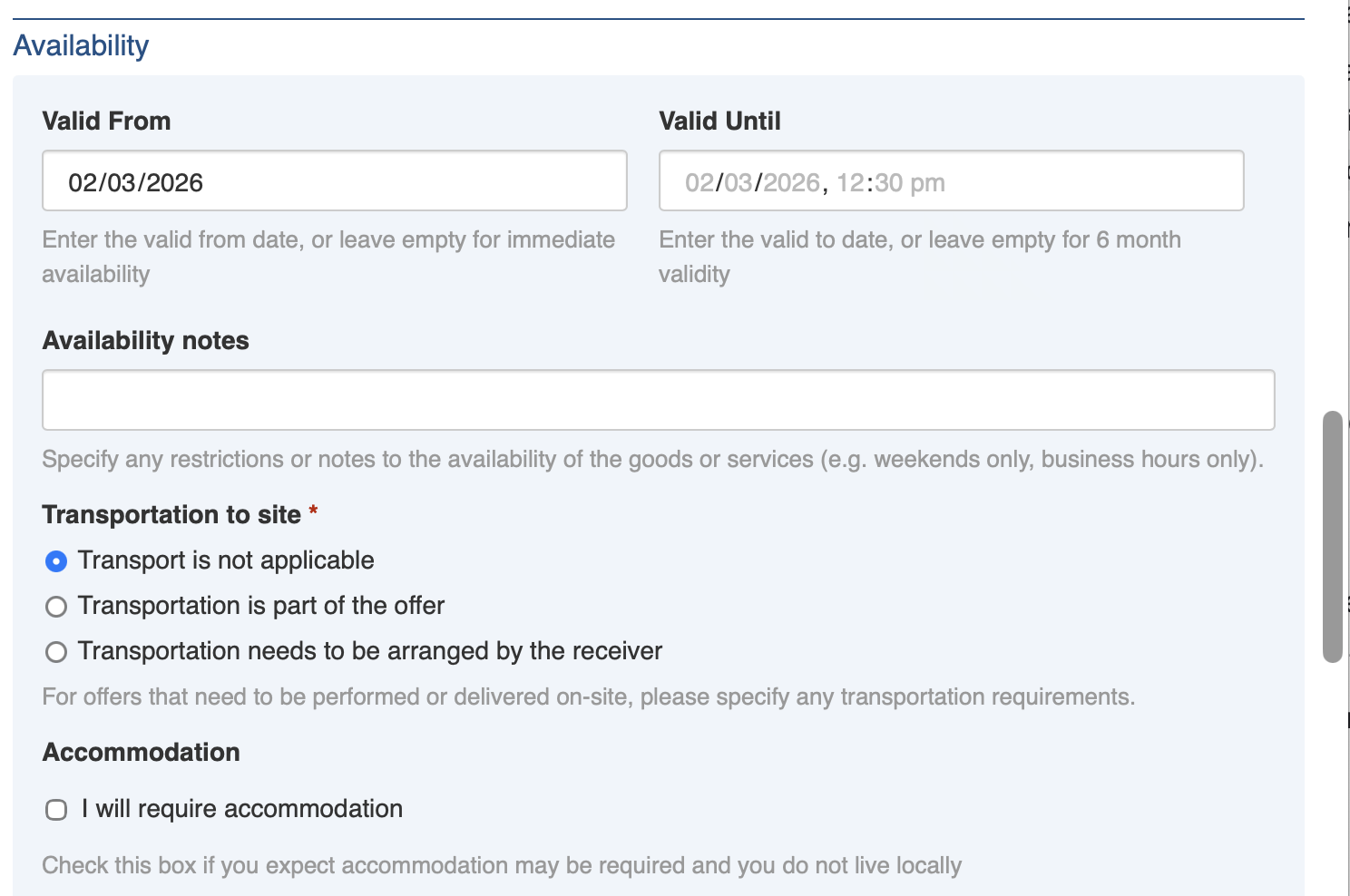
### Availability
This section records the Volunteer individual or organisation's availability to perform the specified Volunteer services.
Availability section
#### Valid From
This field records the first date of availability for the Volunteer individual or Organisation. Leave this blank to indicate immediate availability.
#### Valid To
This field records the last date of availability for the Volunteer individual or Organisation. Leave this empty for a default 6 month validity.
#### Availability Notes
This field specifies any restrictions or notes to the availability of the goods or services (e.g. weekends only, business hours only).
#### Transportation to Site
This field records details of transportation for offers that need to be performed or delivered on-site. If no transport is required for the volunteering (such as remote work) then select *Transport is not applicable*. If the offer does not include transportation, then select *Transport is part of the offer* should be selected. If the Volunteer individual or organisation requires transportation from the receiver then *Transportation needs to be arranged by the receiver* should be selected.
### Additional Details
This section captures any additional details that could help match the Volunteer indivual or organisation's services to people in need.
#### Additional Details
This field enables additional details to be recorded as [rich text](https://docs.cw.crisisworks.com/concepts-and-fundamentals/on-a-computer/using-the-datagrid/editing-items#rich-text-fields).
### Administration
The Administration section captures the required agreement to terms and conditions from the Volunteer. This section can be configured with the options and wording required by your organisation ([contact Service Desk](https://docs.cw.crisisworks.com/security-and-support/maintenance-and-support/accessing-support) to modify), note that this is for all Volunteer Offers across the system.
Administration section and example terms and conditions