# Dynamic Recipients

## Overview

The Dynamic Recipients register enables creation of recipient lists for the [Communication module](https://docs.cw.crisisworks.com/modules/communication). Dynamic Recipients are distribution lists that evolve over time. For example, when you add a Contact and classify them in a certain way, they can be automatically added to the communication list so that Communications Managers can email or text them as required.

The system comes pre-configured with some generic recipient lists. Refer to the [List of Dynamic Recipients](https://docs.cw.crisisworks.com/system-administration/configuring-the-system/dynamic-recipients/list-of-dynamic-recipients) and their usage.

At present this function can be used with the following register items:

| Module        | Register item    | Recipient     |
| ------------- | ---------------- | ------------- |
| Operations    | Contact          | Contact       |
| Recovery      | Person           | Person        |
| Communication | Inline Recipient | Contact       |
| Permits       | Permit           | Asset Contact |

A Communications Manager can easily include them in a Communication by adding the name of the Dynamic Recipient as a message recipient.

Managing this module requires use of CQL, the query language used in the system. CQL queries can be generated through the filtering system and then copied and pasted into a Dynamic Recipient item.

{% hint style="info" %}
Only users with the position of Communications Manager can add a Dynamic Recipients to Communications.
{% endhint %}

### Access <a href="#requests-usingrequests" id="requests-usingrequests"></a>

To access the Dynamic Recipients register you will need to sign in with [*System Admin & Data Entry* position](https://docs.cw.crisisworks.com/system-administration/configuring-the-system/..#system-administration-positions).

You can find the *Dynamic Recipients* register under **System Administration** **> Dynamic Recipients**.

## Viewing Dynamic Recipients

Dynamic Recipients are listed in and searchable via the register [Datagrid](https://docs.cw.crisisworks.com/concepts-and-fundamentals/on-a-computer/using-the-datagrid#data-grid-view). Viewing them in this datagrid may not make much sense and they are rarely if ever changed once created.

To view an existing Dynamic Recipient:

1. Navigate to the Dynamic Recipients register datagrid.
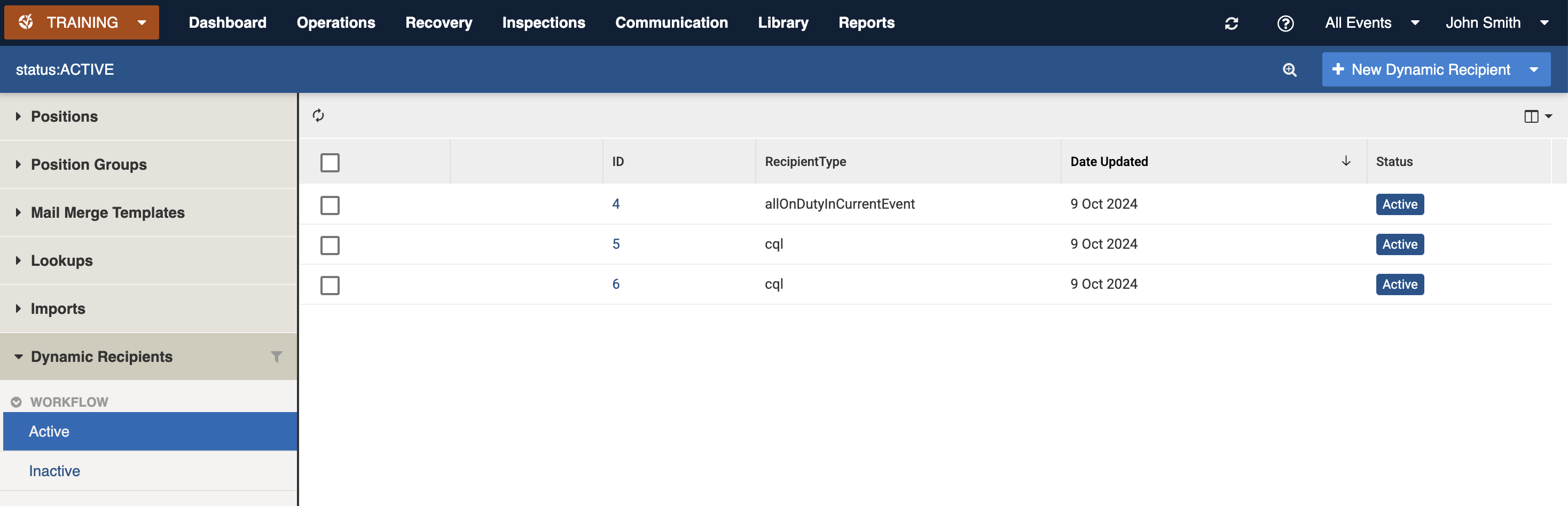
2. Locate the item you wish to view. The register includes additional filters for Workflow Status (Active/Inactive) and Active Tags
3. Open the item using the ID
4. To return to the Datagrid use the Back button <img src="https://3923904090-files.gitbook.io/~/files/v0/b/gitbook-x-prod.appspot.com/o/spaces%2FNy7IznbrPLUq6GJDDQDk%2Fuploads%2FkJtmQ5qacZpOVfkdqfY8%2Fimage.png?alt=media&#x26;token=b4c68b18-dc6e-48bb-8a2e-c14bf3f595be" alt="" data-size="line">

<figure><img src="https://3923904090-files.gitbook.io/~/files/v0/b/gitbook-x-prod.appspot.com/o/spaces%2FNy7IznbrPLUq6GJDDQDk%2Fuploads%2FqzJEkfIJQ3pWTIuPlBWk%2Fimage.png?alt=media&#x26;token=69664cf0-9550-45cd-9b70-3a38ba3e92e2" alt=""><figcaption><p>View of a sample Dynamic Recipient register</p></figcaption></figure>

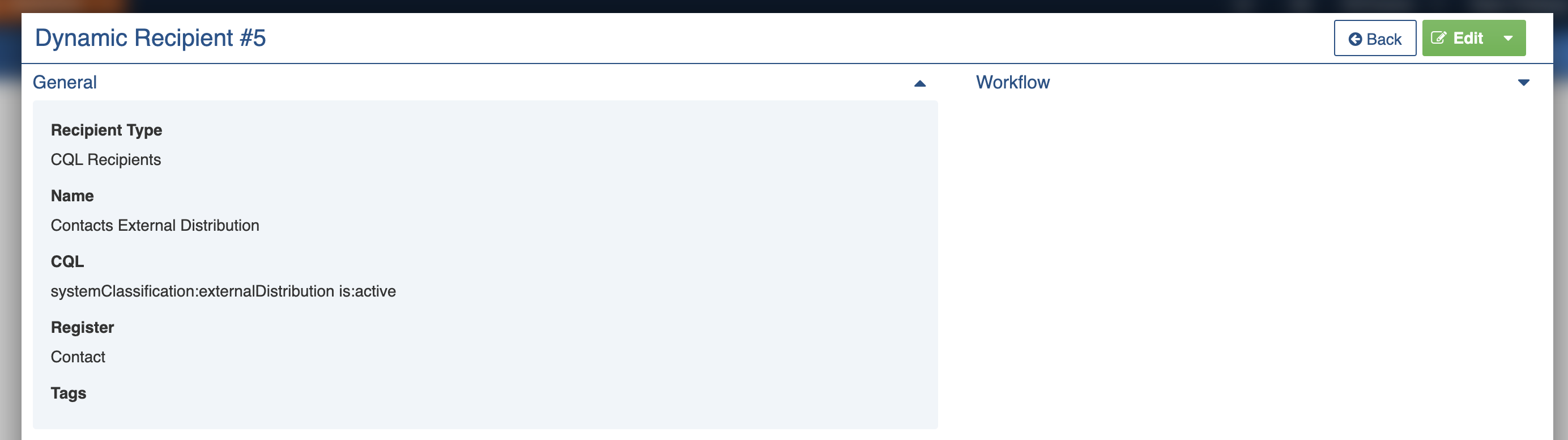
<figure><img src="https://3923904090-files.gitbook.io/~/files/v0/b/gitbook-x-prod.appspot.com/o/spaces%2FNy7IznbrPLUq6GJDDQDk%2Fuploads%2FG7tTtCppZztNHYqlVnem%2Fimage.png?alt=media&#x26;token=19b13347-4aef-4391-8ed4-4343283270de" alt=""><figcaption><p>Example of a Dynamic Recipient</p></figcaption></figure>

## Dynamic Recipient Settings

### General

**Recipient Type** defines the type of recipient, at present the only option is **CQL Recipients**.

**Name** is what appears when the Communications Manager searches and enters it in the recipients list of a Communication. It helps identify the Dynamic Recipient.

**CQL** is the query to perform to find the recipients. This will need to retrieve compatible records in order to work. For more information on CQL see [Search, Filter and Query Registers](https://docs.cw.crisisworks.com/concepts-and-fundamentals/on-a-computer/searching-filtering-and-querying-registers).

**Register** enables the Dynamic Recipient to be added into compatible register items. Only a single register is supported.

**Tags** enables tags to be attached to the item.

### Workflow

Dynamic Recipients have only two statuses: Active and Inactive. Active are enabled for use. Inactive cannot be selected as options by users. They can be reactivated and re-added if needed.

## Editing Dynamic Recipients

Dynamic Recipients can be edited from the datagrid.

1. Navigate to the Dynamic Recipients
2. Locate the Dynamic Recipient you wish to edit by using the Edit button <img src="https://3923904090-files.gitbook.io/~/files/v0/b/gitbook-x-prod.appspot.com/o/spaces%2FNy7IznbrPLUq6GJDDQDk%2Fuploads%2FMAt3SdDCVeaavZpkxUrB%2Fimage.png?alt=media&#x26;token=bf8178b8-3a9c-4b0d-9c30-009542c2ad7b" alt="" data-size="line">
3. Make the necessary changes to the [settings](#lookup-settings)
4. Save <img src="https://3923904090-files.gitbook.io/~/files/v0/b/gitbook-x-prod.appspot.com/o/spaces%2FNy7IznbrPLUq6GJDDQDk%2Fuploads%2FN4Q1ymwZJ5s252DI8Xac%2Fimage.png?alt=media&#x26;token=ea3758c1-f326-47ba-ac4c-c1460bcfcd0f" alt="" data-size="line"> to save your changes

## Adding Dynamic Recipients

To add a Dynamic Recipient:

1. Use the [New Item button](https://docs.cw.crisisworks.com/concepts-and-fundamentals/on-a-computer/using-the-datagrid/adding-items) for New Dynamic Recipient <img src="https://3923904090-files.gitbook.io/~/files/v0/b/gitbook-x-prod.appspot.com/o/spaces%2FNy7IznbrPLUq6GJDDQDk%2Fuploads%2FIT3F3MS1C3nLSzrq6B68%2Fimage.png?alt=media&#x26;token=c570d538-4056-4c84-99a2-bdbfce50ed54" alt="" data-size="line">
2. Select a **Recipient Type** and enter a **Name** and **CQL** for the Dynamic Recipient and select a **Register** to enable it in
3. Make any other configurations changes necessary in the [settings](#dynamic-recipient-settings)
4. Use the **Save** button <img src="https://3923904090-files.gitbook.io/~/files/v0/b/gitbook-x-prod.appspot.com/o/spaces%2FNy7IznbrPLUq6GJDDQDk%2Fuploads%2FWyvhwIZJBvXfK2U8LqPC%2Fimage.png?alt=media&#x26;token=79843521-0f38-4c32-b05b-3fa126a9b4e6" alt="" data-size="line">