# Agriculture
## Overview
{% content-ref url="cases" %}
[cases](https://docs.cw.crisisworks.com/modules/recovery/cases)
{% endcontent-ref %}
The Agriculture register records impacts to crops. Agriculture is a sub-item of [Cases](https://docs.cw.crisisworks.com/modules/recovery/cases) and as such items in the register are attached to or added in existing Case record(s). Once added you can manage existing Agriculture records directly in the register.
This register provides the following features:
* Track agriculture impacts from initial damage to recovery
* Access a map based view of agriculture impacts
* Record the **location** and extent of agriculture impacts
* Record different **agriculture types** (wheat, grains, peas etc), including the **damage level** records the extent of crop damage along with the **damaged area in hectares**
* Record a detailed description of the damage and estimate of **damage value** for financial recording purposes
* Add evidence including **photos**
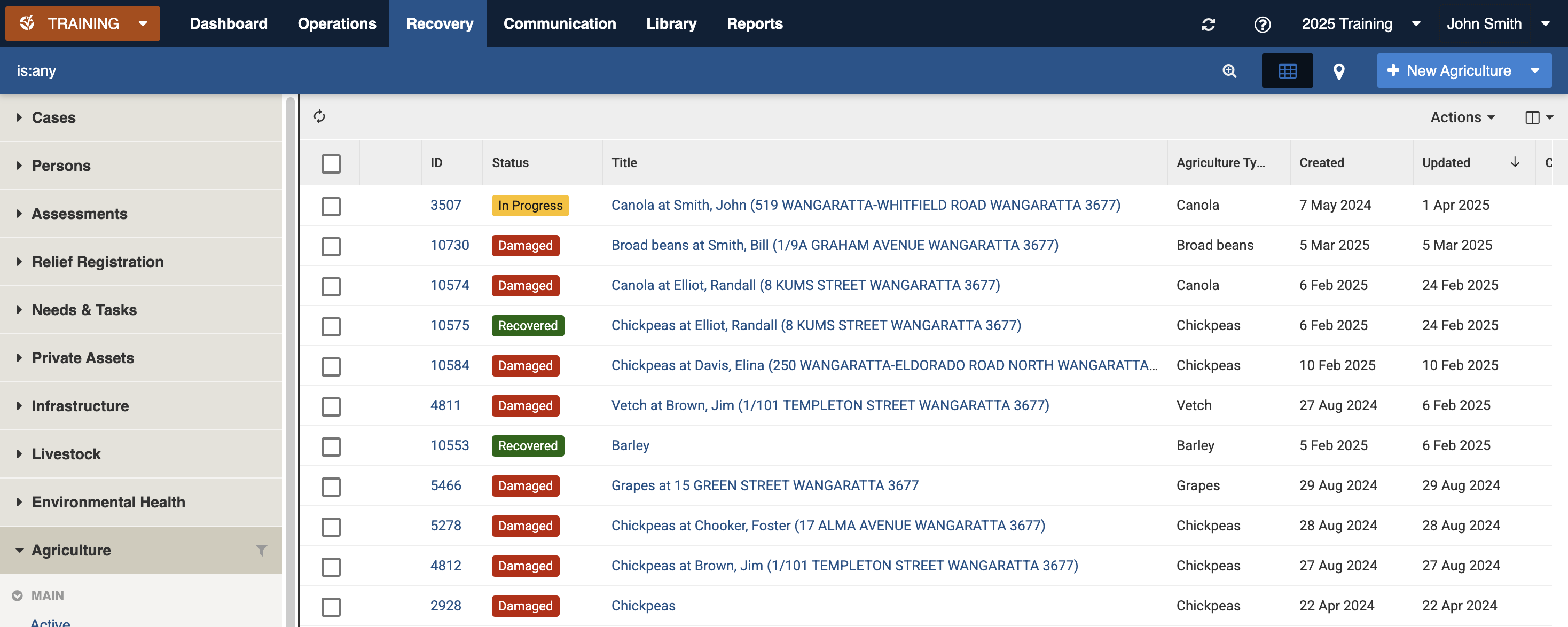
Agriculture register (sample view)
### Access
To access *Agriculture*
* Agriculture must be [enabled for the event](https://docs.cw.crisisworks.com/system-administration/managing-events).
* [Go on duty](https://docs.cw.crisisworks.com/concepts-and-fundamentals/on-a-computer/working-with-events#setting-your-duties-for-events) with an appropriate role such as Recovery Officer or Recover Manager. If you can't access it, ask your administrator to check your permissions.
Locate the *Agriculture* register under **Recovery > Agriculture** in the menu.
Location of the Agriculture register in the Recovery module
## Finding Agriculture Items
{% content-ref url="../../concepts-and-fundamentals/on-a-computer/searching-filtering-and-querying-registers" %}
[searching-filtering-and-querying-registers](https://docs.cw.crisisworks.com/concepts-and-fundamentals/on-a-computer/searching-filtering-and-querying-registers)
{% endcontent-ref %}
The register includes a number of features to assist in finding *Agriculture*:
* [Datagrid](https://docs.cw.crisisworks.com/concepts-and-fundamentals/on-a-computer/using-the-datagrid#data-grid-view) view
* [Map](https://docs.cw.crisisworks.com/concepts-and-fundamentals/on-a-computer/using-the-datagrid#map-view) view
* [Filters](#information-editinganexistinginformationitem-1) including workflow, agriculture types (barley, canola etc) and tags
* Combination filters and search by most fields
### Filters
Filters help make management of *Agriculture* easier by focusing on specific groups of items on the datagrid.
Agriculture filter menu
Filter menu explanations
The following lists some of the filters and how to use them:
\* May vary based on your system configuration
## Viewing Agriculture
{% content-ref url="../../concepts-and-fundamentals/on-a-computer/using-the-datagrid/viewing-items" %}
[viewing-items](https://docs.cw.crisisworks.com/concepts-and-fundamentals/on-a-computer/using-the-datagrid/viewing-items)
{% endcontent-ref %}
When viewing *Agriculture*, sections can be expanded to show information.
As each section is completed, new sections may show additional information.
Some features of the view mode include:
* **Fetch contacts** - using this button shows the relevant contact details for the property if you have access
* **View Map** - using this button shows a polygon or point outline of the item on the map
Agriculture item for Canola that is in progress
## Agriculture Settings
Agriculture is divided into the following sections (sections may or may not appear depending on what information is entered, your permissions level, and what mode you're viewing):
| Left Column | Right Column |
| ----------------------------- | --------------------------------- |
| [Record Notes](#record-notes) | [Workflow](#workflow) |
| [General](#general) | [Related](#related) |
| | [Classification](#classification) |
### Record Notes
When editing, you can record notes as you make changes which will appear in the Activity log.
Refer to: [Recording Notes](https://docs.cw.crisisworks.com/concepts-and-fundamentals/on-a-computer/using-the-datagrid/editing-items#recording-notes)
### General
This section includes all the details of the impact to the crop including the address, the type, damage level, description, damage value and photos.
#### Address
The address can be different to that of the Case for situations were the crops are not on the primary property. Use the [Location](https://docs.cw.crisisworks.com/concepts-and-fundamentals/on-a-computer/using-the-datagrid/editing-items#location) field to enter an address.
#### Agriculture Type
This field sets the type of crop (for example Barley, Canola etc). Use the lookup list to search for the specific crop. Your Administrator configures the list of levels for your site using the Recovery: Agriculture Types [lookup](https://docs.cw.crisisworks.com/system-administration/configuring-the-system/lookups).
#### Damage area in hectares
This text field records the damaged area in hectares.
#### Damage Level
This field records the damage level as a percentage in 10% increments. 100% corresponds with Completely Destroyed. Use the pulldown list to select a percentage.
#### Description
This field is used to record a detailed
### Workflow
#### Precise Geographical Location
The [Location](https://docs.cw.crisisworks.com/concepts-and-fundamentals/on-a-computer/using-the-datagrid/editing-items#location) field is used to record map points, lines or polygons to outline the crop.
#### Tags
Refer to: [Tagging Items](https://docs.cw.crisisworks.com/concepts-and-fundamentals/on-a-computer/using-the-datagrid/tagging-items)
### Related
Refer to: [Linked items](https://docs.cw.crisisworks.com/concepts-and-fundamentals/on-a-computer/using-the-datagrid/viewing-items#linked-items)
Links to parent [Cases](https://docs.cw.crisisworks.com/modules/recovery/cases) are listed here.
### Classification
Refer to: [Editing Items: Classification](https://docs.cw.crisisworks.com/concepts-and-fundamentals/on-a-computer/using-the-datagrid/editing-items#classification)
#### Status
Status
Datagrid Icon
Next available steps
Notes
Damaged
In Progress, Recovered
All new Agriculture items begin with this status
In Progress
Damaged, Recovered
Remediation work is being undertaken
Recovered
In Progress, Damaged
The crop has been recovered
### Activity
Refer to: [Viewing and Opening Register Items: Activity](https://docs.cw.crisisworks.com/concepts-and-fundamentals/on-a-computer/using-the-datagrid/viewing-items#activity)
## Updating Agriculture
{% content-ref url="../../concepts-and-fundamentals/on-a-computer/using-the-datagrid/editing-items" %}
[editing-items](https://docs.cw.crisisworks.com/concepts-and-fundamentals/on-a-computer/using-the-datagrid/editing-items)
{% endcontent-ref %}
When updating Agriculture:
* Add notes on your edits in the **Record Notes** field
* Complete each section of the [Settings](#register-item-settings) as required
* Update the **Status** to reflect the current stage of recovery
* Update the **Damage** levels and damaged value based on ongoing assessment
* Record additional **photos** of damage as required
General section in Edit mode
## Adding Agriculture
Refer to: [Cases - Affected Agriculture](https://docs.cw.crisisworks.com/modules/cases#recovery-people-and-property-enterdetailsonanyimpactedagriculture).\
Agriculture can only be added through their parent register - Cases.\
To add another Agriculture record to a Case (for example a different crop) when viewing an Agriculture item, follow the relevant Related Link to the Case, edit the Case. Make sure it hasn't already been added and add it from the Affected Agriculture section.
## Bulk Actions
{% content-ref url="../../concepts-and-fundamentals/on-a-computer/using-the-datagrid/bulk-actions" %}
[bulk-actions](https://docs.cw.crisisworks.com/concepts-and-fundamentals/on-a-computer/using-the-datagrid/bulk-actions)
{% endcontent-ref %}
The following additional bulk actions can be performed via the Actions menu:
| Action | Description |
| ---------------- | ------------------------------------------------------------------------------------------------------------------------------------------------------------------------------------------------ |
| Copy IDs | Refer to: [Copy IDs](https://docs.cw.crisisworks.com/concepts-and-fundamentals/on-a-computer/using-the-datagrid/bulk-actions#copy-ids) |
| Export to Report |
Refer to: Export to Report Exports to the Recovery Agriculture Report
|
| Bulk Edit |
Refer to: Bulk Edit Change the Status and record notes
|
## Reports
{% content-ref url="../../system-administration/reporting/running-reports" %}
[running-reports](https://docs.cw.crisisworks.com/system-administration/reporting/running-reports)
{% endcontent-ref %}
The Recovery Agriculture Report is the main report for Agriculture. The report includes a number of parameters for extracting relevant data and supports the Export to Report bulk action from the datagrid.