# Weed & Pest Assessments

## Overview <a href="#requests-overview" id="requests-overview"></a>

The Weeds & Pest Assessments module supports recording of roadside weed and pest management with mapping functionality and mobile app support.

This register provides the following features:

* Record inspections and treatment from mobile or web
* Different [positions](#requests-usingrequests-2) with different levels of access and features - Coordinators, Assessors, Officers and Contractor/Treaters
* Record infestations from a large database of species including pest plants, invasive weeds, mice and rabbits (with common and scientific names)
* Find roadside segments using the map
* Estimate the percentage cover of weed species
* Add photos and other supporting evidence
* Coordinators receive automatic notifications of new inspections
* Assign to Contractors/Treaters and record **treatment method**(s) including the **chemical** used, and weather conditions including **wind direction**, **wind speed** and **temperature** along with the **treatment date**, **time,** **photos** and **comments**.
* Highly configurable - add your own chemical treatment options and methods, weed and pest species and ranges for atmospheric conditions
* Configure inspection areas using Library [geospatial features](https://docs.cw.crisisworks.com/modules/library/geospatial-feature) and zone filter

For other types of environmental health concerns such as pollution incidents, hazards and complaints, use the [Recovery Cases](https://docs.cw.crisisworks.com/modules/recovery/cases) module. For compliance, see also [Communication](https://docs.cw.crisisworks.com/modules/communication) module (for example for sending warnings and notices to property owners).

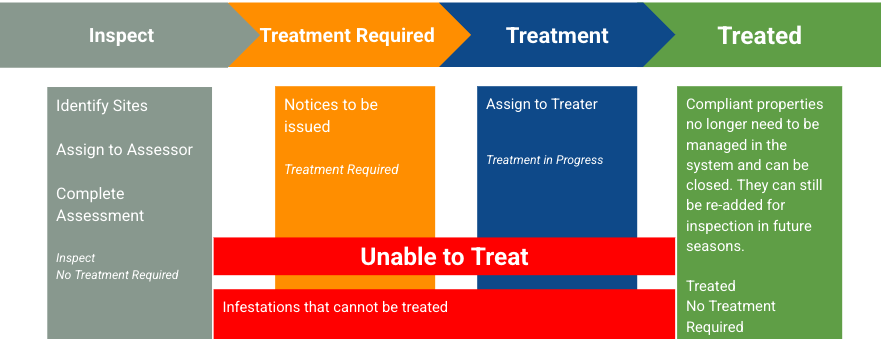
Assessments are managed by workflow which starts with an initial inspection to identify sites and is followed by assessment and treatment if required. A summary of this process is shown below.

<figure><img src="https://3923904090-files.gitbook.io/~/files/v0/b/gitbook-x-prod.appspot.com/o/spaces%2FNy7IznbrPLUq6GJDDQDk%2Fuploads%2FWfJPhIQGyl1Sj2Xi0BZA%2Fimage.png?alt=media&#x26;token=c0a5717b-5783-4259-8bb7-984f5169382d" alt=""><figcaption><p>General overview of Weed &#x26; Pest workflow</p></figcaption></figure>

### Positions <a href="#positions" id="positions"></a>

The following are outlines of the Weed Inspection [positions](https://docs.cw.crisisworks.com/concepts-and-fundamentals/concepts-and-fundamentals#events-users-positions-and-duty) and what they can do:

<table><thead><tr><th width="317.5859375">Position</th><th width="408.453125">Description</th><th data-hidden></th></tr></thead><tbody><tr><td>Weed Inspections Officer</td><td>Use the Crisisworks Field Reporting App, and be assigned inspections.</td><td></td></tr><tr><td>Weed Inspections Assessor</td><td>Access the Inspections register via the web interface, be assigned inspections to assess and view reports.</td><td></td></tr><tr><td>Weed Inspections Coordinator </td><td>Access the Inspections register via the web interface, manage property data, change the assigned officer and see/edit all officers assigned records.</td><td></td></tr><tr><td>Weed Inspections Contractor/Treater</td><td>Can log in to see Weed &#x26; Pest Inspection tasks that have been assigned to them only (<a href="#requests-usingrequests-1">requires administrator setup</a>)</td><td></td></tr></tbody></table>

### Access <a href="#requests-usingrequests" id="requests-usingrequests"></a>

To access *Weed & Pest Assessments*

* *Weed & Pest Assessments* must be [enabled for the event](https://docs.cw.crisisworks.com/system-administration/managing-events).
* [Go on duty](https://docs.cw.crisisworks.com/concepts-and-fundamentals/on-a-computer/working-with-events#setting-your-duties-for-events) with a [Weed Inspection Position](#requests-usingrequests-2)

If you can't access it, ask your administrator to check your permissions.

Locate the *Weed & Pest Assessments* register under **Inspections > Weed & Pest Assessments** in the menu.&#x20;

<figure><img src="https://3923904090-files.gitbook.io/~/files/v0/b/gitbook-x-prod.appspot.com/o/spaces%2FNy7IznbrPLUq6GJDDQDk%2Fuploads%2FZPuXwVHDzdsHk83CotAs%2Fimage.png?alt=media&#x26;token=0bdead41-4eba-4da7-aa22-195ee3fd836b" alt="" width="563"><figcaption><p>Location of the Weed &#x26; Pest Assessments register in the Inspections module</p></figcaption></figure>

### Setup and Configuration <a href="#setup-and-configuration" id="setup-and-configuration"></a>

Administrators are able to set the Weed & Pest Assessments module up by:

* Add (or removing) the Weed & Pest Asessments register from events in the [Event settings](https://docs.cw.crisisworks.com/system-administration/managing-events)
* Enable the Weed Inspections positions  by [adding the positions to the Event](https://docs.cw.crisisworks.com/system-administration/managing-events). Without these positions, users will not be able to use the module.
* [Add the policy of Weed Inspections User to an existing position](https://docs.cw.crisisworks.com/system-administration/configuring-the-system/positions) if it doesn't have it
* [Add the relevant positions](#requests-usingrequests-2) of Weed Inspections to a user's profile if they need it. See the guide on positions.
* Add or modify Chemicals, Treatment Methods, Weed Species and ranges for Percentage Cover,  Wind Direction, Wind Speed and Wind Temperature via [Lookups](https://docs.cw.crisisworks.com/system-administration/configuring-the-system/lookups).
* [Importing work summaries](#importing-data) in bulk

#### **Security Policies** <a href="#security-policies" id="security-policies"></a>

Refer to: [Positions: Security Policies](https://app.gitbook.com/o/XTVHxRDLJsgVRj4dNFUc/s/Ny7IznbrPLUq6GJDDQDk/system-administration/configuring-the-system/positions#security-policies)​

<details>

<summary><strong>Security Policy explanations</strong></summary>

The following security policies apply to Weed & Pest Assessments:

| Security Policy                        | Use                                                                                                                                     |
| -------------------------------------- | --------------------------------------------------------------------------------------------------------------------------------------- |
| <p>Access to weed analytics</p><p></p> | Access to the [Weed & Pest Inspection Reports](https://docs.cw.crisisworks.com/modules/reports/weed-and-pest-inspection-reports) folder |
| <p>Weed Edit All</p><p></p>            | Can view and edit all weed items. Cannot cannot assign                                                                                  |
| Weed Inspection Coordination           | Full Access to Weeds register                                                                                                           |
| <p>Weed Limited</p><p></p>             | Limited Access to view and edit assign items only. Cannot create new items.                                                             |
| <p>Weed Limited and Create</p><p></p>  | Can crete new weed items and access own and assigned items.                                                                             |

</details>

## Finding Weed & Pest Assessments <a href="#information-editinganexistinginformationitem" id="information-editinganexistinginformationitem"></a>

{% content-ref url="../../concepts-and-fundamentals/on-a-computer/searching-filtering-and-querying-registers" %}
[searching-filtering-and-querying-registers](https://docs.cw.crisisworks.com/concepts-and-fundamentals/on-a-computer/searching-filtering-and-querying-registers)
{% endcontent-ref %}

The register includes a number of features to assist in finding *Weed & Pest Assessments* including:

* [Datagrid](https://docs.cw.crisisworks.com/concepts-and-fundamentals/on-a-computer/using-the-datagrid#data-grid-view) view
* [Map](https://docs.cw.crisisworks.com/concepts-and-fundamentals/on-a-computer/using-the-datagrid#map-view) view
* [Filters](#information-editinganexistinginformationitem-1) including workflow, common species, assessments under review, chemicals and treatments and atmospheric conditions
* Combination filters and search by most fields

<figure><img src="https://3923904090-files.gitbook.io/~/files/v0/b/gitbook-x-prod.appspot.com/o/spaces%2FNy7IznbrPLUq6GJDDQDk%2Fuploads%2F85FrE5soQcAHLrh0FaAs%2Fimage.png?alt=media&#x26;token=9daded0e-132b-4e6c-b0d9-44629cf2b69b" alt=""><figcaption><p>Weed &#x26; Pest Assessments datagrid (sample view)</p></figcaption></figure>

<figure><img src="https://3923904090-files.gitbook.io/~/files/v0/b/gitbook-x-prod.appspot.com/o/spaces%2FNy7IznbrPLUq6GJDDQDk%2Fuploads%2FDZGYdSNmS8orTua2s0x7%2Fimage.png?alt=media&#x26;token=a57e9569-9e48-4bc3-bb91-522e0ae0d1c6" alt=""><figcaption><p>Weed &#x26; Pest Management map with item summary (sample view)</p></figcaption></figure>

### Filters <a href="#information-editinganexistinginformationitem" id="information-editinganexistinginformationitem"></a>

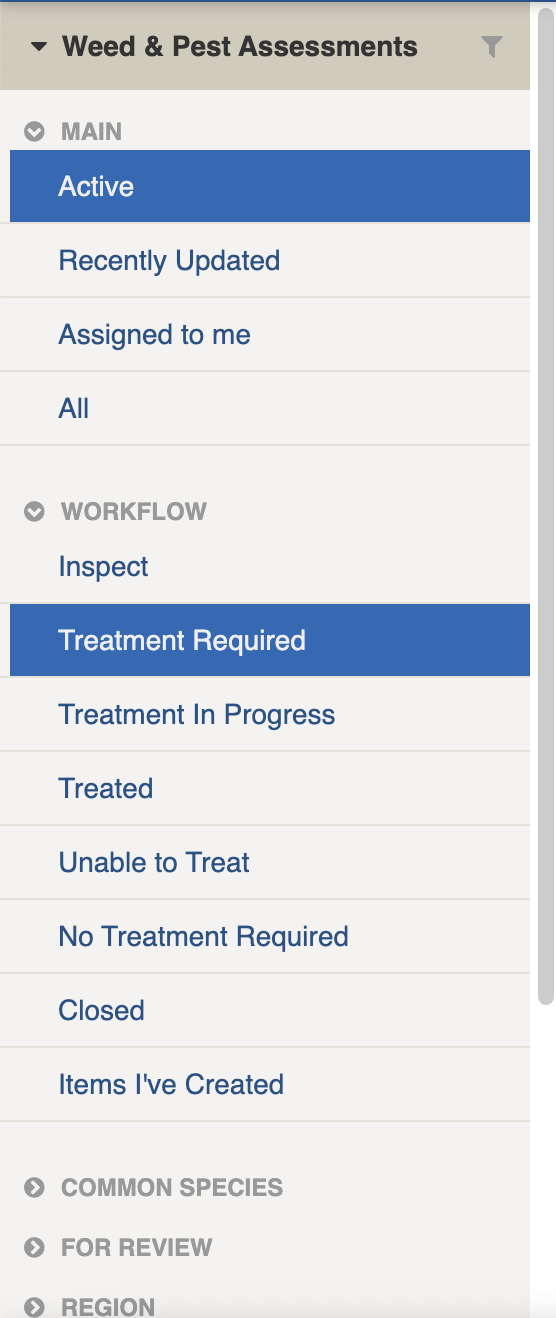
Filters help make management of *Weed & Pest Assessments* easier by focusing on specific groups of items on the datagrid.

<figure><img src="https://3923904090-files.gitbook.io/~/files/v0/b/gitbook-x-prod.appspot.com/o/spaces%2FNy7IznbrPLUq6GJDDQDk%2Fuploads%2Fujxya6kYiMHYthQGQOnK%2Fimage.png?alt=media&#x26;token=51c1f503-9b8b-4bf5-8972-88d14dc929c1" alt="" width="139"><figcaption><p>Weed &#x26; Pest Assessments filter menu</p></figcaption></figure>

<details>

<summary>Filter menu explanations</summary>

The following lists some of the filters and how to use them:

<table><thead><tr><th width="247">Filter Group</th><th>Filter/s</th><th>Use</th></tr></thead><tbody><tr><td>Main</td><td><p>Active</p><p>Recently Updated</p><p>All</p></td><td></td></tr><tr><td></td><td>Assigned to Me</td><td>Assigned to me will show you any assessments that you've been assigned to as an Assessor or Treator</td></tr><tr><td>Workflow</td><td>Inspect</td><td>Shows all items that have been inspected</td></tr><tr><td></td><td>Treatment Required</td><td>Shows all items that require treatment</td></tr><tr><td></td><td>Treatment in Progress</td><td>Shows all items that are currently being treated</td></tr><tr><td></td><td>Treated</td><td>Shows all items which have had treatment applied</td></tr><tr><td></td><td>Unable to Treat</td><td>Shows all items which have been deemed not able to be treated</td></tr><tr><td></td><td>No Treatment Required</td><td>Shows all items that did not require treatment</td></tr><tr><td></td><td>Closed</td><td>Shows all items that were closed</td></tr><tr><td>Common Species</td><td><p>Blackberry</p><p>Sweet Pittosporum</p><p>Pampas Grass</p><p>Ragwort<br>*</p></td><td>Pre-configured list of commonly reported species. Shows all items for this species</td></tr><tr><td>For Review</td><td>Has Supporting Information <br>Has Treatment Comment<br>Treatment Time Required</td><td></td></tr><tr><td>Region</td><td>[List is based on your system configuration]*</td><td>Shows all items for a specific <a href="../../../concepts-and-fundamentals/concepts-and-fundamentals#sites-and-regions">Region</a>.</td></tr><tr><td>Species</td><td>[List is from your species database]*</td><td>Shows all items for the selected species</td></tr><tr><td>Percentage Cover</td><td></td><td>Shows all items that fall within the percentage cover range</td></tr><tr><td>Treatment Method</td><td><p>Cut and Paint</p><p>Hand Pull</p><p>Spot Spray<br>*</p></td><td>Shows all items matching the treatment method</td></tr><tr><td>Active tags</td><td></td><td><p>Any tags in use.</p><p>Refer to: <a href="../../concepts-and-fundamentals/on-a-computer/using-the-datagrid/tagging-items">tags</a></p></td></tr></tbody></table>

&#x20;\* May vary based on your system configuration

</details>

## Viewing Weed & Pest Assessments <a href="#information-editinganexistinginformationitem" id="information-editinganexistinginformationitem"></a>

{% content-ref url="../../concepts-and-fundamentals/on-a-computer/using-the-datagrid/viewing-items" %}
[viewing-items](https://docs.cw.crisisworks.com/concepts-and-fundamentals/on-a-computer/using-the-datagrid/viewing-items)
{% endcontent-ref %}

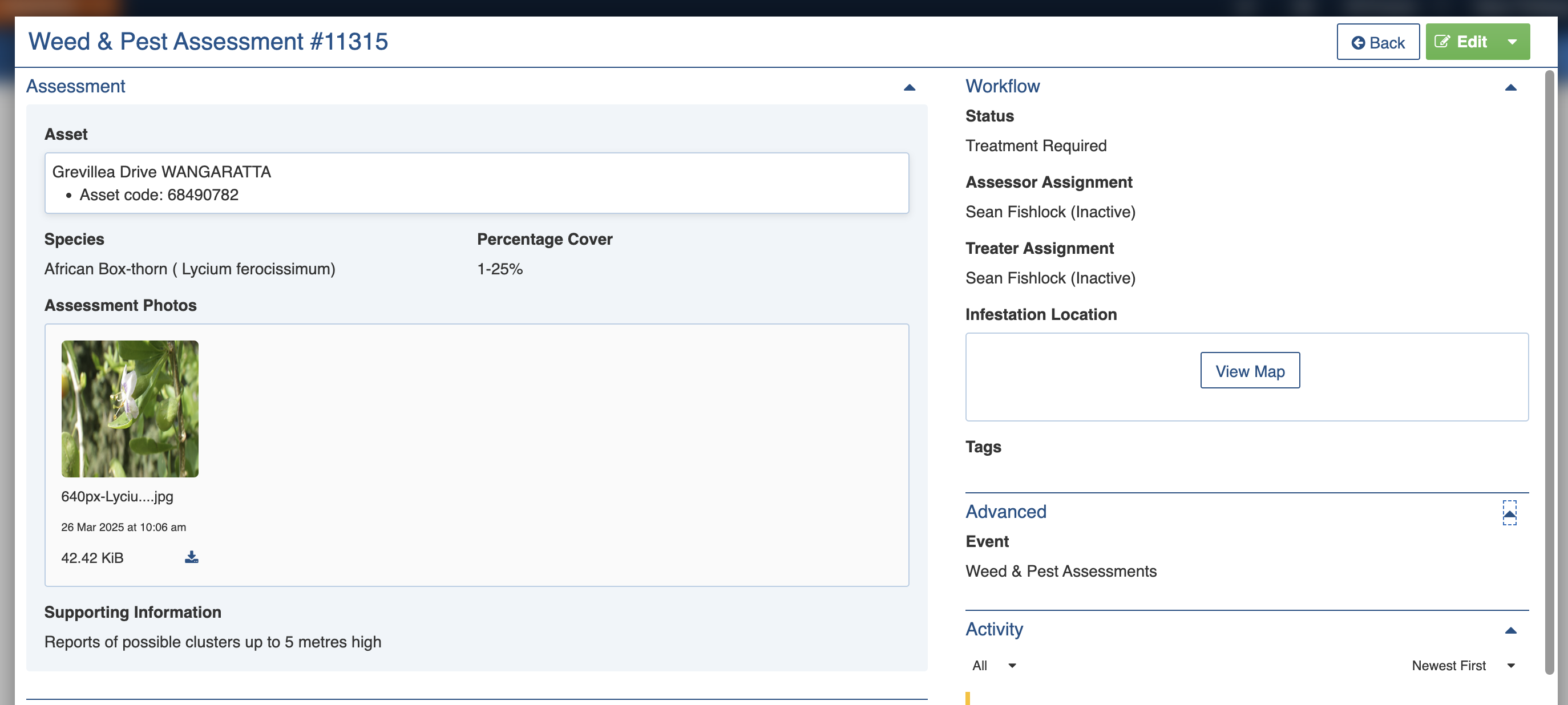
You can open Weed & Pest Assessments from the datagrid or the map.

When viewing *Weed & Pest Assessments*, sections can be expanded to show information.

As each section is completed, new sections may show additional information.&#x20;

<figure><img src="https://3923904090-files.gitbook.io/~/files/v0/b/gitbook-x-prod.appspot.com/o/spaces%2FNy7IznbrPLUq6GJDDQDk%2Fuploads%2FA0c3WVKV6rxVPGYzlrSy%2Fimage.png?alt=media&#x26;token=79f1b5a4-dee9-4568-948f-383e3373d338" alt=""><figcaption><p>Weed &#x26; Pest Assessment for African Box thorn</p></figcaption></figure>

## Weed & Pest Assessment Settings

*Weed & Pest Assessment*s are divided into the following sections (sections may or may not appear depending on what information is entered, your permissions level, and what mode you're viewing):&#x20;

| Left Column                   | Right Column          |
| ----------------------------- | --------------------- |
| [Record Notes](#record-notes) | [Workflow](#workflow) |
| [Assessment](#assessment)     | [Advanced](#advance)  |
| [Treatment](#treatment)       | [Activity](#activity) |

### Record Notes

When editing, record notes in the [rich text field](https://docs.cw.crisisworks.com/concepts-and-fundamentals/on-a-computer/using-the-datagrid/editing-items#rich-text-fields) as you make changes which will appear in the Activity log.

Refer to: [Recording Notes](https://docs.cw.crisisworks.com/concepts-and-fundamentals/on-a-computer/using-the-datagrid/editing-items#recording-notes)

### Assessment

Use the Assessment section to view and record details of any inspection. This section is normally completed by the person assigned to the Assessor position in the [Workflow section](#workflow) and filled in when the Status is set to the *Inspect* stage.

#### Asset

This field records the road segment where the weed or pest was sighted. Use the [location lookup](https://docs.cw.crisisworks.com/concepts-and-fundamentals/on-a-computer/using-the-datagrid/editing-items#location) to select it from the map. If you're on mobile you

#### Species

This field records the weed or pest species. Use the lookup list to search for the specific species observed. The system supports a database of commonly reported weeds and pests. Your Administrator configures the list of levels for your site using the Weed: Weed Species [lookup](https://docs.cw.crisisworks.com/system-administration/configuring-the-system/lookups).

<figure><img src="https://3923904090-files.gitbook.io/~/files/v0/b/gitbook-x-prod.appspot.com/o/spaces%2FNy7IznbrPLUq6GJDDQDk%2Fuploads%2FG2XRDIB9PIdRuynrGYkm%2Fimage.png?alt=media&#x26;token=54d37b87-3ca4-4f7f-a91e-0af35419c705" alt="" width="374"><figcaption><p>Searching the species database</p></figcaption></figure>

#### Percentage Cover

This field records a range to estimate how prevalent the weed or pest is in the recorded area. Use the pulldown list to select a range. Your Administrator configures the list of levels for your site using the Weed: Percentage Cover [lookup](https://docs.cw.crisisworks.com/system-administration/configuring-the-system/lookups).

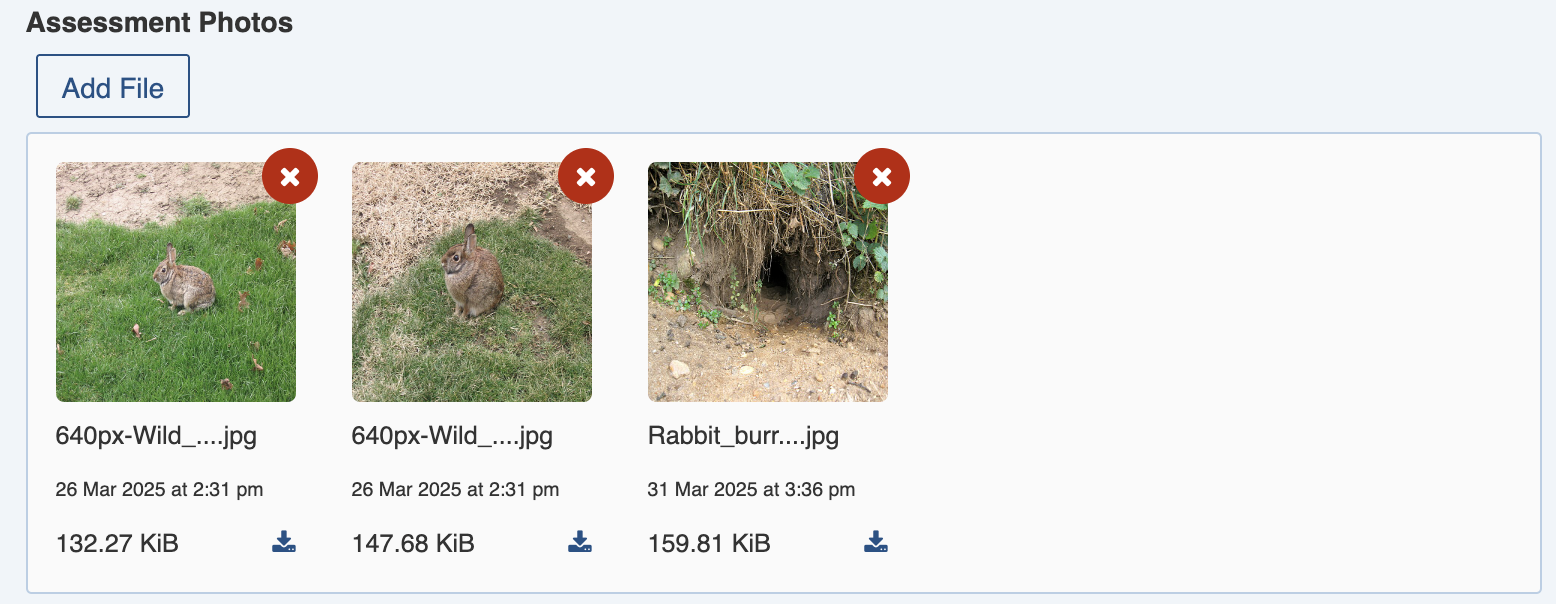
#### Assessment Photos

This field is used to upload photo(s) into the assessment as evidence using [File Attachments](https://docs.cw.crisisworks.com/concepts-and-fundamentals/on-a-computer/using-the-datagrid/editing-items#attaching-files).

<figure><img src="https://3923904090-files.gitbook.io/~/files/v0/b/gitbook-x-prod.appspot.com/o/spaces%2FNy7IznbrPLUq6GJDDQDk%2Fuploads%2Fq37DZUdSw4k3ypkOBu7N%2Fimage.png?alt=media&#x26;token=909a0169-5672-47fe-9fab-b23566c6adbf" alt="" width="375"><figcaption><p>Photos recording a suspected rabbit infestation</p></figcaption></figure>

#### Supporting Information

This field is used for additional information relevant to the inspection using a [rich text field](https://docs.cw.crisisworks.com/concepts-and-fundamentals/on-a-computer/using-the-datagrid/editing-items#rich-text-fields). Where supporting information is provided users can filter to show all items where there are detailed notes.

<figure><img src="https://3923904090-files.gitbook.io/~/files/v0/b/gitbook-x-prod.appspot.com/o/spaces%2FNy7IznbrPLUq6GJDDQDk%2Fuploads%2FsZp9PB5ABtkVF1F0MtTg%2Fimage.png?alt=media&#x26;token=5e537bed-ecd5-4626-b81a-f74e67c65eee" alt="" width="375"><figcaption><p>Supporting Information</p></figcaption></figure>

### Treatment

This section records details of the treatment work along with any atmospheric conditions (as these can affect environmental health compliance) and evidence. It is usually done by the person assigned the *Treater* position [Workflow section](#workflow) when the Status is set to the *Treatment Required* and *Treatment Progress* stages.

#### Treatment Method

This field records the technique used to treat the infestation. Select from the pulldown list of options. Your Administrator configures the list of methods for your site using the Weed: Treatment Method [lookup](https://docs.cw.crisisworks.com/system-administration/configuring-the-system/lookups).

<figure><img src="https://3923904090-files.gitbook.io/~/files/v0/b/gitbook-x-prod.appspot.com/o/spaces%2FNy7IznbrPLUq6GJDDQDk%2Fuploads%2FB5eJAtwMKSLZ3H8GSiU8%2Fimage.png?alt=media&#x26;token=9b764a71-799d-4e15-84d3-c873f05f393f" alt="" width="375"><figcaption><p>Treatment method field</p></figcaption></figure>

#### Chemical

This field records a chemical used for the treatment. If a chemical has been used, select one option from the pulldown list. Your Administrator configures the list of chemicals for your site using the Weed: Chemical [lookup](https://docs.cw.crisisworks.com/system-administration/configuring-the-system/lookups).

<figure><img src="https://3923904090-files.gitbook.io/~/files/v0/b/gitbook-x-prod.appspot.com/o/spaces%2FNy7IznbrPLUq6GJDDQDk%2Fuploads%2F0xLgXCYpKLiQfv3Z2AIz%2Fimage.png?alt=media&#x26;token=eb755e99-e0a1-4a76-a8b4-5e055f2ac35e" alt="" width="375"><figcaption><p>Chemical field</p></figcaption></figure>

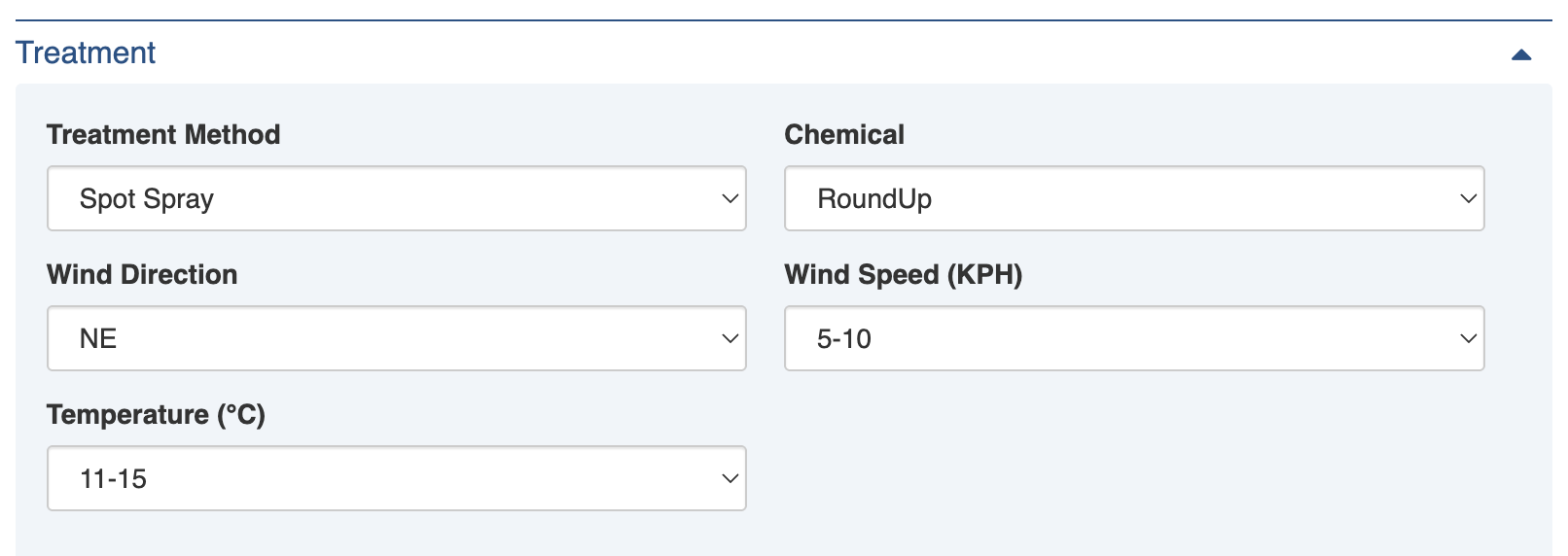
#### Weather Conditions

Three fields are used to record weather conditions - Wind Direction, Wind Speed and Temperature. Atmospheric conditions are required for avoiding spray drift in high temperatures or windy conditions and therefore are important to record for compliance.

<figure><img src="https://3923904090-files.gitbook.io/~/files/v0/b/gitbook-x-prod.appspot.com/o/spaces%2FNy7IznbrPLUq6GJDDQDk%2Fuploads%2FN3MjfAfM4fwWmW5sLrDE%2Fimage.png?alt=media&#x26;token=1481d845-0313-41f8-ab20-1ebfe6d6c1c0" alt="" width="375"><figcaption><p>Treatment details for spraying with weather conditions</p></figcaption></figure>

**Wind Direction** uses the 8-wind compass settings by default to record the direction. Select an option from the pulldown list. Your Administrator can change this using the Weed: Wind Direction [lookup](https://docs.cw.crisisworks.com/system-administration/configuring-the-system/lookups).

**Wind Speed** uses ranges to record the speed in kph. Select an option from the pulldown list. Your Administrator can change the ranges using the Weed: Wind Speed [lookup](https://docs.cw.crisisworks.com/system-administration/configuring-the-system/lookups).

**Temperature** also uses ranges to record the wind temperature in degrees Celcius. Select an option from the pulldown list. Your Administrator can change the ranges using the Weed: Wind Temperature [lookup](https://docs.cw.crisisworks.com/system-administration/configuring-the-system/lookups).

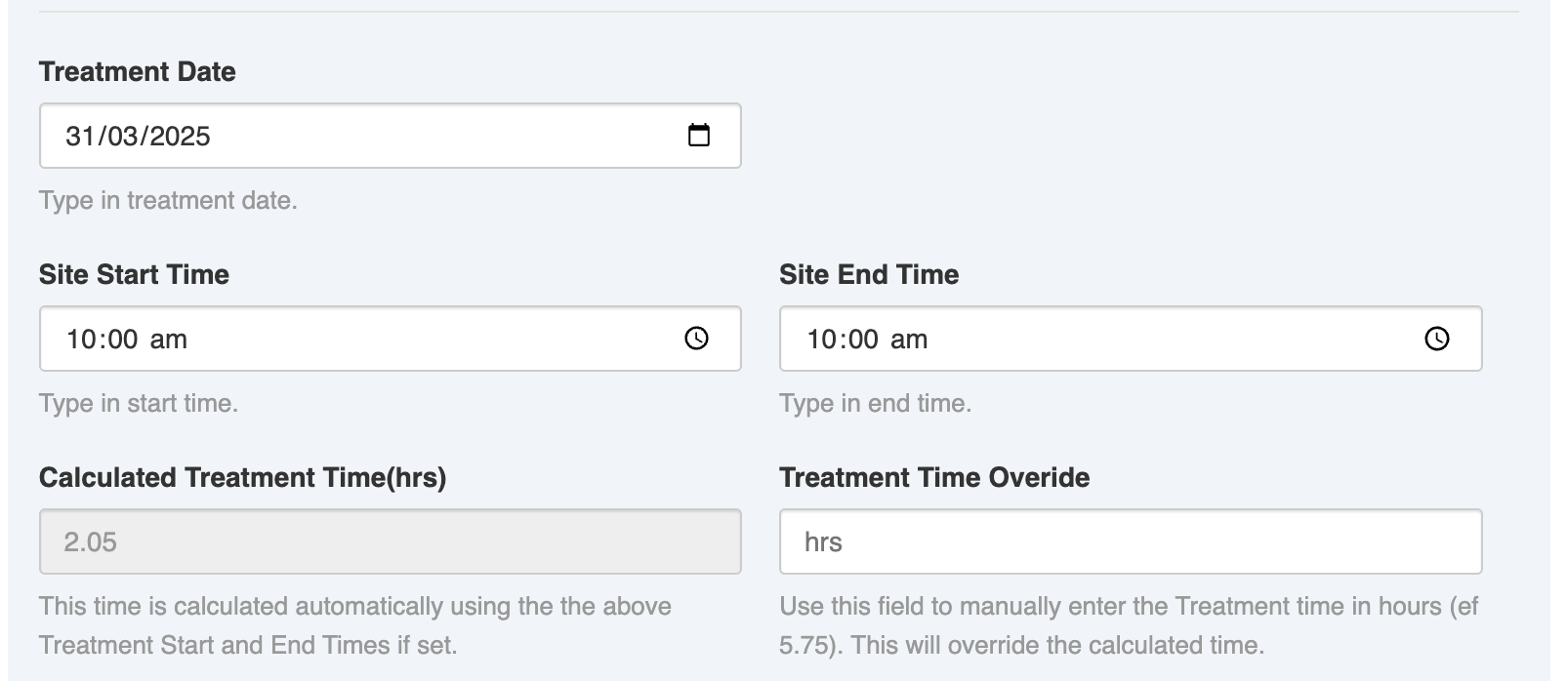
#### Treatment Date and Time fields

Several fields are used to record the Treatment time the duration of onsite treatment work for which is also automatically calculated based on what is entered.

<figure><img src="https://3923904090-files.gitbook.io/~/files/v0/b/gitbook-x-prod.appspot.com/o/spaces%2FNy7IznbrPLUq6GJDDQDk%2Fuploads%2FXlhXXgFU5A2gBJsNGn8b%2Fimage.png?alt=media&#x26;token=be38a2d8-c298-4832-a311-7bf9b5752c43" alt="" width="375"><figcaption><p>Treatment date and time settings (sample)</p></figcaption></figure>

**Treatment Date** records the day of treatment. Use the [date selector](https://docs.cw.crisisworks.com/concepts-and-fundamentals/on-a-computer/using-the-datagrid/editing-items#selecting-dates) to set this.&#x20;

**Site Start Time** and **Site End Time** record the time of the onsite treatment. Use the [time selector](https://docs.cw.crisisworks.com/concepts-and-fundamentals/on-a-computer/using-the-datagrid/editing-items#selecting-dates) to enter the times. Upon saving the calculated duration in hours in the **Calculated Treatment Time** field. If the field calculation doesn't reflect the time spent, the Treatment Time Override.

#### Treatment Photos

This field can capture as many photos of the treatment as necessary using the [Attachments](https://docs.cw.crisisworks.com/concepts-and-fundamentals/on-a-computer/using-the-datagrid/editing-items#attaching-files) function.&#x20;

#### Treatment Comment

This field enables detailed notes on the treatment to be recorded using the [rich text field](https://docs.cw.crisisworks.com/concepts-and-fundamentals/on-a-computer/using-the-datagrid/editing-items#rich-text-fields) provided.

### Workflow

#### Status

New Weed & Pest Assessments start as *Inspect*.  At this stage, the Assessment section is normally completed by the person assigned to the *Assessor* position. If it is decided that no treatment is required then the Status should be set to *No Treatment Required*. If the pest is unable to be treated, the Status should be changed to *Unable to Treat*. In either case, a record remains of the infestation which can be monitored over time.

When treatment is required, the assessment is set to *Treatment Required* and is usually done by the person assigned the *Treater* position. As the treatment progresses, the status should be set to Treatment in Progress. When it is done, the status should be changed to *Treated*.&#x20;

A Coordinator can reviewed and removed the assessment, if they decided it is no longer needs tracking they can archive it by setting the Status to *Closed*.

<table><thead><tr><th width="130">Status</th><th width="143">Datagrid Icon</th><th>Next available steps</th><th>Notes</th></tr></thead><tbody><tr><td>Inspect</td><td><img src="https://3923904090-files.gitbook.io/~/files/v0/b/gitbook-x-prod.appspot.com/o/spaces%2FNy7IznbrPLUq6GJDDQDk%2Fuploads%2F5hBRLv8CYc4GAUhhA2AT%2Fimage.png?alt=media&#x26;token=2147e384-aa23-4d53-aebe-865dad9b4aeb" alt="" data-size="line"></td><td>Treatment Required, Treatment in Progress, Treated, Unable to Treat, No Treatment Required</td><td>All new assessments begin with this status</td></tr><tr><td>Treatment Required</td><td><img src="https://3923904090-files.gitbook.io/~/files/v0/b/gitbook-x-prod.appspot.com/o/spaces%2FNy7IznbrPLUq6GJDDQDk%2Fuploads%2FwbvMAsAxmGBR6bBOvqY8%2Fimage.png?alt=media&#x26;token=a7a1e3fc-0702-4dc7-813f-cad463326ee6" alt="" data-size="original"></td><td>Treatment Required, Treatment in Progress, Treated, Unable to Treat, No Treatment Required</td><td>Weed/Pest has been assessed as requiring treatment</td></tr><tr><td>Treatment in Progress</td><td><img src="https://3923904090-files.gitbook.io/~/files/v0/b/gitbook-x-prod.appspot.com/o/spaces%2FNy7IznbrPLUq6GJDDQDk%2Fuploads%2FsV1E3GBfCKhcXn7V9dzX%2Fimage.png?alt=media&#x26;token=5421bc3e-4249-4e53-a5b4-dc777fb35352" alt="" data-size="original"></td><td>Inspect, Treatment Required, Treated, Unable to Treat, No Treatment Required</td><td>Weed/pest is currently being treated</td></tr><tr><td>Treated</td><td><img src="https://3923904090-files.gitbook.io/~/files/v0/b/gitbook-x-prod.appspot.com/o/spaces%2FNy7IznbrPLUq6GJDDQDk%2Fuploads%2FYj1FtdQ8SqnmFgPjPIxb%2Fimage.png?alt=media&#x26;token=1764dd9c-f641-4ec5-8a22-963beca8b1b6" alt="" data-size="line"></td><td>Inspect, Treatment Required, Treatment in Progress, Unable to Treat, No Treatment Required</td><td>Treatment work has finished</td></tr><tr><td>Unable to Treat</td><td><img src="https://3923904090-files.gitbook.io/~/files/v0/b/gitbook-x-prod.appspot.com/o/spaces%2FNy7IznbrPLUq6GJDDQDk%2Fuploads%2FnrptiL3pT6BsJGbabzio%2Fimage.png?alt=media&#x26;token=7d9bbd82-c2d7-46ae-a3b5-dcfa77af632b" alt="" data-size="line"></td><td>Inspect, Treatment Required, Treatment in Progress, Treated, No Treatment Required, Closed</td><td>The weed/pest can't be treated</td></tr><tr><td>No Treatment Required</td><td><img src="https://3923904090-files.gitbook.io/~/files/v0/b/gitbook-x-prod.appspot.com/o/spaces%2FNy7IznbrPLUq6GJDDQDk%2Fuploads%2FToFhUXMnjSOsbTFs3QML%2Fimage.png?alt=media&#x26;token=297ef1c7-8c1d-459d-aa49-762d1bc2ad64" alt="" data-size="line"></td><td>Inspect, Treatment Required, Treatment in Progress, Treated, Unable to Treat, Closed</td><td>Treatment not required for this infestation</td></tr><tr><td>Closed</td><td><img src="https://3923904090-files.gitbook.io/~/files/v0/b/gitbook-x-prod.appspot.com/o/spaces%2FNy7IznbrPLUq6GJDDQDk%2Fuploads%2FK8WrQ7BoidiybFd2VMM4%2Fimage.png?alt=media&#x26;token=e9b655f8-fa13-4024-a376-3879b250094b" alt="" data-size="line"></td><td>Inspect, Treatment Required, Treatment in Progress, Treated, Unable to Treat, No Treatment Required</td><td>A Coordinator has reviewed and removed the assessment, decided it is no longer needs tracking and archived it.</td></tr></tbody></table>

### Activity

Refer to: [Viewing and Opening Register Items: Activity](https://docs.cw.crisisworks.com/concepts-and-fundamentals/on-a-computer/using-the-datagrid/viewing-items#activity)

## Updating Weed & Pest Assessments

{% content-ref url="../../concepts-and-fundamentals/on-a-computer/using-the-datagrid/editing-items" %}
[editing-items](https://docs.cw.crisisworks.com/concepts-and-fundamentals/on-a-computer/using-the-datagrid/editing-items)
{% endcontent-ref %}

When updating *Weed & Pest Assessments*:

* Add notes on your edits in the **Record Notes** field
* Complete each section of the [Settings](#register-item-settings) as required.&#x20;
* Update the **Status** to reflect the current stage of assessment/treatment
* Record additional **photos** as required

As an Weed Inspections Assessor during the *Inspect* stage:

* Update details in the **Assessment** section
* Note any changes based on ongoing assessment and add **Supporting Information**

As a Treater during the *Treatment Required* or *Treatment in Progress* stage:

* Update the **Treatment** section with treatment information
* Add any notes on the efficacy of treatment to the **Treatment Comment**

As a Weed Inspections Coordinator:

* Delegate and assign Assessors for inspection and Treaters for treatment using the **Assessor Assignment** and **Treater Assignment**
* Review, close (archive) in the **Status** any items that no longer need to be worked on

<figure><img src="https://3923904090-files.gitbook.io/~/files/v0/b/gitbook-x-prod.appspot.com/o/spaces%2FNy7IznbrPLUq6GJDDQDk%2Fuploads%2FuSTLHqJJFdRVbRYU8ebs%2Fimage.png?alt=media&#x26;token=54283d8b-aeab-4228-88ef-191964ba962b" alt=""><figcaption><p>Editing a Weed &#x26; Pest Assessment for treatment of Sweet Pittosporum</p></figcaption></figure>

## Adding Weed & Pest Assessments

{% content-ref url="../../concepts-and-fundamentals/on-a-computer/using-the-datagrid/adding-items" %}
[adding-items](https://docs.cw.crisisworks.com/concepts-and-fundamentals/on-a-computer/using-the-datagrid/adding-items)
{% endcontent-ref %}

To add a new Weed & Pest Assessment:

1. From the register, in the New item menu select the **New Weed & Pest Assessment**  <img src="https://3923904090-files.gitbook.io/~/files/v0/b/gitbook-x-prod.appspot.com/o/spaces%2FNy7IznbrPLUq6GJDDQDk%2Fuploads%2FKYrgBVYHKd8C9ga30K0o%2Fimage.png?alt=media&#x26;token=e8b9fc6a-81be-42c2-a20c-3d3034fdbbc0" alt="" data-size="line"> button (or drop down the list from any other register and select it)
2. Complete each section of the [Settings](#register-item-settings) as required. Initially this should start with the default Status of Inspect and complete Assessment details.
3. Save <img src="https://3923904090-files.gitbook.io/~/files/v0/b/gitbook-x-prod.appspot.com/o/spaces%2FNy7IznbrPLUq6GJDDQDk%2Fuploads%2F2qJNRqfHczOPl1cKEcMo%2Fimage.png?alt=media&#x26;token=1f653f47-1199-4f87-88da-313768ca3dac" alt="" data-size="line">

## Bulk Actions

{% content-ref url="../../concepts-and-fundamentals/on-a-computer/using-the-datagrid/bulk-actions" %}
[bulk-actions](https://docs.cw.crisisworks.com/concepts-and-fundamentals/on-a-computer/using-the-datagrid/bulk-actions)
{% endcontent-ref %}

The following additional bulk actions can be performed via the Actions menu:

| Action        | Description                                                                                                                                      |
| ------------- | ------------------------------------------------------------------------------------------------------------------------------------------------ |
| Copy IDs      | Refer to: [Copy IDs](https://docs.cw.crisisworks.com/concepts-and-fundamentals/on-a-computer/using-the-datagrid/bulk-actions#copy-ids)           |
| Create a Copy | Refer to: [Create a Copy](https://docs.cw.crisisworks.com/concepts-and-fundamentals/on-a-computer/using-the-datagrid/bulk-actions#create-a-copy) |

## Reports

{% content-ref url="../../system-administration/reporting/running-reports" %}
[running-reports](https://docs.cw.crisisworks.com/system-administration/reporting/running-reports)
{% endcontent-ref %}

Reports available for *Weed & Pest Assessments* include:

* Treatments Report&#x20;
* Total Treatments by Assignee Report
* Inspected Assets
* Uninspected assets

<figure><img src="https://3923904090-files.gitbook.io/~/files/v0/b/gitbook-x-prod.appspot.com/o/spaces%2FNy7IznbrPLUq6GJDDQDk%2Fuploads%2FwvOd0HlttwSnW5EWISJm%2Fimage.png?alt=media&#x26;token=8ba8740f-920b-4b79-ac6c-d87f5a564a72" alt=""><figcaption><p>Weed and Pest Inspection Reports from the Reports module</p></figcaption></figure>