# Operations

## Overview <a href="#overview" id="overview"></a>

The Operations Module contains registers for Emergency Management Operations and Response phase.

The module contains functions for recording staff logs, managing requests and tasks, information and operational resources as well as time sheeting and expense tracking.

Operations is designed to broadly align with the objectives and functions of incident management systems such as the Australasian Inter-Service Incident Management System (AIIMS) and Incident Command System (ICS). This makes it effective in an Emergency Operations Centre (EOC) for electronic management of emergencies of any size using an all agencies approach.

### Positions <a href="#positions" id="positions"></a>

The following table outlines Operations [positions](https://docs.cw.crisisworks.com/concepts-and-fundamentals/concepts-and-fundamentals#events-users-positions-and-duty) and what users with them can do according to their default [security policies](https://docs.cw.crisisworks.com/system-administration/configuring-the-system/positions#security-policies):

<table><thead><tr><th width="212.30078125">Position</th><th width="408.453125">Description</th><th>Examples</th><th data-hidden></th></tr></thead><tbody><tr><td>Operations Officer</td><td><p>Supports operations.</p><p>Users on duty with this position can add and update items.</p></td><td></td><td></td></tr><tr><td>Operations Coordinator</td><td><p>Provides overall operations coordination.</p><p>Users on duty with this position can add and update events and operations items. They can update Operations costs and resources. They can assign, close and move items. They can also view reports.</p></td><td></td><td></td></tr><tr><td>Operations Support</td><td><p>Provides data entry support.</p><p>Users on duty with this position can view and update items assigned to them.</p></td><td></td><td></td></tr></tbody></table>

Other positions may have similar security policies. A [System Administrator](https://docs.cw.crisisworks.com/system-administration/configuring-the-system/positions) can establish positions with [custom security policies](#security-policies).

{% if visitor.claims.platform.cw === true && visitor.claims.topics.councilVic === true %}
For Victorian councils, refer to: [Positions Access Summary](https://docs.cw.crisisworks.com/security-and-support/practice-notes/playbooks-crisisworks-better-practice-guides/positions-access-summary).
{% endif %}

### Access <a href="#access" id="access"></a>

Access to the module and certain registers is limited to positions working in operations.

To access *Operations:*

1. [Sign in](https://docs.cw.crisisworks.com/concepts-and-fundamentals/on-a-computer/getting-access#signing-in) with an [Operations position](#information-editinganexistinginformationitem)
2. In the [Modules Menu](https://docs.cw.crisisworks.com/concepts-and-fundamentals/on-a-computer/navigation#modules-menu) select *Operations*

{% hint style="info" %}
If your account doesn't have access to this module and you need to use it, contact your [System Administrator](https://docs.cw.crisisworks.com/system-administration/configuring-the-system). Your administrator will need to have [setup and configured](#finding) the module in such a way that you can access it.
{% endhint %}

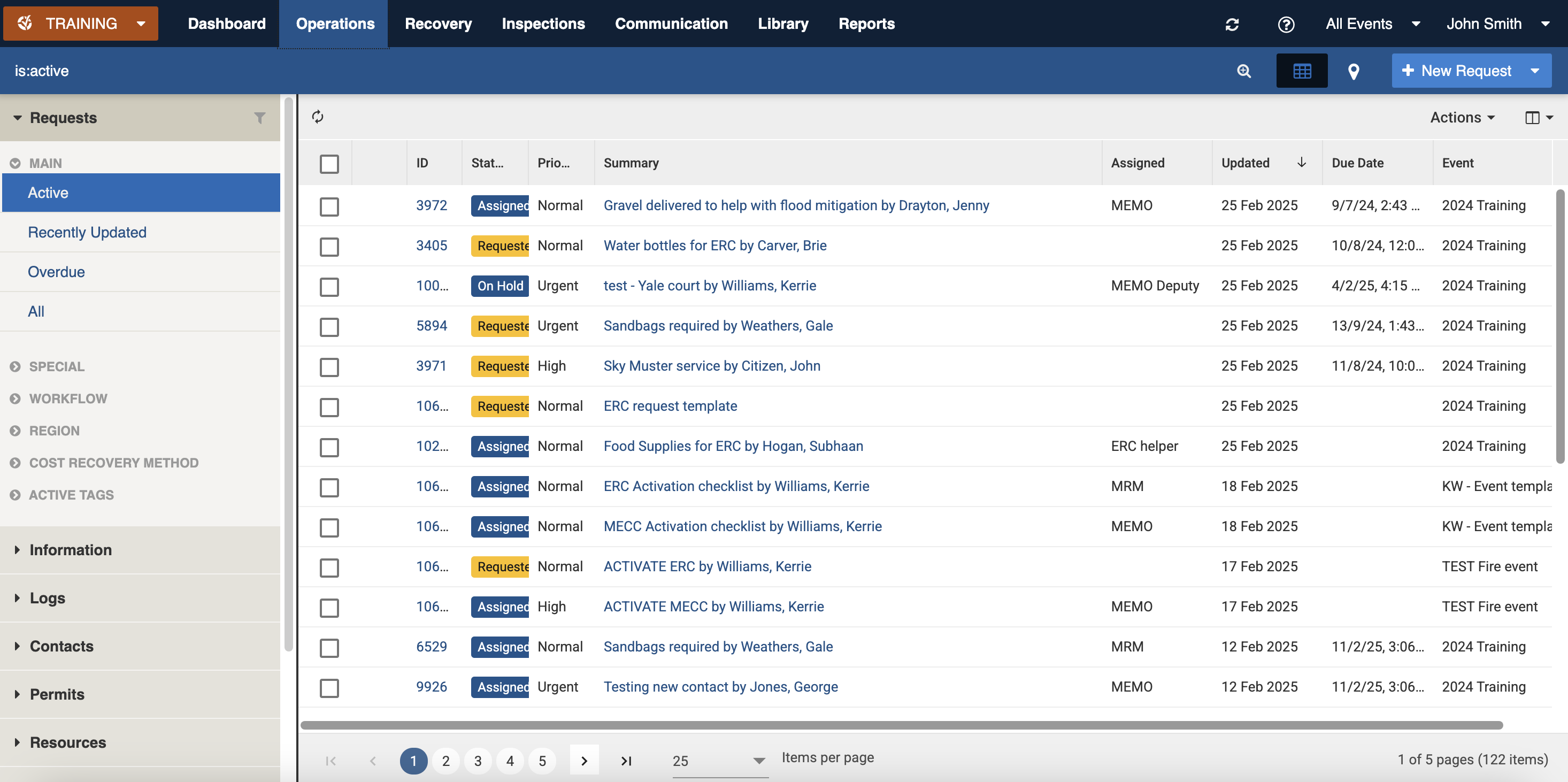
<figure><img src="https://3923904090-files.gitbook.io/~/files/v0/b/gitbook-x-prod.appspot.com/o/spaces%2FNy7IznbrPLUq6GJDDQDk%2Fuploads%2FXoCkUh4ehb90on576Mtn%2Fimage.png?alt=media&#x26;token=65c1b8b2-636c-4d8f-b2a9-0e91869ef304" alt=""><figcaption><p>View of the Operations module showing the main register: Requests</p></figcaption></figure>

### Setup and Configuration <a href="#finding" id="finding"></a>

Administrators can configure [Operations positions](#positions) to control access to parts of the Operations module. Additionally [security policies](#security-policies) can be set per register.&#x20;

#### Security Policies <a href="#security-policies" id="security-policies"></a>

Refer to: [Positions: Security Policies](https://docs.cw.crisisworks.com/system-administration/configuring-the-system/positions#security-policies)

<details>

<summary><strong>Security Policy explanations</strong></summary>

The following security policies apply to Operations:

<table><thead><tr><th width="239.546875">Security Policy</th><th>Use</th></tr></thead><tbody><tr><td><p>Operations Admin</p><p></p></td><td>Access items in participating events, can update all but not assign or move.</td></tr><tr><td>Operations Coordination</td><td>Full read/write access to operations data within involved events, with the ability to manage assignments and moving records between events.</td></tr><tr><td>Operations Limited</td><td>Limited read/write access to operations registers for assigned items. Cannot assign or move.</td></tr><tr><td>Operations Officer</td><td>Can create items. Can edit all Operations registers for records assigned to them or they have created. Cannot assign or close.</td></tr><tr><td>Operations Read Only</td><td>Can view all operations items in participating events but cannot update.</td></tr><tr><td>Operations Read Only Assigned</td><td>Limited read-only access to operations records within involved events only where the data is assigned or shared.</td></tr><tr><td>Operations Resource Assignment</td><td>Can assign resources within the request form</td></tr></tbody></table>

</details>

## Registers <a href="#registers" id="registers"></a>

Access to each of the listed registers is based on your system's configuration and license.

<table><thead><tr><th width="186">Register</th><th width="206">Sub-register of</th><th>Uses</th></tr></thead><tbody><tr><td><a href="operations/requests">Requests</a></td><td></td><td>For actionable tasks that require coordination and resources<br>Requests is the default Operations register</td></tr><tr><td><a href="operations/requests/request-tasks">Request Tasks</a></td><td>Requests</td><td>For managing individual tasks related to a request</td></tr><tr><td><a href="operations/information">Information</a></td><td></td><td>For recording information that is disseminated to team/s including Situation Reports, Briefings and Incident Action Plans</td></tr><tr><td><a href="operations/logs">Logs</a></td><td></td><td>For recording observations, intentions, actions and decisions</td></tr><tr><td><a href="operations/contacts">Contacts</a></td><td></td><td>A directory of key contacts which can also be users</td></tr><tr><td><a href="operations/permits">Permits</a></td><td></td><td>For processing compliance applications</td></tr><tr><td><a href="operations/resources">Resources</a></td><td></td><td>For managing cost tracking, recovery and <a href="#bla-bla">allocation of resources</a></td></tr></tbody></table>

## Reports <a href="#reports" id="reports"></a>

{% content-ref url="../system-administration/reporting/running-reports" %}
[running-reports](https://docs.cw.crisisworks.com/system-administration/reporting/running-reports)
{% endcontent-ref %}

See [Operations Reports](https://docs.cw.crisisworks.com/modules/reports/operations-reports) for the reports available for Operations data.
