# Request Tasks

## Overview <a href="#requests-overview" id="requests-overview"></a>

Request Tasks are used to record actionable items that can be added within a request for additional tracking of resources and costs. For example, a Request for a cleanup might call for a chainsaw, cutting down of trees, and volunteers. These would be individual request tasks and this register keeps track of their status, assignment and deployment of each of these.

Request Tasks are added within the **Tasks, Resources & Costs** section of a Request. Refer to [Requests](https://docs.cw.crisisworks.com/modules/operations/requests) for more information on managing them.

The Request Tasks sub-register allows direct management of these.

### Access <a href="#requests-usingrequests" id="requests-usingrequests"></a>

To access Request Tasks:

1. [Go on duty](https://docs.cw.crisisworks.com/concepts-and-fundamentals/on-a-computer/working-with-events#setting-your-duties-for-events) with an [Operations position](https://docs.cw.crisisworks.com/modules/operations/..#information-editinganexistinginformationitem). If you can't access it after doing this, contact your System Administrator. Requests (and Request Tasks) must be enabled within the current event.
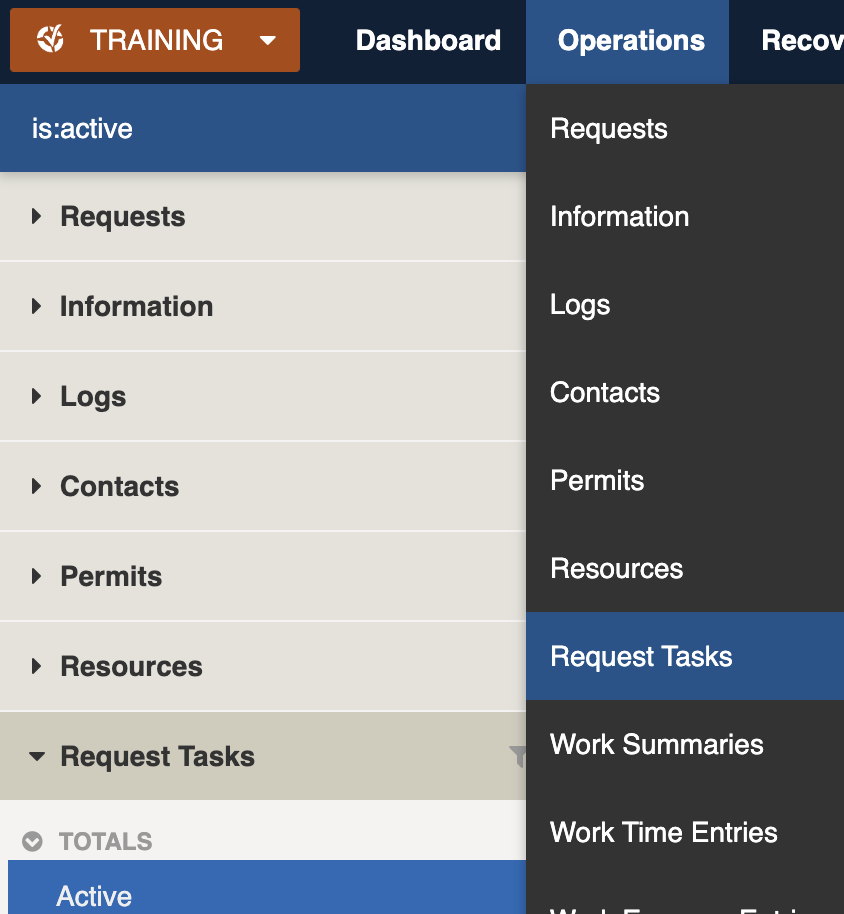
2. Navigate to:\
   Operations → Request Tasks

&#x20;

<figure><img src="https://3923904090-files.gitbook.io/~/files/v0/b/gitbook-x-prod.appspot.com/o/spaces%2FNy7IznbrPLUq6GJDDQDk%2Fuploads%2FzGJ4PXkPymOIHpGBdWOt%2Fimage.png?alt=media&#x26;token=8a08a4c3-7ee2-41f8-9fd3-a51288829bb6" alt="" width="375"><figcaption><p>Location of the Request Tasks register in the Operations module</p></figcaption></figure>

## Finding Request Tasks <a href="#information-editinganexistinginformationitem" id="information-editinganexistinginformationitem"></a>

{% content-ref url="../../../concepts-and-fundamentals/on-a-computer/searching-filtering-and-querying-registers" %}
[searching-filtering-and-querying-registers](https://docs.cw.crisisworks.com/concepts-and-fundamentals/on-a-computer/searching-filtering-and-querying-registers)
{% endcontent-ref %}

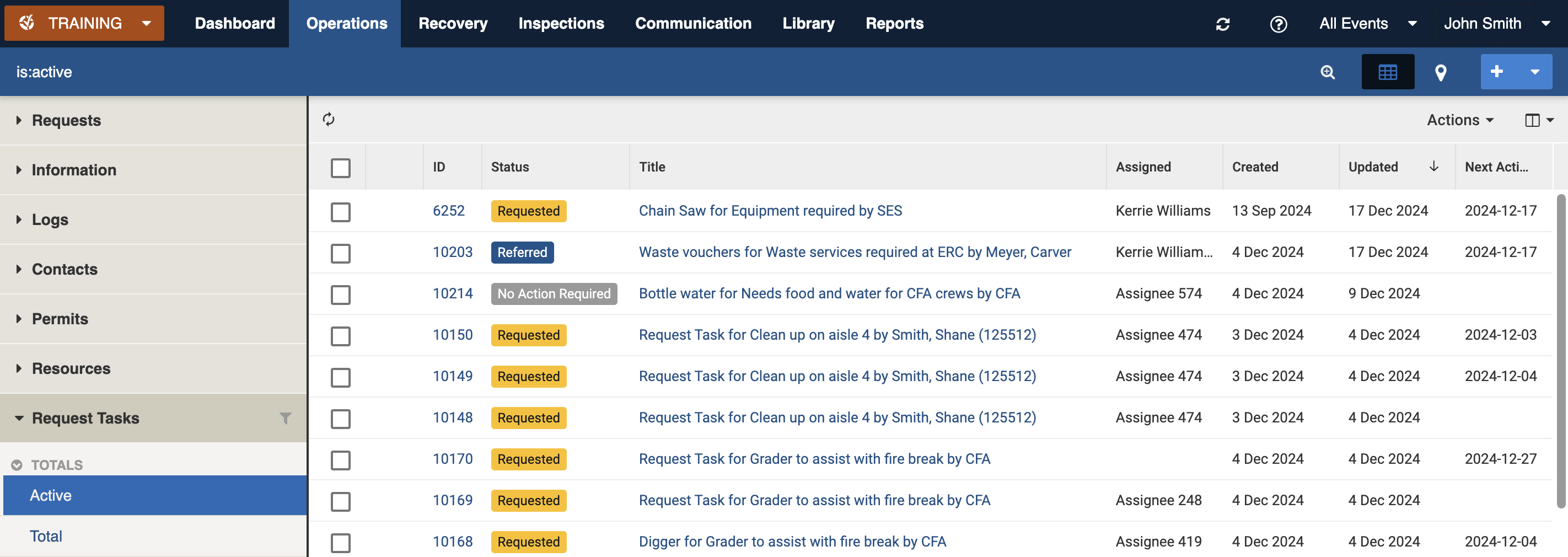
The register includes a number of features to assist in finding *Request Tasks*:

* [Datagrid](https://docs.cw.crisisworks.com/concepts-and-fundamentals/on-a-computer/using-the-datagrid#data-grid-view) view
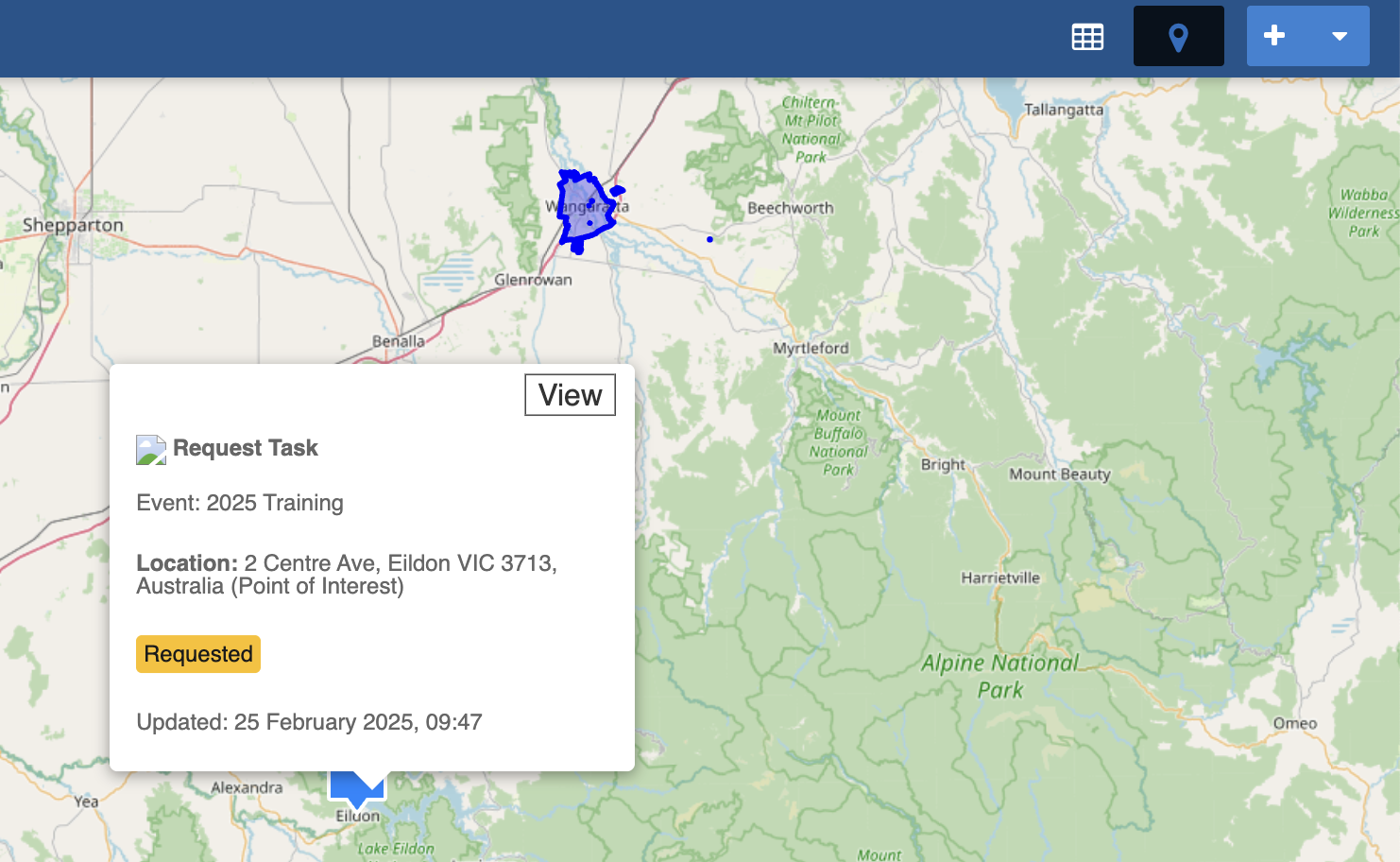
* [Map](https://docs.cw.crisisworks.com/concepts-and-fundamentals/on-a-computer/using-the-datagrid#map-view) view
* [Filters](#information-editinganexistinginformationitem-1) including workflow and active tags
* Combination filters and search by most fields

<figure><img src="https://3923904090-files.gitbook.io/~/files/v0/b/gitbook-x-prod.appspot.com/o/spaces%2FNy7IznbrPLUq6GJDDQDk%2Fuploads%2FHGB5TJcrLIMblo0anbc1%2Fimage.png?alt=media&#x26;token=f4a0a074-afda-4c6a-8b87-7625a5f428e6" alt=""><figcaption><p>A sample Request Tasks datagrid</p></figcaption></figure>

<figure><img src="https://3923904090-files.gitbook.io/~/files/v0/b/gitbook-x-prod.appspot.com/o/spaces%2FNy7IznbrPLUq6GJDDQDk%2Fuploads%2FRZrzEP87oXil06tqYK6j%2Fimage.png?alt=media&#x26;token=bc2fe98b-fa58-451a-93f1-5cdcd375ea44" alt="" width="375"><figcaption><p>Request Task map item summary</p></figcaption></figure>

### Filters <a href="#information-editinganexistinginformationitem" id="information-editinganexistinginformationitem"></a>

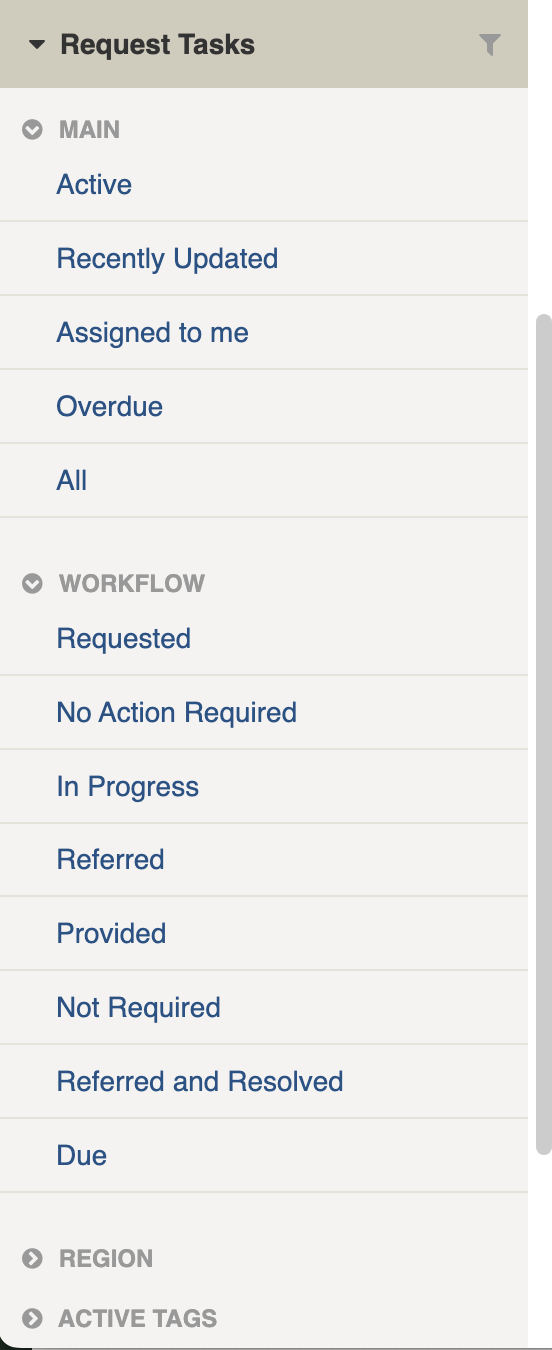
Filters help make management of *Request Tasks* easier by focusing on specific groups of items on the datagrid.

<figure><img src="https://3923904090-files.gitbook.io/~/files/v0/b/gitbook-x-prod.appspot.com/o/spaces%2FNy7IznbrPLUq6GJDDQDk%2Fuploads%2FC0M5LvRURvRmjsqJUce0%2Fimage.png?alt=media&#x26;token=80c72099-9e6b-46d1-ac46-a5888fd9a0db" alt="" width="138"><figcaption><p>Request Tasks filter menu</p></figcaption></figure>

<details>

<summary>Filter menu explanations</summary>

The following lists some of the filters and how to use them:

<table><thead><tr><th width="247">Filter Group</th><th>Filter/s</th><th>Use</th></tr></thead><tbody><tr><td>Main</td><td>Active, Recently Updated, Assigned to me, Overdue, All</td><td></td></tr><tr><td>Workflow</td><td>Requested</td><td>Finds all items with Status of Requested</td></tr><tr><td></td><td>No Action Required</td><td>Finds all items with Status of No Action Required</td></tr><tr><td></td><td>In Progress</td><td>Finds all items with Status of In Progress</td></tr><tr><td></td><td>Referred</td><td>Finds all items with Status of In Referred</td></tr><tr><td></td><td>Provided</td><td>Finds all items with Status of In Provided</td></tr><tr><td></td><td>Not Required</td><td>Finds all items with Status of In Not Required</td></tr><tr><td></td><td>Referred and Resolved</td><td>Finds all items with Status of Referred and Resolved</td></tr><tr><td>Region</td><td>[List is based on your system configuration]*</td><td></td></tr><tr><td>Active tags</td><td>[List is based on your system configuration]*</td><td><p>Any tags in use.</p><p>Refer to: <a href="../../../concepts-and-fundamentals/on-a-computer/using-the-datagrid/tagging-items">tags</a></p></td></tr></tbody></table>

&#x20;\* May vary based on your system configuration

</details>

## Viewing Request Tasks <a href="#information-editinganexistinginformationitem" id="information-editinganexistinginformationitem"></a>

{% content-ref url="../../../concepts-and-fundamentals/on-a-computer/using-the-datagrid/viewing-items" %}
[viewing-items](https://docs.cw.crisisworks.com/concepts-and-fundamentals/on-a-computer/using-the-datagrid/viewing-items)
{% endcontent-ref %}

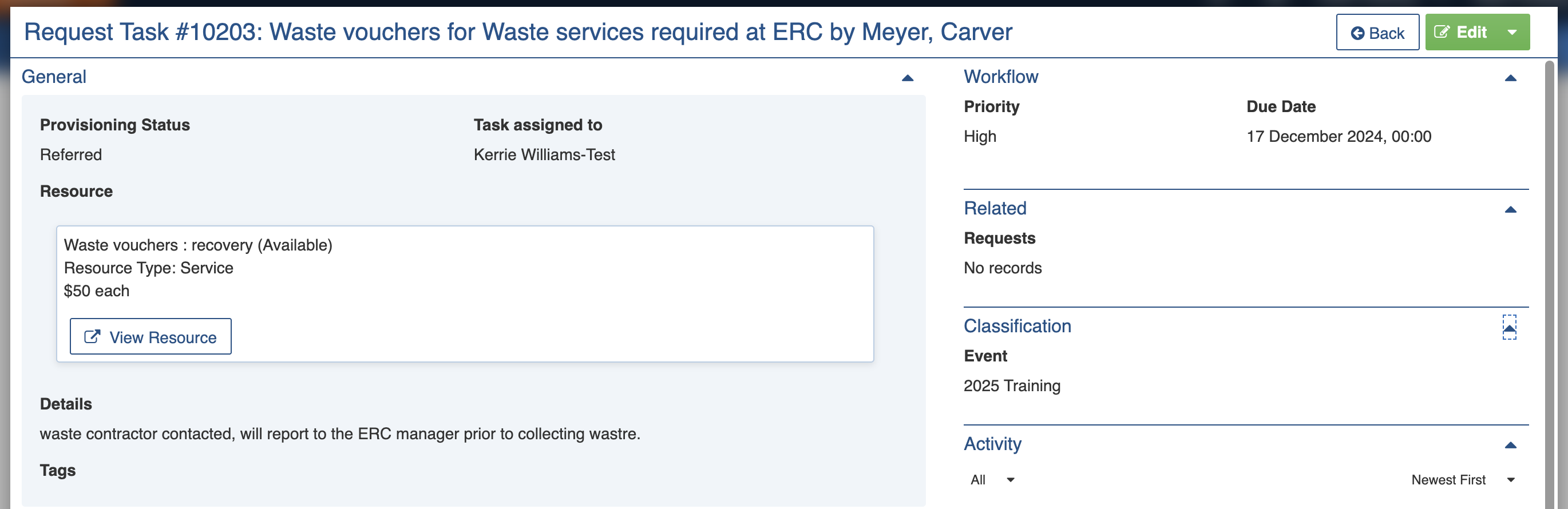
When viewing *Request Tasks*, sections can be expanded to show information.

As each section is completed, new sections may show additional information.&#x20;

<figure><img src="https://3923904090-files.gitbook.io/~/files/v0/b/gitbook-x-prod.appspot.com/o/spaces%2FNy7IznbrPLUq6GJDDQDk%2Fuploads%2FWAWtYAmXNrgY3FGQxVgB%2Fimage.png?alt=media&#x26;token=f47ddfe9-6295-4253-91b0-9e3cad6d008c" alt=""><figcaption><p>Request Task for waste vouchers</p></figcaption></figure>

## Request Tasks Settings

*Request Tasks* are divided into the following sections (sections may or may not appear depending on what information is entered, your permissions level, and what mode you're viewing):&#x20;

| Left Column                            | Right Column                      |
| -------------------------------------- | --------------------------------- |
| [Record Notes](#record-notes)          | [Workflow](#workflow)             |
| [General](#requests-assigningarequest) | [Related](#related)               |
| [Location](#location)                  | [Classification](#classification) |
|                                        | [Activity](#activity)             |

### Record Notes

When editing, record notes in the [rich text field](https://docs.cw.crisisworks.com/concepts-and-fundamentals/on-a-computer/using-the-datagrid/editing-items#rich-text-fields) as you make changes which will appear in the Activity log.

Refer to: [Recording Notes](https://docs.cw.crisisworks.com/concepts-and-fundamentals/on-a-computer/using-the-datagrid/editing-items#recording-notes)

### General <a href="#requests-assigningarequest" id="requests-assigningarequest"></a>

The General section outlines the details of the task, including its status, assignment and any resources allocated to it.

#### Provisioning Status

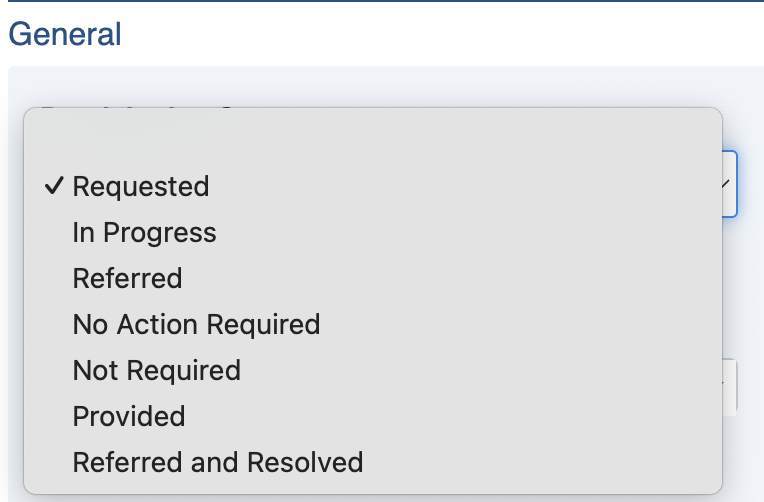
Users set the status of the task by editing via the **Provisioning Status** field.

<figure><img src="https://3923904090-files.gitbook.io/~/files/v0/b/gitbook-x-prod.appspot.com/o/spaces%2FNy7IznbrPLUq6GJDDQDk%2Fuploads%2F6cRhFUBBFj64NnTqEcl6%2Fimage.png?alt=media&#x26;token=5779464f-9ff3-4017-83d4-9edba12544ac" alt="" width="375"><figcaption><p>Provisioning Status</p></figcaption></figure>

Newly created Requests will have a Provisioning status of **Requested** and may be progressed by changing this setting it to **In Progress** or **Referred**. When the Request Task has been completed, the Provision status should be updated to indicate the job is complete.

Setting the status to **Provided** or one of the grey options above such as **Not Required**, **Referred and Resolved** or **No Action Required** will resolve it and remove it from the Active view.

Statuses are indicated visually and colour coded on the datagrid which allows them to be filtered.&#x20;

Request Tasks have the following Statuses, in order of which they can be set:

<table><thead><tr><th width="130">Status</th><th width="93">Colour</th><th width="143">Datagrid Icon</th><th width="184">Next available steps</th><th>Notes</th></tr></thead><tbody><tr><td>Requested</td><td>Yellow</td><td><img src="https://3923904090-files.gitbook.io/~/files/v0/b/gitbook-x-prod.appspot.com/o/spaces%2FNy7IznbrPLUq6GJDDQDk%2Fuploads%2FlzwMhclHJrGF5XYRJxlf%2Fimage.png?alt=media&#x26;token=8e7945bd-647b-4d27-8835-980634dd38d4" alt="" data-size="line"></td><td></td><td>Newly added tasks have this status.</td></tr><tr><td>Referred</td><td>Blue</td><td><img src="https://3923904090-files.gitbook.io/~/files/v0/b/gitbook-x-prod.appspot.com/o/spaces%2FNy7IznbrPLUq6GJDDQDk%2Fuploads%2FoOXiEjirt9lNkIPqjEE1%2Fimage.png?alt=media&#x26;token=84ecd575-c475-4094-8813-0c89b41e24c8" alt="" data-size="line"></td><td></td><td>Use this status if the task has been assigned to someone.</td></tr><tr><td>In Progress</td><td>Blue</td><td><img src="https://3923904090-files.gitbook.io/~/files/v0/b/gitbook-x-prod.appspot.com/o/spaces%2FNy7IznbrPLUq6GJDDQDk%2Fuploads%2FztbPE1drLyjvL2lRIStC%2Fimage.png?alt=media&#x26;token=436cf589-2206-48a3-927a-3e012bffcd94" alt="" data-size="line"></td><td></td><td>The task is being worked on.</td></tr><tr><td>Provided</td><td>Dark Green</td><td><img src="https://3923904090-files.gitbook.io/~/files/v0/b/gitbook-x-prod.appspot.com/o/spaces%2FNy7IznbrPLUq6GJDDQDk%2Fuploads%2FBmo5vk1TzSxGn1KHjXJd%2Fimage.png?alt=media&#x26;token=d7320e6b-2d0b-4384-8ce1-768ded2080b1" alt="" data-size="line"></td><td></td><td>Indicates that a service has been provided. Will be removed from the Active filter</td></tr><tr><td>Not Required</td><td>Gray</td><td><img src="https://3923904090-files.gitbook.io/~/files/v0/b/gitbook-x-prod.appspot.com/o/spaces%2FNy7IznbrPLUq6GJDDQDk%2Fuploads%2FUZCrqYI6x8cubAFKwzSE%2Fimage.png?alt=media&#x26;token=f167406f-57a7-4bfa-b1c3-bb7f75ece2da" alt="" data-size="line"></td><td></td><td>Indicates that the task is no longer required. Will be removed from the Active filter.</td></tr><tr><td>Referred and Resolved</td><td>Green</td><td><img src="https://3923904090-files.gitbook.io/~/files/v0/b/gitbook-x-prod.appspot.com/o/spaces%2FNy7IznbrPLUq6GJDDQDk%2Fuploads%2FxLUYaVElM0vawKh2r6Gu%2Fimage.png?alt=media&#x26;token=9911e4cc-c6bc-4b5a-bc63-aa9902f68e3f" alt="" data-size="original"></td><td></td><td>Indicates that the task was referred (assigned) but has been handled. Will be removed from the Active filter.</td></tr><tr><td>No Action Required</td><td>Gray</td><td><img src="https://3923904090-files.gitbook.io/~/files/v0/b/gitbook-x-prod.appspot.com/o/spaces%2FNy7IznbrPLUq6GJDDQDk%2Fuploads%2FNFxMS7vHQeqTQqDZKiFR%2Fimage.png?alt=media&#x26;token=82d6c80f-052d-4747-b3a9-3c21c8c1ff1f" alt="" data-size="original"></td><td></td><td>Indicates that the item is for information only and no action is required. Will be removed from the Active filter.</td></tr></tbody></table>

#### Reference

Use this field to record invoice number or any other reference numbers.

#### Task Assigned To <a href="#requests-assigningarequest" id="requests-assigningarequest"></a>

When assigning, it is recommended to set the Provisioning status to Referred.

To assign a Request Tasks select the person who will handle the assignment. Type into the field to filter the list below.

![](https://3923904090-files.gitbook.io/~/files/v0/b/gitbook-x-prod.appspot.com/o/spaces%2FNy7IznbrPLUq6GJDDQDk%2Fuploads%2FyRqBH8SITB2tNiBfPrPx%2Fimage.png?alt=media\&token=1e0f6c40-59e9-4313-b2af-693e97c4b6a4)

#### Resource <a href="#requests-assigningarequest" id="requests-assigningarequest"></a>

The Resource field is used, optionally, link a single [Resource](https://docs.cw.crisisworks.com/modules/operations/resources) to the task if required for resource allocation or cost tracking.

Search for a resource by beginning to type the name of the resource and it will filter the database of global resources. Use \* to find words that contain your search. For example sand\* (which can find sandbags and sandpit)

<figure><img src="https://3923904090-files.gitbook.io/~/files/v0/b/gitbook-x-prod.appspot.com/o/spaces%2FNy7IznbrPLUq6GJDDQDk%2Fuploads%2FLyIflDWwub1ZJVJ3UyoT%2Fimage.png?alt=media&#x26;token=e04e3560-84a5-4e35-a61f-1a3b600f5c73" alt="" width="375"><figcaption><p>Resource field and Resource selection</p></figcaption></figure>

#### Details

Details records any description of the task required.

#### Associated task documents and images

This field lets you upload a file (such as a document or image) to help further specify the task to the person it is assigned to

**Tags**

Refer to [Tagging Items](https://docs.cw.crisisworks.com/modules/operations/requests/broken-reference)

### Location

Use the [location selection tools](https://docs.cw.crisisworks.com/modules/operations/requests/broken-reference) to embed a **Precise Geographical Location** for the task deployment.

### Workflow

Request workflow consists of:

* [Priority](https://docs.cw.crisisworks.com/modules/operations/requests/broken-reference)
* [Due Date](https://docs.cw.crisisworks.com/modules/operations/requests/broken-reference)

Each of these workflows can trigger notifications to ensure that coordinators and users can keep on top of tasks.

### Related

This section contains a list of links to related Requests.

Refer to: [Linked items](https://docs.cw.crisisworks.com/concepts-and-fundamentals/on-a-computer/using-the-datagrid/viewing-items#linked-items)

### Classification

Refer to:  [Editing Items: Classification](https://docs.cw.crisisworks.com/concepts-and-fundamentals/on-a-computer/using-the-datagrid/editing-items#classification)

### Activity

Refer to: [Viewing and Opening Register Items: Activity](https://docs.cw.crisisworks.com/concepts-and-fundamentals/on-a-computer/using-the-datagrid/viewing-items#activity)

## Updating Request Tasks

{% content-ref url="../../../concepts-and-fundamentals/on-a-computer/using-the-datagrid/editing-items" %}
[editing-items](https://docs.cw.crisisworks.com/concepts-and-fundamentals/on-a-computer/using-the-datagrid/editing-items)
{% endcontent-ref %}

When updating *Request Tasks*:

* Add notes on your edits in the **Record Notes** field
* Complete each section of the [Settings](#register-item-settings) as required. Note that some options may open up new sections to complete.
* Update the **Provisioning Status** to reflect the current stage
* Maintain the **Priority** and **Due Date**
* Ensure that the **Details** reflects the task
* Coordinators should update the **Task assigned to**

<figure><img src="https://3923904090-files.gitbook.io/~/files/v0/b/gitbook-x-prod.appspot.com/o/spaces%2FNy7IznbrPLUq6GJDDQDk%2Fuploads%2F88rw8tfEJQkbyk2WbrFp%2Fimage.png?alt=media&#x26;token=31d6a331-5e99-4b3e-b0c8-2949dca62899" alt=""><figcaption><p>Editing a Request Task for a Water Tanker</p></figcaption></figure>

## Adding Request Tasks

As Request Tasks is a sub-item of the [Request](https://docs.cw.crisisworks.com/modules/operations/requests) register you can only add them from the [Tasks, Resources & Costs](https://docs.cw.crisisworks.com/modules/operations/requests/..#tasks-resources-and-costs) section of the Request register.

## Bulk Actions

{% content-ref url="../../../concepts-and-fundamentals/on-a-computer/using-the-datagrid/bulk-actions" %}
[bulk-actions](https://docs.cw.crisisworks.com/concepts-and-fundamentals/on-a-computer/using-the-datagrid/bulk-actions)
{% endcontent-ref %}

The following additional bulk actions can be performed via the Actions menu:

| Action           | Description                                                                                                                                                                                                                 |
| ---------------- | --------------------------------------------------------------------------------------------------------------------------------------------------------------------------------------------------------------------------- |
| Copy IDs         | Refer to: [Copy IDs](https://docs.cw.crisisworks.com/concepts-and-fundamentals/on-a-computer/using-the-datagrid/bulk-actions#copy-ids)                                                                                      |
| Export to Report | <p>Refer to: <a href="../../../../concepts-and-fundamentals/on-a-computer/using-the-datagrid/bulk-actions#export-to-report">Export to Report</a><br>Exports to the Request Needs & Tasks Report</p>                         |
| Bulk Edit        | <p>Refer to: <a href="../../../../concepts-and-fundamentals/on-a-computer/using-the-datagrid/bulk-actions#bulk-edit">Bulk Edit</a><br>Change the Provisioning Status, Assignment, Priority, Due Date, Details and notes</p> |

## Reports

{% content-ref url="../../../system-administration/reporting/running-reports" %}
[running-reports](https://docs.cw.crisisworks.com/system-administration/reporting/running-reports)
{% endcontent-ref %}

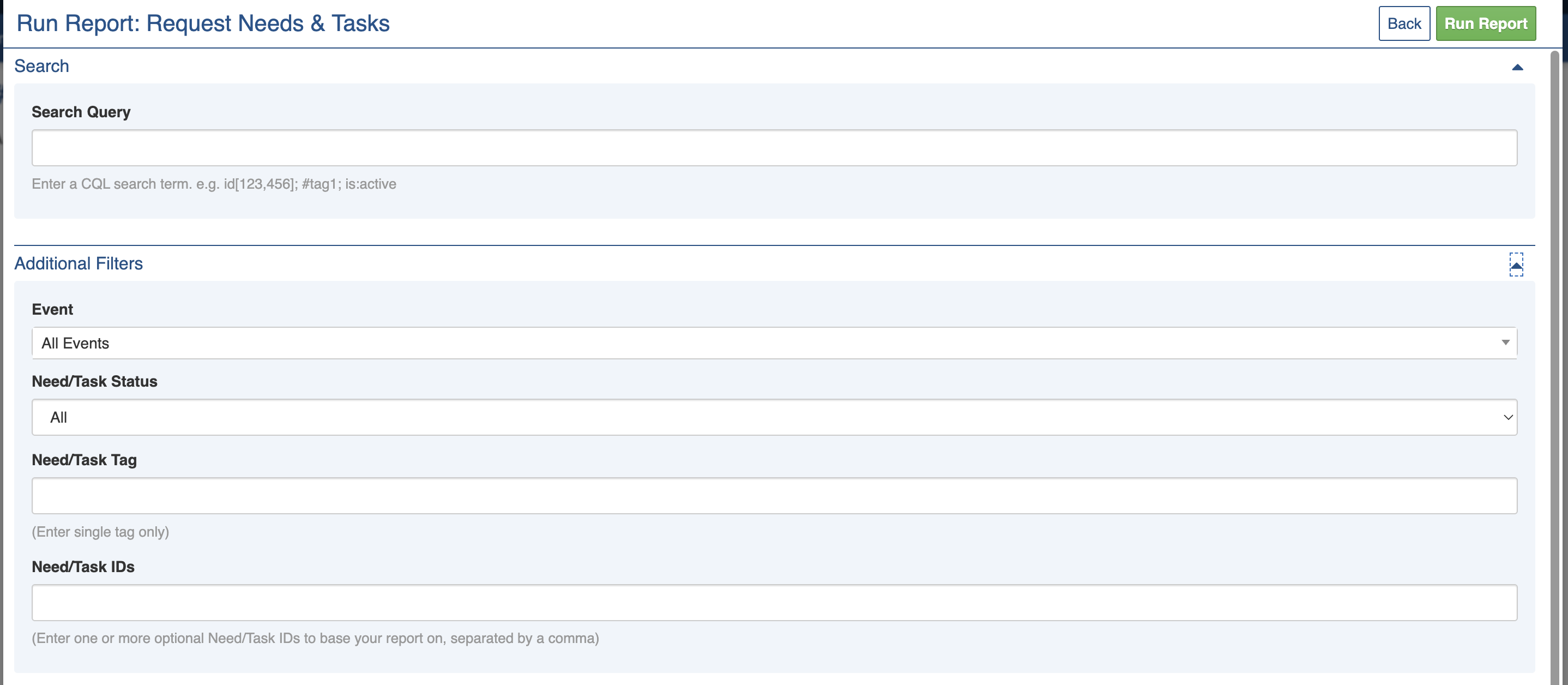
The main report for *Request Needs & Tasks* is the **Request Needs & Tasks Report** found in [Operations Reports](https://docs.cw.crisisworks.com/modules/reports/operations-reports).

<figure><img src="https://3923904090-files.gitbook.io/~/files/v0/b/gitbook-x-prod.appspot.com/o/spaces%2FNy7IznbrPLUq6GJDDQDk%2Fuploads%2FL4mdYQGnuLwgjwolBqMi%2Fimage.png?alt=media&#x26;token=daf6a4b9-5cde-4beb-bf0c-9eb00993a650" alt="" width="563"><figcaption><p>Request Needs &#x26; Tasks Report parameters</p></figcaption></figure>