# Infrastructure
## Overview
The Infrastructure register (also known as Infrastructure Assessments) records damage to roads, culverts, signs and facilities affected by disasters.
This register provides the following features:
* Assessment record contains all the fields you need to track damage, track repair costs and track assignments of tasks to contractors and officers.
* Supports any **Infrastructure type**
* Separate fields exist to track damage photos and repair photos
* Add multiple Recovery [Needs and Task](https://docs.cw.crisisworks.com/modules/recovery/needs-and-tasks) records to assign parts of the repair to internal or external resources, including contractors and staff.
* Add before and after repair photos
* Track the estimated cost
* Track the actual cost based on financial reconciliation
Label [Register] register (sample view)
### Access
To access *Infrastructure*:
* *Infrastructure Assessments*: must be [enabled for the event](https://docs.cw.crisisworks.com/system-administration/managing-events).
* [Go on duty](https://docs.cw.crisisworks.com/concepts-and-fundamentals/on-a-computer/working-with-events#setting-your-duties-for-events) with an appropriate role such as Recovery Officer or Recovery Coordinator. If you can't access it, ask your administrator to check your permissions.
Locate the *Infrastructure* register under **Recovery > Infrastructure** in the menu.
Location of the Infrastructure register in the Recovery module
## Finding Infrastructure Assessments
{% content-ref url="../../concepts-and-fundamentals/on-a-computer/searching-filtering-and-querying-registers" %}
[searching-filtering-and-querying-registers](https://docs.cw.crisisworks.com/concepts-and-fundamentals/on-a-computer/searching-filtering-and-querying-registers)
{% endcontent-ref %}
The register includes a number of features to assist in finding *Infrastructure Assessmentss*:
* [Datagrid](https://docs.cw.crisisworks.com/concepts-and-fundamentals/on-a-computer/using-the-datagrid#data-grid-view) view
* [Map](https://docs.cw.crisisworks.com/concepts-and-fundamentals/on-a-computer/using-the-datagrid#map-view) view
* [Filters](#information-editinganexistinginformationitem-1) including workflow for tracking progress, infrastructure type and damage level
* Combination filters and search by most fields
### Filters
Filters help make management of *Infrastructure Assessments* easier by focusing on specific groups of items on the datagrid.
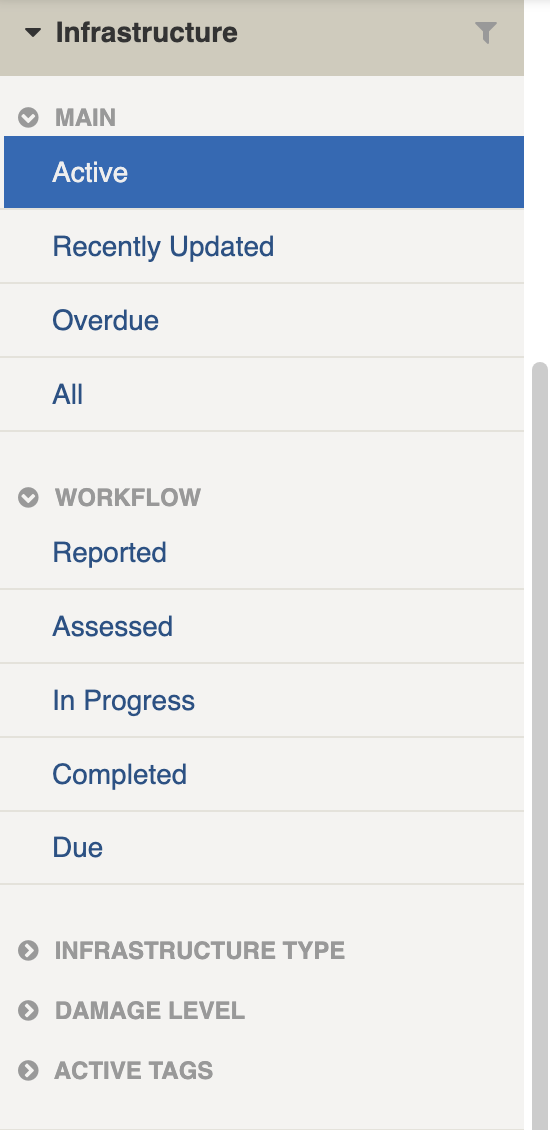
Infrastructure filters
Filter menu explanations
The following lists some of the filters and how to use them:
Filter Group
Filter/s
Use
Main
Active, Recently Updated, Overdue, All
Workflow
Reported
Newly added items can be found here
Assessed
In Progress
Remediation work has commenced
Completed
Remediation work is finished
Due
Infrastructure Type
[List is based on your system configuration]*
Find Infrastructure by type, for example footpath, road, stormwater etc.
Active tags
[List is based on your system configuration]*
Any tags in use.
Refer to: tags
\* May vary based on your system configuration
## Viewing Infrastructure Assesmentss
{% content-ref url="../../concepts-and-fundamentals/on-a-computer/using-the-datagrid/viewing-items" %}
[viewing-items](https://docs.cw.crisisworks.com/concepts-and-fundamentals/on-a-computer/using-the-datagrid/viewing-items)
{% endcontent-ref %}
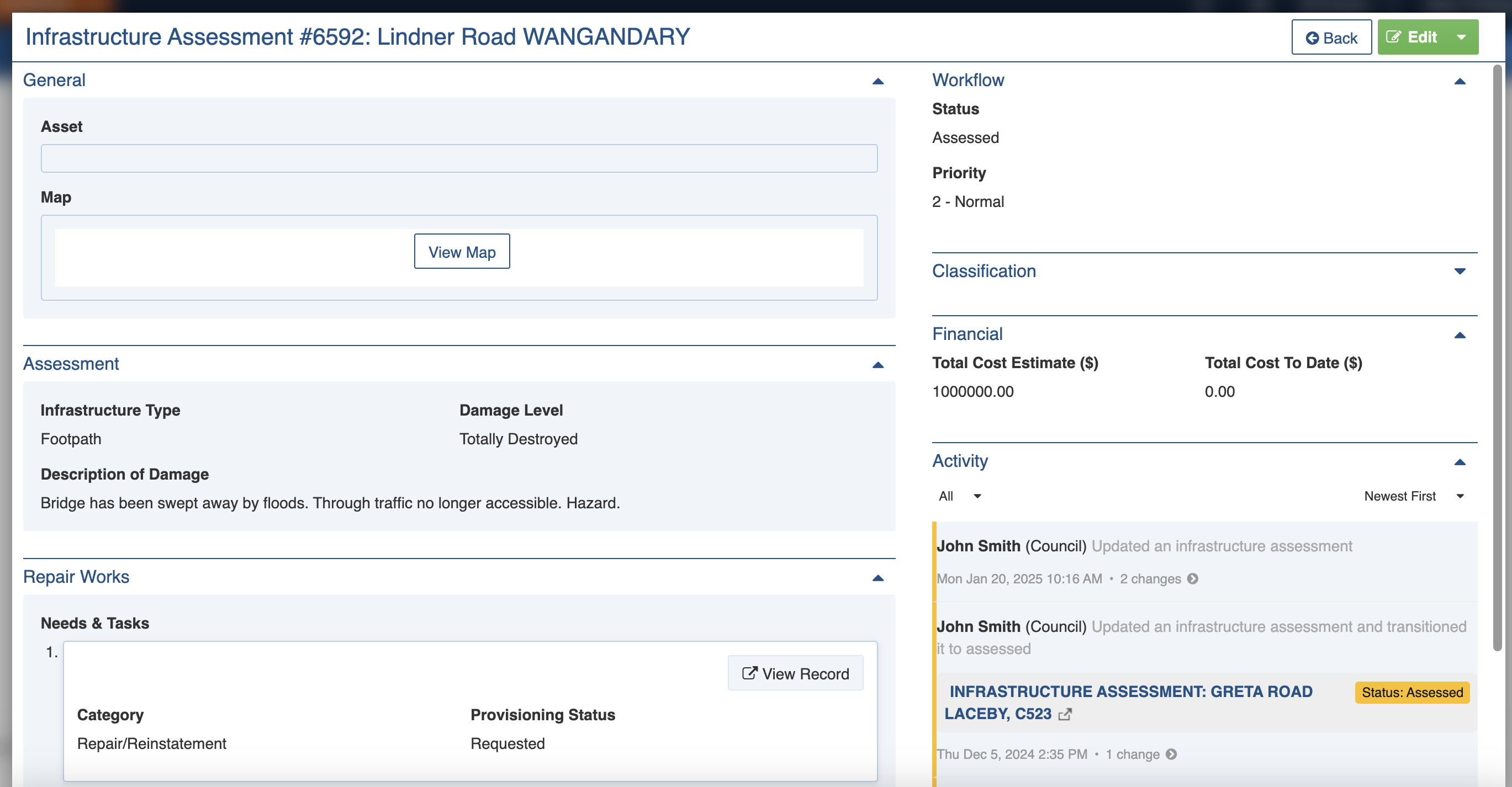
When viewing *Assessments*, sections can be expanded to show information.
As each section is completed, new sections may show additional information.
## Infrastructure Assessment Settings
Infrastructure Assesments s are divided into the following sections (sections may or may not appear depending on what information is entered, your permissions level, and what mode you're viewing):
| Left Column | Right Column |
| ----------------------------- | --------------------------------- |
| [Record Notes](#record-notes) | [Workflow](#workflow) |
| [General](#general) | [Classification](#classification) |
| [Assessment](#assessment) | [Financial](#financia) |
| [Repair Works](#repair-work) | [Activity](#activity) |
### Record Notes
When editing, you can record notes as you make changes which will appear in the Activity log.
Refer to: [Recording Notes](https://docs.cw.crisisworks.com/concepts-and-fundamentals/on-a-computer/using-the-datagrid/editing-items#recording-notes)
### General
This section is used to record the location of the asset. \
**Asset** can be used to look the property up from the asset database. Assets must be either in the database or [imported by an administrator.](https://docs.cw.crisisworks.com/system-administration/configuring-the-system/imports) \
**Map** is used to record a location and add any other points, lines or polygons to the map. This is useful when the Asset can't be found in the database.
### Assessment
The Assessment section records details of the assessment including the type of infrastructure and any damage.
**Infrastructure Type** records the type of infrastructure (for example road, footpath, reserve etc) from a list and is required to complete. Your Administrator configures the list for your site using the *Recovery: Infrastructure Type* [lookup](https://docs.cw.crisisworks.com/system-administration/configuring-the-system/lookups).
**Damage Level** qualify the impact in terms of whether the infrastructure is functioning or not, whether it has been partially or totally destroyed or if it requires assessment. This setting is required. If it requires assessment, a Need or Task for an assessment so that [Repair Works](#repair-works) can be tracked.
Damage Level setting
Where the asset is linear like a (road, footpath or bridge etc), **Length in kms** can help quantify its size and therefore help estimate any costs.
**Description of Damage** records detailed notes on damage and is required to complete. This description also appears in the datagrid.
**Damage Photos** records optional photos. Image(s) are uploaded using the [Add File button](https://docs.cw.crisisworks.com/concepts-and-fundamentals/on-a-computer/using-the-datagrid/editing-items#attaching-files).
### Repair Works
The Repair Works section is used to track the process of infrastructure repair.
#### Scope of Repairs
This field records detailed notes on works required for remediation. It supports [rich text](https://docs.cw.crisisworks.com/concepts-and-fundamentals/on-a-computer/using-the-datagrid/editing-items#rich-text-fields) content.
#### Repair Progress Photos
This field records optional photos showing evidence of repair work. Image(s) are uploaded using the [Add File button](https://docs.cw.crisisworks.com/concepts-and-fundamentals/on-a-computer/using-the-datagrid/editing-items#attaching-files).
#### **Needs and Tasks**
This field record any services, tasks and immediate needs and supports allocation of resources as Needs & Tasks sub-items. Multiple Needs and Tasks can be added in this section.
Needs & Task categories for Infrastructure
Use the View Record or View Resource buttons to view full details.
Needs and Tasks section
Needs and Tasks are Sub-items. You can [add](https://docs.cw.crisisworks.com/modules/needs-and-tasks#adding-needs-and-tasks) as many as needed. These will be created in the [Needs & Tasks](https://docs.cw.crisisworks.com/modules/recovery/needs-and-tasks) register where you can view the full details. Note that you can't create them there however.
When an external agency is assigned a task and has the required consent, they can manage it through Needs and Tasks.
#### Category
This field is specific to Infrastructure Assessments based on the type of repair work to be undertaken. A Category is required for each Need/Task. Your Administrator configures the list for your site using the *Recovery: Infrastructure Repair* [lookup](https://docs.cw.crisisworks.com/system-administration/configuring-the-system/lookups).
#### Cost Estimate ($)
This field records a value for works and is totalled for all Needs and Tasks attached to an Infrastructure Assessment in the Total Cost Estimate ($) field.
### Workflow
The Workflow section is used to track general progress of the Assessment item.
#### Status
New Assessments begin as Reported. They can be assigned at this stage and once they've been assessed set to Assessed. When they are being worked on, they can be set to In Progress. When the work is completed
Status
Datagrid Icon
Next available steps
Notes
Reported
Assessed, Completed
Infrastructure damage has been reported. Newly added items begin with this status.
Assessed
In Progress, Completed
The extent of the damage has been assessed.
In Progress
Completed
Remediation work is in progress.
Completed
In Progress, Audited
Work has been completed. It may be audited after this step.
Audited
In Progress, Closed
Work has been checked and closed off.
### Classification
Refer to: [Editing Items: Classification](https://docs.cw.crisisworks.com/concepts-and-fundamentals/on-a-computer/using-the-datagrid/editing-items#classification)
### Financial
The Financial section is used to record costs.
**Total Cost Estimate ($)** can be used to record any overall estimate for the Assessment.
**Total Cost to Date ($)** automatically totals the value of any Needs & Tasks added into the [Repair Works](#repair-works) section.
### Activity
Refer to: [Viewing and Opening Register Items: Activity](https://docs.cw.crisisworks.com/concepts-and-fundamentals/on-a-computer/using-the-datagrid/viewing-items#activity)
## Updating Infrastructure Assessments
{% content-ref url="../../concepts-and-fundamentals/on-a-computer/using-the-datagrid/editing-items" %}
[editing-items](https://docs.cw.crisisworks.com/concepts-and-fundamentals/on-a-computer/using-the-datagrid/editing-items)
{% endcontent-ref %}
When updating *Infrastructure Assessments*:
* Add notes on your edits in the **Record Notes** field
* Complete each section of the [Settings](#register-item-settings) as required. Note that some options may open up new sections to complete.
Updating an Infrastructure Assessment
## Adding Infrastructure Assessments
{% content-ref url="cases" %}
[cases](https://docs.cw.crisisworks.com/modules/recovery/cases)
{% endcontent-ref %}
{% content-ref url="../../concepts-and-fundamentals/on-a-computer/using-the-datagrid/adding-items" %}
[adding-items](https://docs.cw.crisisworks.com/concepts-and-fundamentals/on-a-computer/using-the-datagrid/adding-items)
{% endcontent-ref %}
{% hint style="info" %}
You can add Infrastructure Assessments either as standalone items or in a [Case](https://docs.cw.crisisworks.com/modules/recovery/cases). Use Cases when you need to record other information such as affected persons or conduct other assessments such as Environmental Health.
{% endhint %}
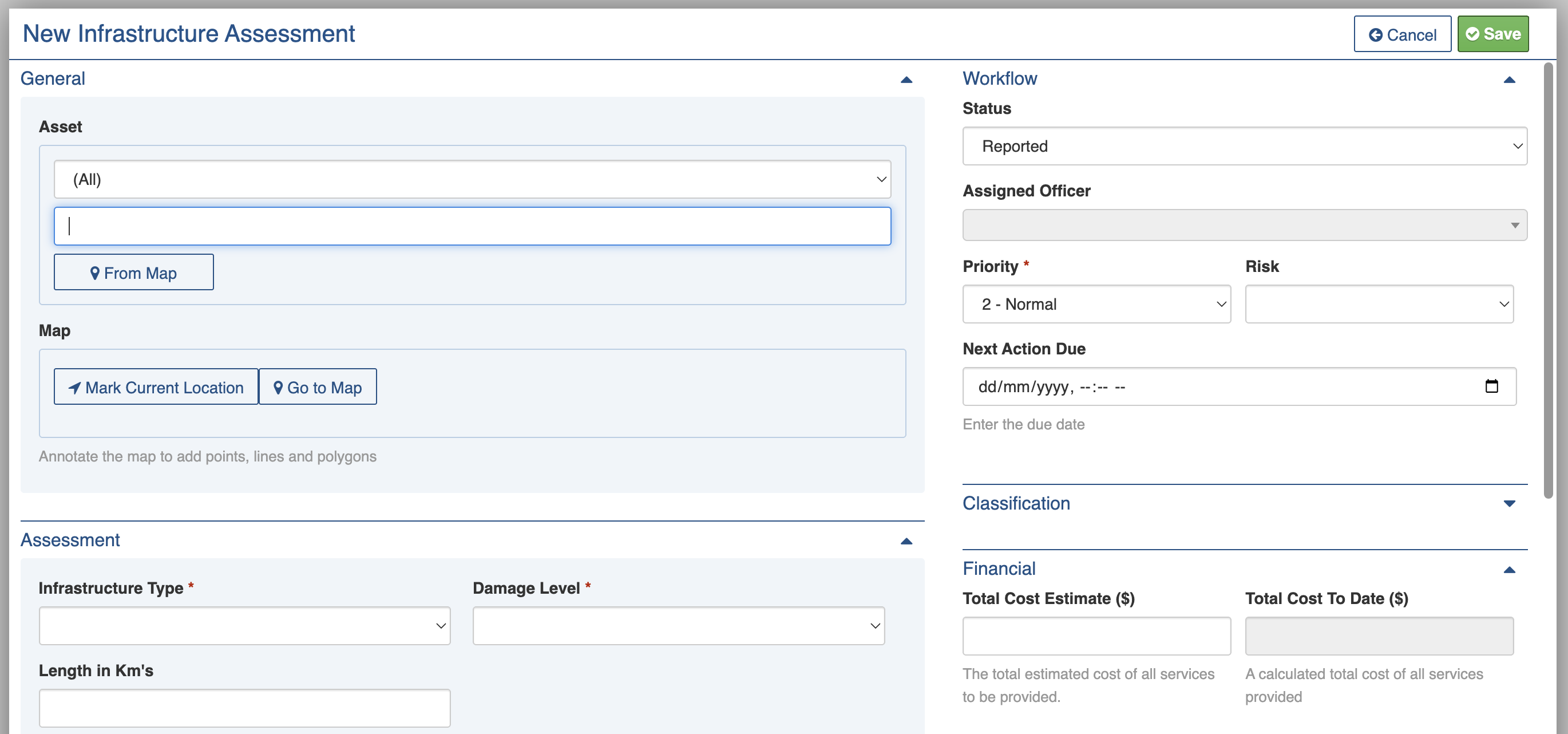
1. From the register, in the New item menu select the **New Infrastructure Assessment** button (or drop down the list from any other register and select it)
2. Complete each section of the [Settings](#register-item-settings) as required in particular:
1. Update the **Status** to reflect the current stage of the process
2. Assign to an **Assigned Officer** at the appropriate time (such as to conduct an assessment or audit)
3. Make sure the **Description of Damage** and **Scope of Repairs** reflect any new findings during an assessment
4. Update the **Next Action Due** to reflect the current step
5. Upload any available **Repair Progress Photos**
6. Add and update [**Needs and Tasks**](#needs-and-tasks) to track and assign remediation works
3. Save
New Infrastructure Assessment form
## Bulk Actions
{% content-ref url="../../concepts-and-fundamentals/on-a-computer/using-the-datagrid/bulk-actions" %}
[bulk-actions](https://docs.cw.crisisworks.com/concepts-and-fundamentals/on-a-computer/using-the-datagrid/bulk-actions)
{% endcontent-ref %}
The following additional bulk actions can be performed via the Actions menu:
| Action | Description |
| ---------------- | ------------------------------------------------------------------------------------------------------------------------------------------------------------------------------------------------------------------------------------ |
| Copy IDs | Refer to: [Copy IDs](https://docs.cw.crisisworks.com/concepts-and-fundamentals/on-a-computer/using-the-datagrid/bulk-actions#copy-ids) |
| Export to Report |
Refer to: Export to Report Exports to Recovery Infrastructure Assessment Report
|
| Bulk Edit |
Refer to: Bulk Edit Change Status, Assigned Officer, Infrastructure Type, Damage Level or Next Action Due in bulk
|
| Create a Copy | See [Create a Copy](https://docs.cw.crisisworks.com/concepts-and-fundamentals/on-a-computer/using-the-datagrid/bulk-actions#create-a-copy) |
## Importing Infrastructure Assessments
{% content-ref url="../../system-administration/configuring-the-system/imports" %}
[imports](https://docs.cw.crisisworks.com/system-administration/configuring-the-system/imports)
{% endcontent-ref %}
A System Administrator can add and/or update Infrastructure Assessments in bulk via the Import system using the **Recovery Infrastructure Assessments** option.
## Reports
{% content-ref url="../../system-administration/reporting/running-reports" %}
[running-reports](https://docs.cw.crisisworks.com/system-administration/reporting/running-reports)
{% endcontent-ref %}
Reports available for *Infrastructure* include: **Recovery Infrastructure Assessments**.







 button (or drop down the list from any other register and select it)
2. Complete each section of the [Settings](#register-item-settings) as required in particular:
1. Update the **Status** to reflect the current stage of the process
2. Assign to an **Assigned Officer** at the appropriate time (such as to conduct an assessment or audit)
3. Make sure the **Description of Damage** and **Scope of Repairs** reflect any new findings during an assessment
4. Update the **Next Action Due** to reflect the current step
5. Upload any available **Repair Progress Photos**
6. Add and update [**Needs and Tasks**](#needs-and-tasks) to track and assign remediation works
3. Save
button (or drop down the list from any other register and select it)
2. Complete each section of the [Settings](#register-item-settings) as required in particular:
1. Update the **Status** to reflect the current stage of the process
2. Assign to an **Assigned Officer** at the appropriate time (such as to conduct an assessment or audit)
3. Make sure the **Description of Damage** and **Scope of Repairs** reflect any new findings during an assessment
4. Update the **Next Action Due** to reflect the current step
5. Upload any available **Repair Progress Photos**
6. Add and update [**Needs and Tasks**](#needs-and-tasks) to track and assign remediation works
3. Save