# Livestock

## Overview <a href="#requests-overview" id="requests-overview"></a>

{% content-ref url="cases" %}
[cases](https://docs.cw.crisisworks.com/modules/recovery/cases)
{% endcontent-ref %}

The Livestock register records animal loss from an impact against known levels of stock. Livestock is a sub-item of [Cases](https://docs.cw.crisisworks.com/modules/recovery/cases) and as such items in the register are attached to or added in existing Case record(s). Once added you can manage existing Livestock records directly in the register.

This register provides the following features:

* Record the location and extent of the livestock impact
* Add details of affected livestock (dairy, poultry, beef, goats, horses, sheep etc), including the number of livestock prior to an impact
* Record numbers of deceased, missing and those with status that is still being assessed.&#x20;
* Record the number of animal(s) at a property prior to and from an impact

You can only record one type of animal per livestock item. To record a different animal, attach another Livestock item to a Case.

<figure><img src="https://3923904090-files.gitbook.io/~/files/v0/b/gitbook-x-prod.appspot.com/o/spaces%2FNy7IznbrPLUq6GJDDQDk%2Fuploads%2FzgId87yuI9nGQlG9tIa9%2Fimage.png?alt=media&#x26;token=41af1383-f375-4198-beea-c008452a2e45" alt=""><figcaption><p>Livestock register (sample view)</p></figcaption></figure>

### Access <a href="#requests-usingrequests" id="requests-usingrequests"></a>

To access *Livestock*

* *Livestock* must be [enabled for the event](https://docs.cw.crisisworks.com/system-administration/managing-events).
* [Go on duty](https://docs.cw.crisisworks.com/concepts-and-fundamentals/on-a-computer/working-with-events#setting-your-duties-for-events) with an appropriate role such as Recovery Officer or Recovery Coordinator. If you can't access it, ask your administrator to check your permissions.

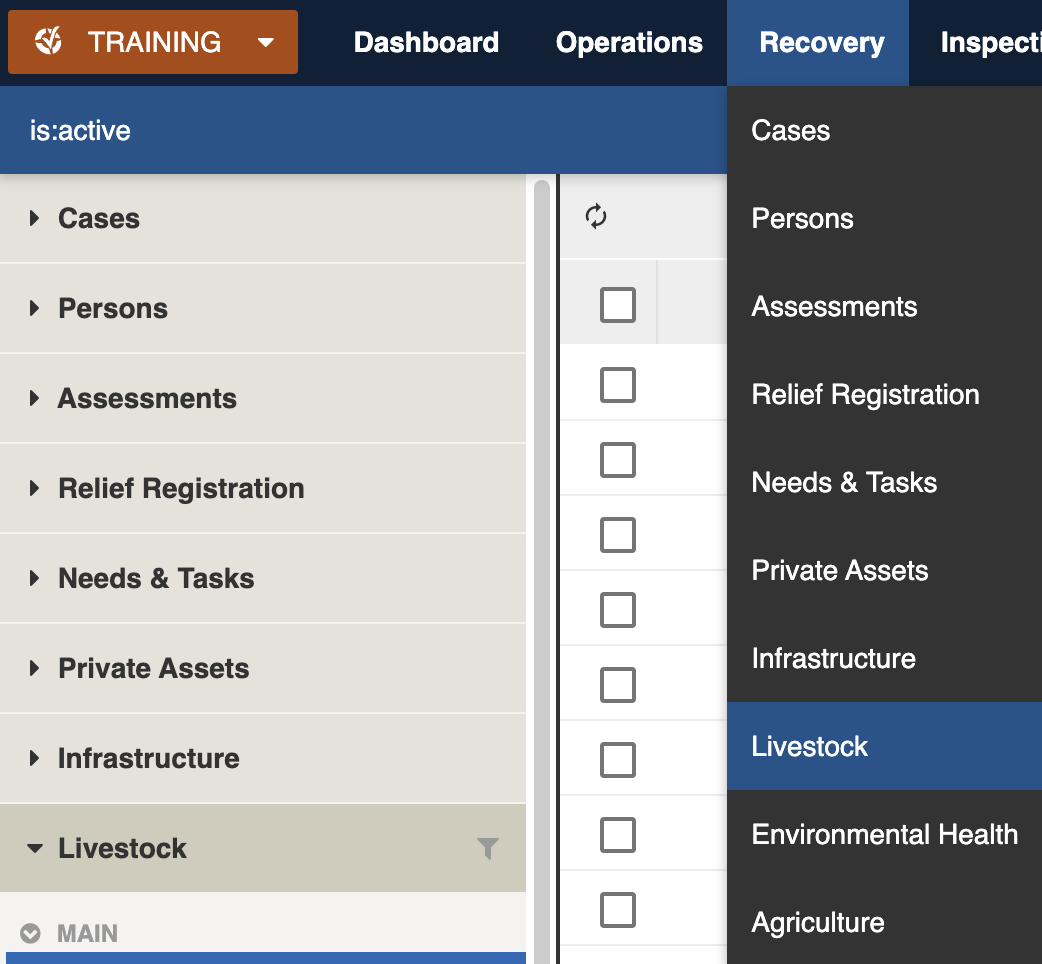
Locate the *Livestock*: register under **Recovery > Livestock** in the menu.&#x20;

<figure><img src="https://3923904090-files.gitbook.io/~/files/v0/b/gitbook-x-prod.appspot.com/o/spaces%2FNy7IznbrPLUq6GJDDQDk%2Fuploads%2FAw34T7otInBVXbNcWr3i%2Fimage.png?alt=media&#x26;token=7f52158b-1996-49bd-baf5-cfa80f91a4f4" alt="" width="375"><figcaption><p>Location of the Livestock register in the Recovery module</p></figcaption></figure>

## Finding Livestock <a href="#information-editinganexistinginformationitem" id="information-editinganexistinginformationitem"></a>

{% content-ref url="../../concepts-and-fundamentals/on-a-computer/searching-filtering-and-querying-registers" %}
[searching-filtering-and-querying-registers](https://docs.cw.crisisworks.com/concepts-and-fundamentals/on-a-computer/searching-filtering-and-querying-registers)
{% endcontent-ref %}

The register includes a number of features to assist in finding *Livestock*:

* [Datagrid](https://docs.cw.crisisworks.com/concepts-and-fundamentals/on-a-computer/using-the-datagrid#data-grid-view) view
* [Filters](#information-editinganexistinginformationitem-1) including such as workflow, category (type of animal - beef, bee hive, sheep etc) and tags
* Combination filters and search by most fields

### Filters <a href="#information-editinganexistinginformationitem" id="information-editinganexistinginformationitem"></a>

Filters help make management of *Livestock* easier by focusing on specific groups of items on the datagrid.

<figure><img src="https://3923904090-files.gitbook.io/~/files/v0/b/gitbook-x-prod.appspot.com/o/spaces%2FNy7IznbrPLUq6GJDDQDk%2Fuploads%2FQ5UftTyeUGFRroP9yRFC%2Fimage.png?alt=media&#x26;token=8cc89aa4-75f4-4303-89ef-10ad4be82933" alt="" width="140"><figcaption><p>Livestock filter menu</p></figcaption></figure>

<details>

<summary>Filter menu explanations</summary>

The following lists some of the filters and how to use them:

<table><thead><tr><th width="247">Filter Group</th><th>Filter/s</th><th>Use</th></tr></thead><tbody><tr><td>Main</td><td>Active, Recently Updated, All</td><td></td></tr><tr><td>Workflow</td><td>New</td><td>All newly added livestock items</td></tr><tr><td></td><td>Open</td><td>Livestock items which have been opened for updating</td></tr><tr><td></td><td>Review</td><td>Shows livestock currently under review</td></tr><tr><td></td><td>Closed</td><td>Shows livestock assessments no longer being updated</td></tr><tr><td>Category</td><td>[List is based on your system configuration]*</td><td>Finds livestock by type (for example Beef, Dairy etc)</td></tr><tr><td>Active tags</td><td>[List is based on your system configuration]*</td><td><p>Any tags in use.</p><p>Refer to: tags</p></td></tr></tbody></table>

</details>

## Viewing Livestock <a href="#information-editinganexistinginformationitem" id="information-editinganexistinginformationitem"></a>

{% content-ref url="../../concepts-and-fundamentals/on-a-computer/using-the-datagrid/viewing-items" %}
[viewing-items](https://docs.cw.crisisworks.com/concepts-and-fundamentals/on-a-computer/using-the-datagrid/viewing-items)
{% endcontent-ref %}

When viewing *Livestock*, sections can be expanded to show information.

As each section is completed, new sections may show additional information.&#x20;

<figure><img src="https://3923904090-files.gitbook.io/~/files/v0/b/gitbook-x-prod.appspot.com/o/spaces%2FNy7IznbrPLUq6GJDDQDk%2Fuploads%2Fsxn9ozudYnkpsZ8eugDw%2Fimage.png?alt=media&#x26;token=dff3968e-7a22-491e-abcc-7d77bc46b471" alt=""><figcaption><p>Livestock record for poultry showing the number prior to the impact and the current dead, missing and under assessment</p></figcaption></figure>

## Livestock Settings

Livestock are divided into the following sections:&#x20;

| Left Column                   | Right Column                       |
| ----------------------------- | ---------------------------------- |
| [General](#genera)            | [W](#workflow)[orkflow](#workflow) |
| [Record Notes](#record-notes) | [Related](#related)                |
|                               | [Classification](#classification)  |
|                               | [Activity](#activity)              |

### General

The General section is used to record current Livestock information.&#x20;

#### Category

This field records the type of animal being recorded, for example Poultry, Beef, Sheep etc. Use the pulldown list to select a category. Your Administrator configures the list of levels for your site using the Recovery: Agriculture Types [lookup](https://docs.cw.crisisworks.com/system-administration/configuring-the-system/lookups).

#### Prior

This field records the number of animals that were known prior to the impact.

#### Dead

This field records the number of animals that have been found to be deceased.

#### Missing

This field records the number of animals that have been found to be missing.

#### Require Assessment

This field records the number of animals that require assessment. They may be sick or injured and may still require to be put down.

#### Tags

Refer to: [Tagging Items](https://docs.cw.crisisworks.com/concepts-and-fundamentals/on-a-computer/using-the-datagrid/tagging-items)

### Record Notes

When editing, you can record notes as you make changes which will appear in the Activity log.

Refer to: [Recording Notes](https://docs.cw.crisisworks.com/concepts-and-fundamentals/on-a-computer/using-the-datagrid/editing-items#recording-notes)

### Workflow

#### Status

Livestock workflow generally goes from New (when new items are created from Cases) to Open when being updated and under review when the figures are still being collated and finally Closed when the full stocktake has been performed.

<table><thead><tr><th width="130">Status</th><th width="143">Datagrid Icon</th><th>Next available steps</th><th>Notes</th></tr></thead><tbody><tr><td>New</td><td><img src="https://3923904090-files.gitbook.io/~/files/v0/b/gitbook-x-prod.appspot.com/o/spaces%2FNy7IznbrPLUq6GJDDQDk%2Fuploads%2Fx74nUP4Zxam8PlKrPnqM%2Fimage.png?alt=media&#x26;token=38dd822a-bec7-466b-8989-5d38c6164bdc" alt="" data-size="line"></td><td>Open</td><td>All new requests begin with this status</td></tr><tr><td>Open</td><td><img src="https://3923904090-files.gitbook.io/~/files/v0/b/gitbook-x-prod.appspot.com/o/spaces%2FNy7IznbrPLUq6GJDDQDk%2Fuploads%2FOIuns6EoH12g1THZthYr%2Fimage.png?alt=media&#x26;token=9b2a85a4-86d9-41c1-a25f-71632d4fd83d" alt="" data-size="line"></td><td>Under Review, New</td><td>Livestock items being opened for updating should have this status. </td></tr><tr><td>Under Review</td><td><img src="https://3923904090-files.gitbook.io/~/files/v0/b/gitbook-x-prod.appspot.com/o/spaces%2FNy7IznbrPLUq6GJDDQDk%2Fuploads%2FwfhCpumBjroaxzva3Kil%2Fimage.png?alt=media&#x26;token=718cac98-9c4c-4619-b489-7a62e3ceedb1" alt="" data-size="line"></td><td>Closed, New</td><td>Figures are still being collated, some animals may still be under assessment.</td></tr><tr><td>Closed</td><td><img src="https://3923904090-files.gitbook.io/~/files/v0/b/gitbook-x-prod.appspot.com/o/spaces%2FNy7IznbrPLUq6GJDDQDk%2Fuploads%2FKDPE4SiczSDXPApPP430%2Fimage.png?alt=media&#x26;token=064ff537-0b4b-4d2a-8473-12431cafe948" alt="" data-size="line"></td><td>Closed</td><td>Assessments are no longer being updated and final numbers are recorded.</td></tr></tbody></table>

### Related

Lists any related Case records.

Refer to: [Linked items](https://docs.cw.crisisworks.com/concepts-and-fundamentals/on-a-computer/using-the-datagrid/viewing-items#linked-items)

### Classification

Set the **Event** in this section.

Refer to:  [Editing Items: Classification](https://docs.cw.crisisworks.com/concepts-and-fundamentals/on-a-computer/using-the-datagrid/editing-items#classification)

### Activity

Refer to: [Viewing and Opening Register Items: Activity](https://docs.cw.crisisworks.com/concepts-and-fundamentals/on-a-computer/using-the-datagrid/viewing-items#activity)

## Updating Livestock

{% content-ref url="../../concepts-and-fundamentals/on-a-computer/using-the-datagrid/editing-items" %}
[editing-items](https://docs.cw.crisisworks.com/concepts-and-fundamentals/on-a-computer/using-the-datagrid/editing-items)
{% endcontent-ref %}

When updating *\[Register Item]s*:

* Add notes on your edits in the **Record Notes** field
* Complete each section of the [Settings](#register-item-settings) as required.&#x20;
* Record any updates to the impacted figures, such as **Dead**, **Missing** or **Require Assessment**

<figure><img src="https://3923904090-files.gitbook.io/~/files/v0/b/gitbook-x-prod.appspot.com/o/spaces%2FNy7IznbrPLUq6GJDDQDk%2Fuploads%2F0O41VMxokc7UAgmKIUMw%2Fimage.png?alt=media&#x26;token=499221da-04e6-4feb-9748-fb16b40d9aeb" alt=""><figcaption><p>Updating a Livestock item for Beef in Edit mode</p></figcaption></figure>

## Adding Livestock

Refer to: [Cases - Livestock](https://docs.cw.crisisworks.com/modules/cases#recovery-people-and-property-enterdetailsonanyaffectedlivestock).

Livestock can only be added through their parent register - Cases.

To add another Livestock record to a Case (for example a different animal) when viewing a Livestock item, follow the relevant [Related Link ](#related)to the Case, edit the Case. Make sure it hasn't already been added and add it from the Affected Livestock section.

## Bulk Actions

{% content-ref url="../../concepts-and-fundamentals/on-a-computer/using-the-datagrid/bulk-actions" %}
[bulk-actions](https://docs.cw.crisisworks.com/concepts-and-fundamentals/on-a-computer/using-the-datagrid/bulk-actions)
{% endcontent-ref %}

The following additional bulk actions can be performed via the Actions menu:

| Action           | Description                                                                                                                                                                                       |
| ---------------- | ------------------------------------------------------------------------------------------------------------------------------------------------------------------------------------------------- |
| Copy IDs         | Refer to: [Copy IDs](https://docs.cw.crisisworks.com/concepts-and-fundamentals/on-a-computer/using-the-datagrid/bulk-actions#copy-ids)                                                            |
| Export to Report | <p>Refer to: <a href="../../../concepts-and-fundamentals/on-a-computer/using-the-datagrid/bulk-actions#export-to-report">Export to Report</a></p><p>Exports to the Recovery Livestock report.</p> |
| Bulk Edit        | <p>Refer to: <a href="../../../concepts-and-fundamentals/on-a-computer/using-the-datagrid/bulk-actions#bulk-edit">Bulk Edit</a></p><p>Change the Status in bulk and record notes </p>             |

## Reports

{% content-ref url="../../system-administration/reporting/running-reports" %}
[running-reports](https://docs.cw.crisisworks.com/system-administration/reporting/running-reports)
{% endcontent-ref %}

Reports available for *Livestock* include the **Recovery Livestock** report.