# Persons
## Overview
The *Persons* sub-register holds all the Person records that have been created through Relief Registrations and Recovery Cases and include links through to their related parent records.
Persons are similar to (but not the same as) [Contacts](https://docs.cw.crisisworks.com/modules/operations/contacts). You can use Persons to record affected entities for both **Individual** Persons or **Organisations** such as businesses.
Persons can be added via a Case, a Relief Registration or directly by selecting **New Person**.
*Person* records can be managed directly through this sub-register and have their own Workflow fields.
Any changes made to the *Person* record will be reflected back in the Case or Relief Registration record they are connected to. Links to their parent records are listed and hyperlinked under the **Related** section of the record.
The *Person* record includes **Contact Details**, **Records Notes**, **Message History** and **Workflow Status**.
### Access
To access *Persons*:
* *Persons* must be [enabled for the event](https://docs.cw.crisisworks.com/system-administration/managing-events).
* [Go on duty](https://docs.cw.crisisworks.com/concepts-and-fundamentals/on-a-computer/working-with-events#setting-your-duties-for-events) with an appropriate role such as Recovery Officer or Recovery Manager. If you can't access it, ask your administrator to check your permissions.
Locate the *Persons* register under **Recovery** > **Persons** in the menu.
Location of the Persons register in the Recovery module
## Finding Persons
{% content-ref url="../../concepts-and-fundamentals/on-a-computer/searching-filtering-and-querying-registers" %}
[searching-filtering-and-querying-registers](https://docs.cw.crisisworks.com/concepts-and-fundamentals/on-a-computer/searching-filtering-and-querying-registers)
{% endcontent-ref %}
The register includes a number of features to assist in finding *Persons*:
* [Datagrid](https://docs.cw.crisisworks.com/concepts-and-fundamentals/on-a-computer/using-the-datagrid#data-grid-view) view
* Filters including workflow, relief centre, alphabetical listings, language, relationship to primary contact and tags
* Combination filters and search by most fields
## Viewing Persons
{% content-ref url="../../concepts-and-fundamentals/on-a-computer/using-the-datagrid/viewing-items" %}
[viewing-items](https://docs.cw.crisisworks.com/concepts-and-fundamentals/on-a-computer/using-the-datagrid/viewing-items)
{% endcontent-ref %}
When viewing *Persons*, sections can be expanded and filled in.
As each section is completed, new fields and options may become available.
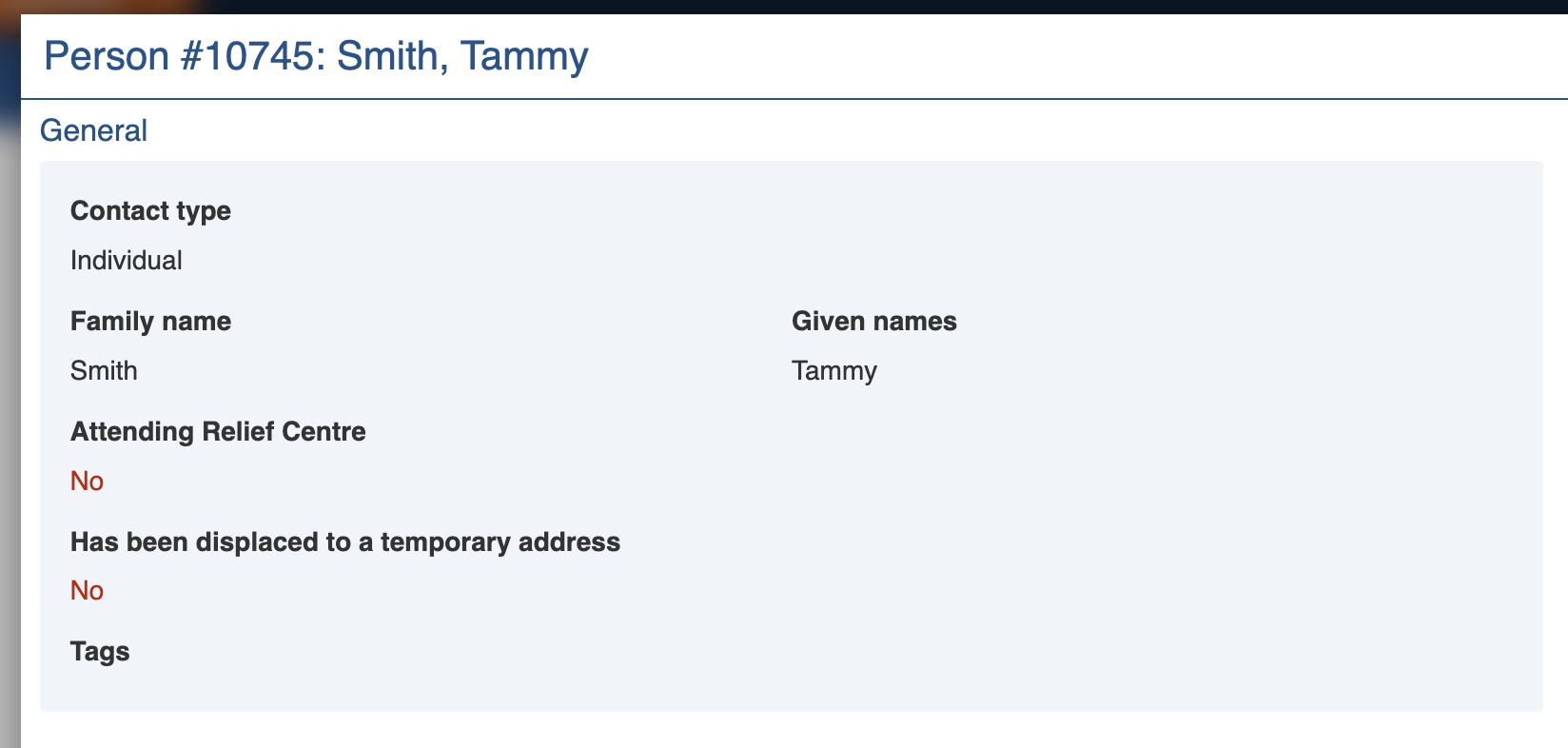
Sample Person record
## Person Settings
| Left Column | Right Column |
| ----------------------------------- | --------------------------------- |
| [Record Notes](#record-notes) | [Workflow](#workflow) |
| [General](#general) | [Classification](#classification) |
| [Contact Details](#contact-details) | [Related](#related) |
| [Communication](#communication) | [Activity](#activity) |
### Record Notes
When editing, you can record notes as you make changes which will appear in the Activity log.
Refer to: [Recording Notes](https://docs.cw.crisisworks.com/concepts-and-fundamentals/on-a-computer/using-the-datagrid/editing-items#recording-notes)
### General
The General section contains contact information including:
* **Contact Type** - if the record is for an *Individual* or an *Organisation*
* Identification information including **Family Name**, **Given Names**, **Age** (or **Date of Birth** depending on your system's configuration), **Gender** and **Born in Australia**
* **Phone** numbers and **Email**
* Additional fields for helping managing Cultural and Linguistic Diversity including **Aboriginal or Torres Strait Islander origin**, **Language** (to determine if a translator may be needed) and **Identifying as having a disability**.
* When selecting **Attending Relief Centre**, record the centre they attended in the **Relief Centre** field
* When selecting **Has been displaced to a temporary address**, record the temporary address in the **Temporary Address** section
General section for a Person
### Contact Details
Contact details is used mainly for communication via **Phone**, **Email** or **Post**. If a Person doesn't wish to be contacted.
Information captured in related items (such as Relief Registrations or Cases) can be used for communication purposes. If no information is recorded in related items it is recommended to select **Specify other address** and record it here.
**Use address of property in this case** will look up the address from the Case or Relief Registration. When selecting **Specify other address**, record the temporary address in the **Address** section
Contact Details section for a Person
### Communication
{% content-ref url="../communication" %}
[communication](https://docs.cw.crisisworks.com/modules/communication)
{% endcontent-ref %}
The Communication section may contain a **Message History** in the form of a delivery report of any messages sent to the Person.
### Workflow
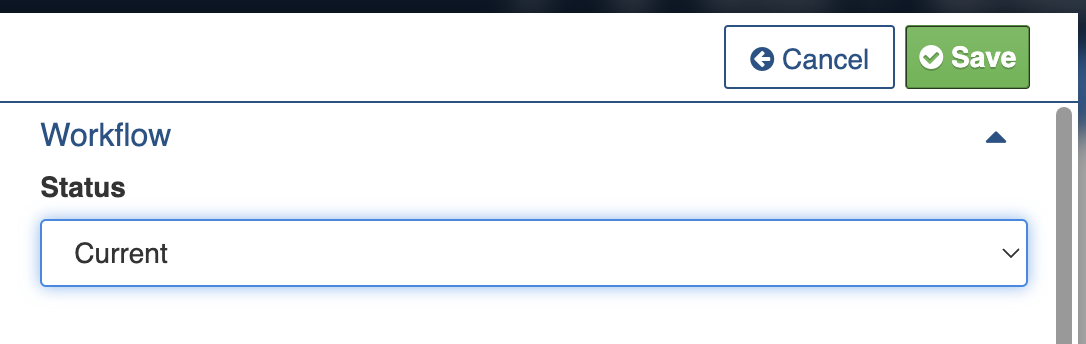
The Workflow section of the Person record allows you to set their status.
Workflow section
Persons have the following Statuses, in order of which they can be set:
Status
Datagrid Icon
Notes
Current
Person record is current and can be linked to Cases and Relief.
Closed
Closed records are no longer needed and will not show up in lists.
Closed (Duplicate)
Closed (Error)
Draft
Template
For more information refer to the [Data Dictionary](https://docs.cw.crisisworks.com/modules/recovery/broken-reference).
### Classification
Refer to: [Editing Items: Classification](https://docs.cw.crisisworks.com/concepts-and-fundamentals/on-a-computer/using-the-datagrid/editing-items#classification)
### Related
If the *Person* record was created via a Case or Relief Registration, a link will be listed here to those related parent records.
Related items section
### Activity
Refer to: [Viewing and Opening Register Items: Activity](https://docs.cw.crisisworks.com/concepts-and-fundamentals/on-a-computer/using-the-datagrid/viewing-items#activity)
## Updating Persons
{% content-ref url="../../concepts-and-fundamentals/on-a-computer/using-the-datagrid/editing-items" %}
[editing-items](https://docs.cw.crisisworks.com/concepts-and-fundamentals/on-a-computer/using-the-datagrid/editing-items)
{% endcontent-ref %}
When updating Persons:
* Keep contact information up to date.
* Record notes in the Record Notes field.
## Adding Persons
{% content-ref url="../../concepts-and-fundamentals/on-a-computer/using-the-datagrid/adding-items" %}
[adding-items](https://docs.cw.crisisworks.com/concepts-and-fundamentals/on-a-computer/using-the-datagrid/adding-items)
{% endcontent-ref %}
To add a new Person:
1. Select the **New Person** button from the New item menu.
2. Select **Individual** or **Organisation** under Contact type.
3. Complete each section of the [Person Settings](#persons-settings) as required. Note that some options may open up new sections to complete.
4. Set communication preferences under **Where can we send postal communication?**
5. Save the Case
The new Person begins as **Current**.
## Bulk Actions
{% content-ref url="../../concepts-and-fundamentals/on-a-computer/using-the-datagrid/bulk-actions" %}
[bulk-actions](https://docs.cw.crisisworks.com/concepts-and-fundamentals/on-a-computer/using-the-datagrid/bulk-actions)
{% endcontent-ref %}
The following additional bulk actions can be performed on Persons via the Actions menu:
| Action | Description |
| ------------------------- | ------------------------------------------------------------------------------------------------------------------------------------------------------------------------------------------------------------------------------------------------------- |
| Copy IDs | Refer to: [Copy IDs](https://docs.cw.crisisworks.com/concepts-and-fundamentals/on-a-computer/using-the-datagrid/bulk-actions#copy-ids) |
| Bulk Edit Persons |
Refer to: Bulk Edit Change the Status or Record notes for multiple Persons
Adds the Primary Contacts for Cases or Relief Registration as Recipients to a Communication
|
## Importing Persons
{% content-ref url="../../system-administration/configuring-the-system/imports" %}
[imports](https://docs.cw.crisisworks.com/system-administration/configuring-the-system/imports)
{% endcontent-ref %}
A System Administrator can add and/or update Persons in bulk via the Import system using the [Recovery Contact and Related Case Import](https://docs.cw.crisisworks.com/system-administration/configuring-the-system/imports/register-items/recovery-contact-and-related-case-import) option.
## Reports
{% content-ref url="../../system-administration/reporting/running-reports" %}
[running-reports](https://docs.cw.crisisworks.com/system-administration/reporting/running-reports)
{% endcontent-ref %}
The main Reports for Persons include the [Recovery Affected Contacts Report](https://docs.cw.crisisworks.com/modules/recovery/broken-reference) this is also as a bulk option from the [Actions menu](#bulk-actions).

 *Person* records can be managed directly through this sub-register and have their own Workflow fields.
Any changes made to the *Person* record will be reflected back in the Case or Relief Registration record they are connected to. Links to their parent records are listed and hyperlinked under the **Related** section of the record.
The *Person* record includes **Contact Details**, **Records Notes**, **Message History** and **Workflow Status**.
### Access
To access *Persons*:
* *Persons* must be [enabled for the event](https://docs.cw.crisisworks.com/system-administration/managing-events).
* [Go on duty](https://docs.cw.crisisworks.com/concepts-and-fundamentals/on-a-computer/working-with-events#setting-your-duties-for-events) with an appropriate role such as Recovery Officer or Recovery Manager. If you can't access it, ask your administrator to check your permissions.
Locate the *Persons* register under **Recovery** > **Persons** in the menu.
*Person* records can be managed directly through this sub-register and have their own Workflow fields.
Any changes made to the *Person* record will be reflected back in the Case or Relief Registration record they are connected to. Links to their parent records are listed and hyperlinked under the **Related** section of the record.
The *Person* record includes **Contact Details**, **Records Notes**, **Message History** and **Workflow Status**.
### Access
To access *Persons*:
* *Persons* must be [enabled for the event](https://docs.cw.crisisworks.com/system-administration/managing-events).
* [Go on duty](https://docs.cw.crisisworks.com/concepts-and-fundamentals/on-a-computer/working-with-events#setting-your-duties-for-events) with an appropriate role such as Recovery Officer or Recovery Manager. If you can't access it, ask your administrator to check your permissions.
Locate the *Persons* register under **Recovery** > **Persons** in the menu.




 The new Person begins as **Current**.
## Bulk Actions
{% content-ref url="../../concepts-and-fundamentals/on-a-computer/using-the-datagrid/bulk-actions" %}
[bulk-actions](https://docs.cw.crisisworks.com/concepts-and-fundamentals/on-a-computer/using-the-datagrid/bulk-actions)
{% endcontent-ref %}
The following additional bulk actions can be performed on Persons via the Actions menu:
| Action | Description |
| ------------------------- | ------------------------------------------------------------------------------------------------------------------------------------------------------------------------------------------------------------------------------------------------------- |
| Copy IDs | Refer to: [Copy IDs](https://docs.cw.crisisworks.com/concepts-and-fundamentals/on-a-computer/using-the-datagrid/bulk-actions#copy-ids) |
| Bulk Edit Persons |
The new Person begins as **Current**.
## Bulk Actions
{% content-ref url="../../concepts-and-fundamentals/on-a-computer/using-the-datagrid/bulk-actions" %}
[bulk-actions](https://docs.cw.crisisworks.com/concepts-and-fundamentals/on-a-computer/using-the-datagrid/bulk-actions)
{% endcontent-ref %}
The following additional bulk actions can be performed on Persons via the Actions menu:
| Action | Description |
| ------------------------- | ------------------------------------------------------------------------------------------------------------------------------------------------------------------------------------------------------------------------------------------------------- |
| Copy IDs | Refer to: [Copy IDs](https://docs.cw.crisisworks.com/concepts-and-fundamentals/on-a-computer/using-the-datagrid/bulk-actions#copy-ids) |
| Bulk Edit Persons |