# Needs & Tasks

## Overview <a href="#requests-overview" id="requests-overview"></a>

The Needs & Tasks register is used for recording services and tasks to track the immediate needs for which can be assigned to providers.

Needs & Tasks are a sub-item of and can be attached to the following parent registers:

* [Cases](https://docs.cw.crisisworks.com/modules/recovery/cases)
* [Relief Registrations](https://docs.cw.crisisworks.com/modules/recovery/relief-registration)
* [Infrastructure](https://docs.cw.crisisworks.com/modules/recovery/infrastructure)

You cannot add Needs & Tasks directly, they must be added through one of these registers. Each of these can have one or more Needs and Tasks attached. It is important to monitor both the parent register and the Need/Tasks associated with it. It is possible for a parent item to be closed for example, but have open tasks remaining. Ideally a Coordinator should review open tasks and finalise them before closing the parent record.

Having its own register and workflow means that you can manage provision of services separately. You can assign them to providers, which can include internal teams, and track them until the services are fully delivered. Providers can be given restricted access only to the their currently assigned Needs & Tasks.

Needs & Tasks provide the following features:

* Flexlible task management compatible with Cases, Relief Registrations and Infrastructure
* **Assign** to users, positions or refer to external providers who are automatically notified as they progress through the workflow.
* External providers can be set up to access and manage only tasks they've been assigned
* **Estimate costs** for and allocate [resources](https://docs.cw.crisisworks.com/modules/operations/resources) to tasks
* Set a **due date** to manage follow ups and be automatically notified when the due date is approaching or **overdue.**
* **Categories** and **Tagging** to help manage related groups of items to make them quick and easy to find and report on

### Access <a href="#requests-usingrequests" id="requests-usingrequests"></a>

To access *Needs & Tasks*:&#x20;

* *Needs/Task* must be [enabled for the event](https://docs.cw.crisisworks.com/system-administration/managing-events).
* [Go on duty](https://docs.cw.crisisworks.com/concepts-and-fundamentals/on-a-computer/working-with-events#setting-your-duties-for-events) with an appropriate role such as Relief Officer, Recovery Officer, Relief Coordinator or Recovery Coordinator. If you can't access it, ask your administrator to check your permissions.

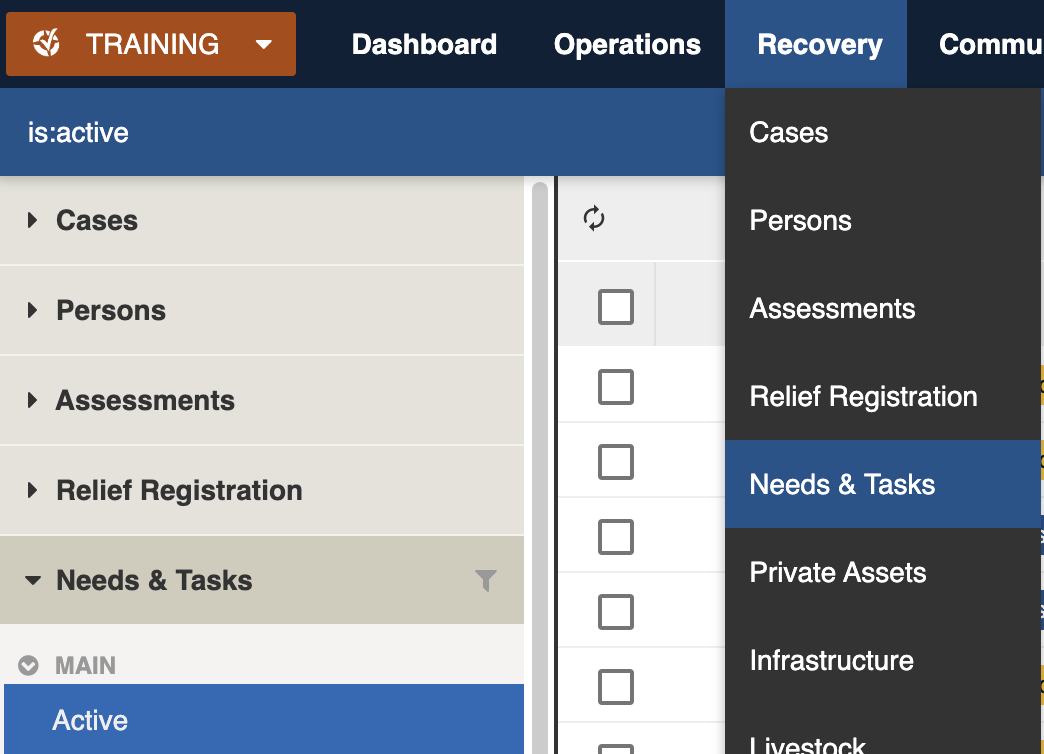
Locate the *Needs & Tasks* register under **Recovery** > **Needs & Tasks** in the menu.&#x20;

<figure><img src="https://3923904090-files.gitbook.io/~/files/v0/b/gitbook-x-prod.appspot.com/o/spaces%2FNy7IznbrPLUq6GJDDQDk%2Fuploads%2FXqxQEkVAQdww2HuTnSTW%2Fimage.png?alt=media&#x26;token=6242a8c7-ce23-44ef-a2c8-c925c7d23e98" alt="" width="375"><figcaption><p>Location of the Needs &#x26; Tasks register in the Recovery module</p></figcaption></figure>

## Finding Needs & Tasks <a href="#information-editinganexistinginformationitem" id="information-editinganexistinginformationitem"></a>

{% content-ref url="../../concepts-and-fundamentals/on-a-computer/searching-filtering-and-querying-registers" %}
[searching-filtering-and-querying-registers](https://docs.cw.crisisworks.com/concepts-and-fundamentals/on-a-computer/searching-filtering-and-querying-registers)
{% endcontent-ref %}

The register includes a number of features to assist in finding *Relief Registrations*:

* [Datagrid](https://docs.cw.crisisworks.com/concepts-and-fundamentals/on-a-computer/using-the-datagrid#data-grid-view) view
* [Map](https://docs.cw.crisisworks.com/concepts-and-fundamentals/on-a-computer/using-the-datagrid#map-view) view&#x20;
* [Filters](#information-editinganexistinginformationitem-1) including Workflow, Types, Aboriginal and Torres Strait Islander Cultural Specific Support, Region, Category and tags
* Combination filters and search by most fields

### Filters <a href="#information-editinganexistinginformationitem" id="information-editinganexistinginformationitem"></a>

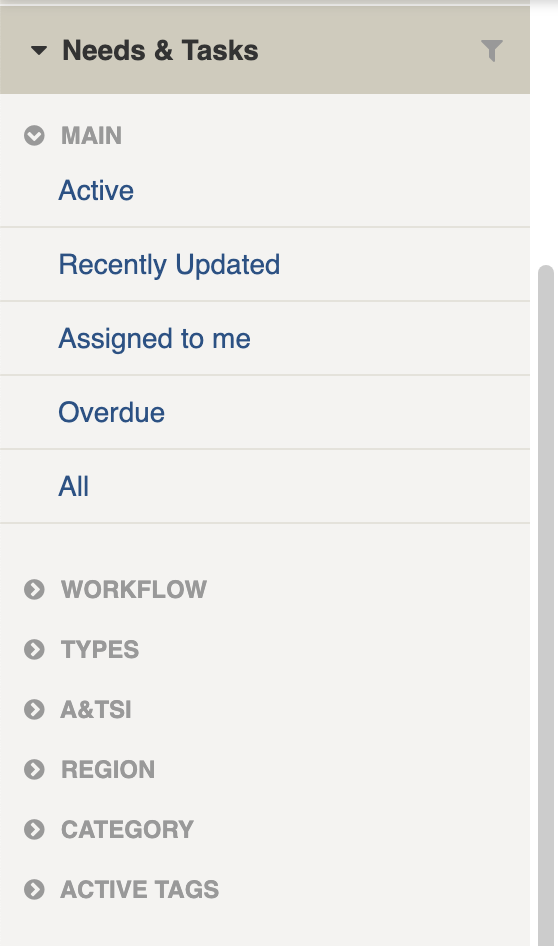
Filters help make management of Needs & Tasks easier by focusing on specific groups of items on the datagrid.

<figure><img src="https://3923904090-files.gitbook.io/~/files/v0/b/gitbook-x-prod.appspot.com/o/spaces%2FNy7IznbrPLUq6GJDDQDk%2Fuploads%2FAZNs6lFLt5ud76zZH4ot%2Fimage.png?alt=media&#x26;token=55a976b8-5a52-49a7-9395-dc3a6baf262b" alt="" width="140"><figcaption><p>Needs &#x26; Tasks filter menu</p></figcaption></figure>

<details>

<summary>Filter menu explanations</summary>

The following lists some of the filters and how to use them:

<table><thead><tr><th width="247">Filter Group</th><th>Filter/s</th><th>Use</th></tr></thead><tbody><tr><td>Main</td><td>Shows Active, Recently updated, Assigned to me, Overdue and All</td><td></td></tr><tr><td>Workflow</td><td>Requested</td><td></td></tr><tr><td></td><td>No Action Required</td><td></td></tr><tr><td></td><td>In Progress</td><td></td></tr><tr><td></td><td>Referred</td><td></td></tr><tr><td></td><td>Provided</td><td></td></tr><tr><td></td><td>Not Required</td><td></td></tr><tr><td></td><td>Referred and Resolved</td><td></td></tr><tr><td></td><td>Due</td><td></td></tr><tr><td>Types</td><td>Relief/Cases, Infrastructure Services</td><td></td></tr><tr><td>A&#x26;TSI</td><td>Cultural Specific Support</td><td>Finds all Needs/Tasks that require cultural support</td></tr><tr><td>Region</td><td></td><td></td></tr><tr><td>Category</td><td></td><td></td></tr><tr><td>Active tags</td><td></td><td><p>Any tags in use.</p><p>Refer to: tags</p></td></tr></tbody></table>

</details>

## Viewing Needs & Tasks <a href="#information-editinganexistinginformationitem" id="information-editinganexistinginformationitem"></a>

{% content-ref url="../../concepts-and-fundamentals/on-a-computer/using-the-datagrid/viewing-items" %}
[viewing-items](https://docs.cw.crisisworks.com/concepts-and-fundamentals/on-a-computer/using-the-datagrid/viewing-items)
{% endcontent-ref %}

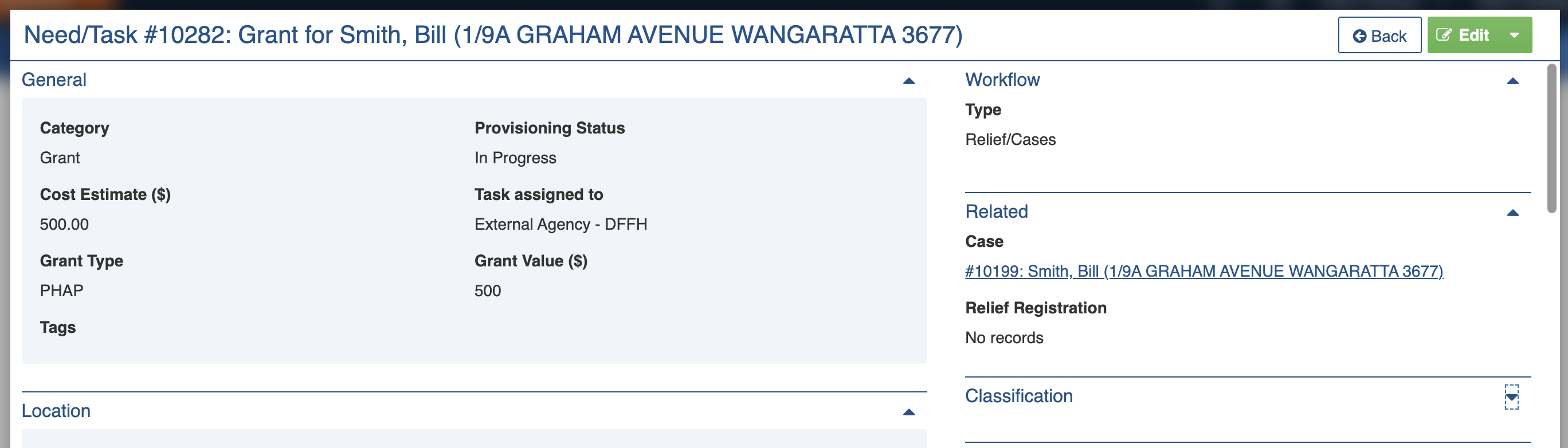
When viewing *Needs & Tasks*, sections can be expanded to show information.

As each section is completed, new sections may show additional information.&#x20;

<figure><img src="https://3923904090-files.gitbook.io/~/files/v0/b/gitbook-x-prod.appspot.com/o/spaces%2FNy7IznbrPLUq6GJDDQDk%2Fuploads%2FKc5RYzY27qvcJaHkx2p3%2Fimage.png?alt=media&#x26;token=5b500a4d-62df-4cc7-a0fe-80f3da1a605e" alt=""><figcaption><p>Sample Need/Task for provision of a  grant associated with a Case assigned to external agency DFFH</p></figcaption></figure>

## Need/Task Settings

| Left Column          | Right Column                      |
| -------------------- | --------------------------------- |
| [General](#general)  | [Workflow](#workflow)             |
| [Location](#locatio) | [Related](#related)               |
|                      | [Classification](#classification) |
|                      | [Activity](#activity)             |

### General

The General section records the key information including Workflow.

#### Category

This field categorises Needs & Tasks, for example those that are related to Accommodation, Fencing or Transport etc. This can be used to report on provisioning for different types of needs. Your Administrator configures the list of categories for your site using the [Recovery: Immediate Need Category](https://docs.cw.crisisworks.com/system-administration/configuring-the-system/lookups) lookup.

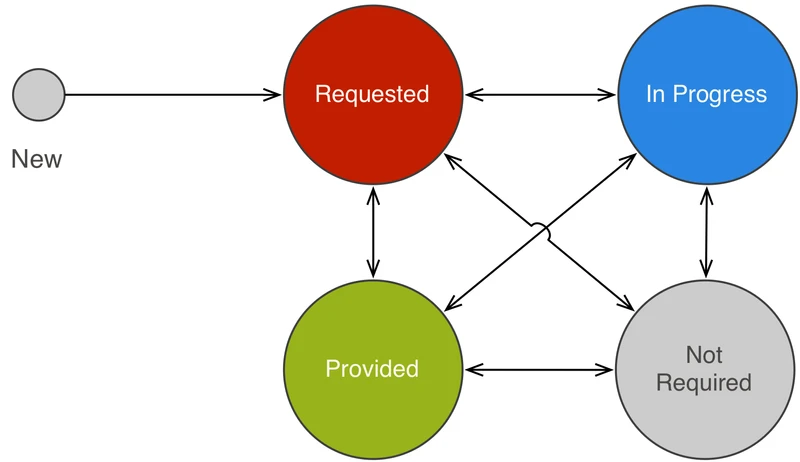
#### Provisioning Status

This field records the current step in service provision. On the datagrid this appears as just 'Status'. A basic overview of the workflow is shown in the diagram below.

<figure><img src="https://3923904090-files.gitbook.io/~/files/v0/b/gitbook-x-prod.appspot.com/o/spaces%2FNy7IznbrPLUq6GJDDQDk%2Fuploads%2FqxNtAiMbIKbrJsNWFQJa%2Fimage.png?alt=media&#x26;token=aae96043-2195-4062-8e34-97eec809bce9" alt="" width="375"><figcaption><p>Workflow diagram for Needs and Tasks</p></figcaption></figure>

Needs & Tasks have the following Provisioning Statuses, in order of which they can be set.:

<table><thead><tr><th width="200.8828125">Provisioning Status</th><th width="143">Datagrid Icon</th><th>Notes</th></tr></thead><tbody><tr><td>Requested</td><td><img src="https://3923904090-files.gitbook.io/~/files/v0/b/gitbook-x-prod.appspot.com/o/spaces%2FNy7IznbrPLUq6GJDDQDk%2Fuploads%2FIjKGVkwSKn5RoNiWZIJH%2Fimage.png?alt=media&#x26;token=e93c67df-06e8-4a3c-94c9-264fc4c973eb" alt="" data-size="line"></td><td>Newly created Needs/Tasks that are yet to be actioned get this status. This is an Active status.</td></tr><tr><td>No Action Required</td><td><img src="https://3923904090-files.gitbook.io/~/files/v0/b/gitbook-x-prod.appspot.com/o/spaces%2FNy7IznbrPLUq6GJDDQDk%2Fuploads%2FKUVo9P9eAZLEqu7cT0W5%2Fimage.png?alt=media&#x26;token=04b64ee1-c23c-4017-8056-2701c9ad611d" alt="" data-size="line"></td><td>No further action is required. Items given this status are archived and don't appear in Active lists.</td></tr><tr><td>In Progress</td><td><img src="https://3923904090-files.gitbook.io/~/files/v0/b/gitbook-x-prod.appspot.com/o/spaces%2FNy7IznbrPLUq6GJDDQDk%2Fuploads%2FfiM9ZuROhU619ifEAVax%2Fimage.png?alt=media&#x26;token=9333452e-f173-47f7-aa9e-bfc72d3c43be" alt="" data-size="line"></td><td>Those being worked on and typically assigned to a user or position are get set to this. This is an Active status.</td></tr><tr><td>Referred</td><td><img src="https://3923904090-files.gitbook.io/~/files/v0/b/gitbook-x-prod.appspot.com/o/spaces%2FNy7IznbrPLUq6GJDDQDk%2Fuploads%2FppOIvNyb7Q7Qvm3CGpp6%2Fimage.png?alt=media&#x26;token=16361a46-92b8-4ca1-8f2c-52a031e1f867" alt="" data-size="line"></td><td>Typically those assigned to an external provider are get set to this. This is an Active status.</td></tr><tr><td>Provided</td><td><img src="https://3923904090-files.gitbook.io/~/files/v0/b/gitbook-x-prod.appspot.com/o/spaces%2FNy7IznbrPLUq6GJDDQDk%2Fuploads%2FNgyfRXeKSI73NLQebzp4%2Fimage.png?alt=media&#x26;token=7f398388-193e-4d39-bce9-89e0e6ae0593" alt="" data-size="line"></td><td>Services required of this Need/Task has been delivered. Items given this status are archived and don't appear in Active lists.</td></tr><tr><td>Not Required</td><td><img src="https://3923904090-files.gitbook.io/~/files/v0/b/gitbook-x-prod.appspot.com/o/spaces%2FNy7IznbrPLUq6GJDDQDk%2Fuploads%2FmVXxoptoXUPAHHiWh4Wn%2Fimage.png?alt=media&#x26;token=fbf5b692-14f0-47d7-b94c-146dc68b7406" alt="" data-size="line"></td><td>The service is not required. Items given this status are archived and don't appear in Active lists.</td></tr><tr><td>Referred and Resolved</td><td><img src="https://3923904090-files.gitbook.io/~/files/v0/b/gitbook-x-prod.appspot.com/o/spaces%2FNy7IznbrPLUq6GJDDQDk%2Fuploads%2FmKNbuHCc0Fh6neJMYIGu%2Fimage.png?alt=media&#x26;token=dfccd869-a462-4f3c-9a8c-a5259b298346" alt="" data-size="line"></td><td>The service has been referred and the provider has reported that it has been provided, so it is resolved. Items given this status are archived and don't appear in Active lists.</td></tr></tbody></table>

#### **Reference**

This field records any reference numbers such as invoice numbers.

#### Cost Estimate

This field records an estimate of costs for the Need/Task. This is used, for example, to generate totals in financial reports.

#### Task Assigned To

This field records the user, position or external provider that the item has been assigned (or referred) to.

#### Resource

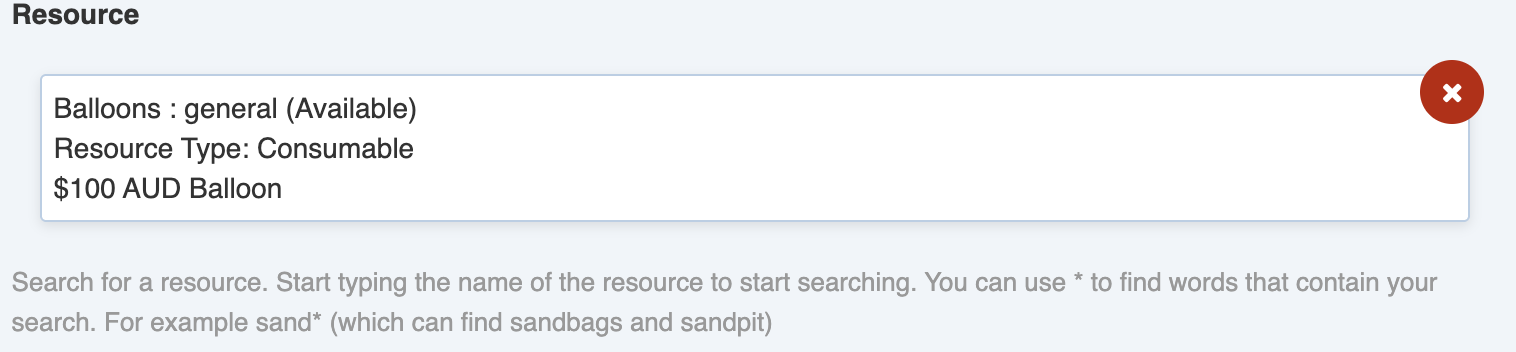
Use this field if you need to record a [Resource](https://docs.cw.crisisworks.com/modules/operations/resources) allocated to the Need/Task. You can only attach a single resource. Resources must be added in the the Resource register before they can be allocated.

<figure><img src="https://3923904090-files.gitbook.io/~/files/v0/b/gitbook-x-prod.appspot.com/o/spaces%2FNy7IznbrPLUq6GJDDQDk%2Fuploads%2Fplwsf4b3q3QiDTPzsTNz%2Fimage.png?alt=media&#x26;token=3d550379-dafe-4136-b8cf-867d9cfb9902" alt="" width="375"><figcaption><p>Resource field allows a single resource to be allocated to a Need/Task</p></figcaption></figure>

#### Details <a href="#details" id="details"></a>

This field records additional information about of any actions or activities required to perform the Need/Task as a [Rich Text field](https://docs.cw.crisisworks.com/concepts-and-fundamentals/on-a-computer/using-the-datagrid/editing-items#rich-text-fields). This is important information for anyone who is assigned the task, particularly when they are referred to external providers.

#### Associated task documents and images

This field enables users to attach images or documents using the [Add File button](https://docs.cw.crisisworks.com/concepts-and-fundamentals/on-a-computer/using-the-datagrid/editing-items#attaching-files).

If files have already been uploaded you can download and view them from here.

#### Tags

This field is used to classify the item. Refer to [Tagging items](https://docs.cw.crisisworks.com/concepts-and-fundamentals/on-a-computer/using-the-datagrid/tagging-items)

### Location

The Location section records an optional geographical location for the Need/Task using the [Location Selector](https://docs.cw.crisisworks.com/concepts-and-fundamentals/on-a-computer/using-the-datagrid/editing-items#location). This is displayed on the Register's map view.&#x20;

### Workflow

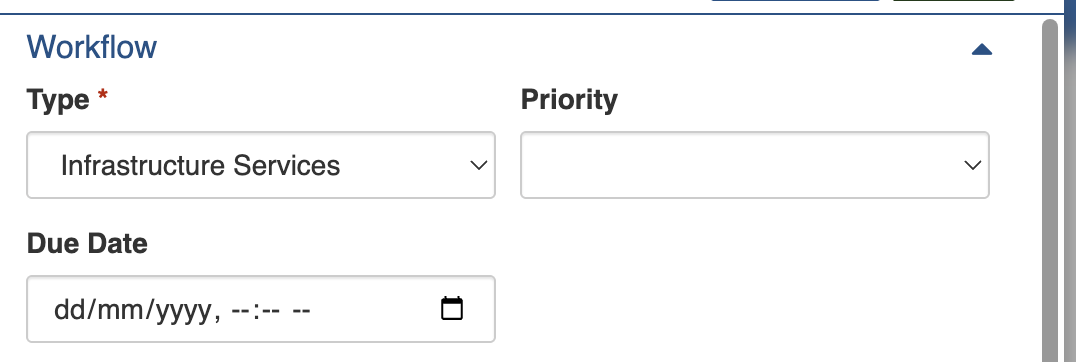
The Workflow section records additional information about the kind and importance of the Need/Task.

#### Type

This field records which register the Need/Task was created from. [Relief Registrations](https://docs.cw.crisisworks.com/modules/recovery/relief-registration) and [Cases](https://docs.cw.crisisworks.com/modules/recovery/cases) are recorded under *Relief/Cases* and Infrastructure Needs and Tasks are recorded under *Infrastructure Services*.

**Priority** helps indicate information items that are a higher priority than others. Priority is an optional column on the datagrid and allows you to create filters to find high and urgent priority tasks.

**Due Date** records the date when it becomes Overdue, these items can be found using the Overdue filter on the datagrid. For use of the date field refer to: [Selecting dates](https://docs.cw.crisisworks.com/concepts-and-fundamentals/on-a-computer/using-the-datagrid/editing-items#selecting-dates).

<figure><img src="https://3923904090-files.gitbook.io/~/files/v0/b/gitbook-x-prod.appspot.com/o/spaces%2FNy7IznbrPLUq6GJDDQDk%2Fuploads%2FuRr1uR4NgRW9QP2d1RKP%2Fimage.png?alt=media&#x26;token=0e3a5da9-8253-4965-ade3-2bca377bd73a" alt="" width="375"><figcaption><p>Workflow section</p></figcaption></figure>

### Related

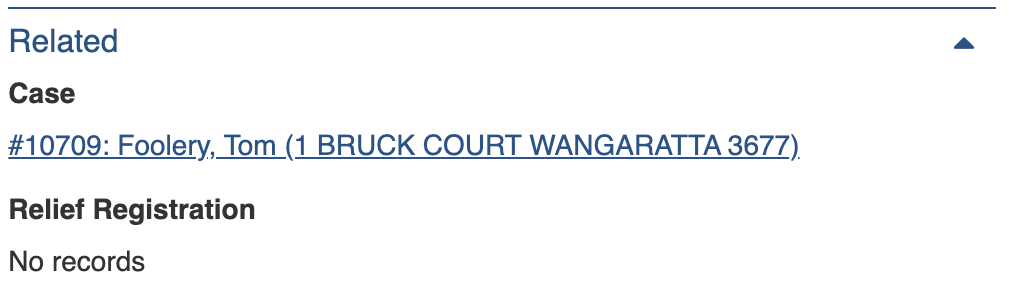
Any parent records of Needs/Tasks Case are listed in the Related section under their respective type/category. You can follow these back to the parent record for more context.

<figure><img src="https://3923904090-files.gitbook.io/~/files/v0/b/gitbook-x-prod.appspot.com/o/spaces%2FNy7IznbrPLUq6GJDDQDk%2Fuploads%2FQRdYOdklNPT8cHW3YyXO%2Fimage.png?alt=media&#x26;token=c5ef9140-42e7-4467-8193-23e9cfdbe502" alt="" width="375"><figcaption><p>Related section showing link to related Case.</p></figcaption></figure>

### Classification

Refer to:  [Editing Items: Classification](https://docs.cw.crisisworks.com/concepts-and-fundamentals/on-a-computer/using-the-datagrid/editing-items#classification)

### Activity

Refer to: [Viewing and Opening Register Items: Activity](https://docs.cw.crisisworks.com/concepts-and-fundamentals/on-a-computer/using-the-datagrid/viewing-items#activity)

## Updating Needs & Tasks

{% content-ref url="../../concepts-and-fundamentals/on-a-computer/using-the-datagrid/editing-items" %}
[editing-items](https://docs.cw.crisisworks.com/concepts-and-fundamentals/on-a-computer/using-the-datagrid/editing-items)
{% endcontent-ref %}

When updating Needs & Tasks:

* Add notes on your edits in the **Record Notes** field
* Ensure **Provisioning Status** to reflects the current stage
* Manage **priority** and **due date**
* Enter **cost estimates** and **resources** for any costs incurred or resources utilised
* Check the **location** is current and matches the service provision

### Assigning Needs & Tasks

* When assigning Tasks, set **Task Assigned to** to a user or position and change the **Provisioning Status** to *In Progress*
* When referring Tasks, set Task Assigned to a position associated with an external provider and change the **Provisioning Status** to *Referred*

## Adding Needs & Tasks

Needs & Tasks can only be added through their parent register.

For further instructions, refer to:

* Cases
* Relief Registrations
* Infrastructure

When adding Needs & Tasks:

1. Go to the relevant Needs and Tasks section in the parent register and in the **Add services, tasks and immediate needs** field. Use the Add button <img src="https://3923904090-files.gitbook.io/~/files/v0/b/gitbook-x-prod.appspot.com/o/spaces%2FNy7IznbrPLUq6GJDDQDk%2Fuploads%2FAJaQEUsCC4f7S0XdbRZC%2Fimage.png?alt=media&#x26;token=84e85837-7009-4567-bb86-9cddfbf8e1f6" alt="" data-size="line">or, if there are existing Needs & Tasks use the Add Another button <img src="https://3923904090-files.gitbook.io/~/files/v0/b/gitbook-x-prod.appspot.com/o/spaces%2FNy7IznbrPLUq6GJDDQDk%2Fuploads%2FDUVGgm4gIvXVzJy44GMm%2Fimage.png?alt=media&#x26;token=a806f552-1800-4e94-91f3-801dd9f685f3" alt="" data-size="line">.
2. To add multiple use the Add Another button <img src="https://3923904090-files.gitbook.io/~/files/v0/b/gitbook-x-prod.appspot.com/o/spaces%2FNy7IznbrPLUq6GJDDQDk%2Fuploads%2FDUVGgm4gIvXVzJy44GMm%2Fimage.png?alt=media&#x26;token=a806f552-1800-4e94-91f3-801dd9f685f3" alt="" data-size="line">.&#x20;
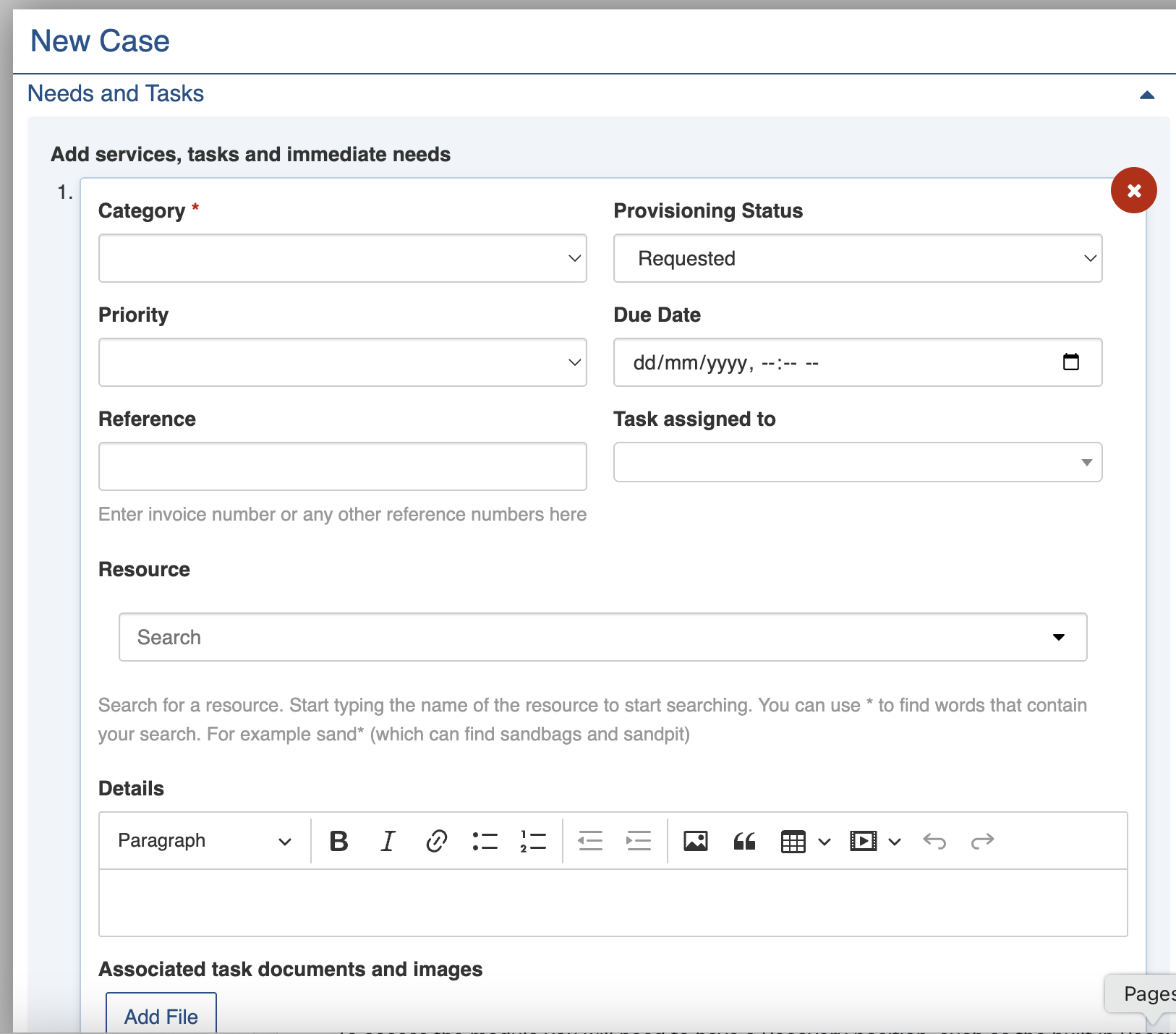
3. Set the **Category** using the pull-down list. This is required at minimum.
4. New records are automatically have the **Provisioning Status** set to *Requested*.
5. Complete each section of the [Need/Task Settings ](#need-task-settings)as required. You can remove an existing Needs & Tasks sub-item using the red cross icon on the top right.
6. Repeat steps 2-5 for as many Needs and Tasks that you require.
7. Complete also each section of the form in the parent record you're working with.
8. Save <img src="https://3923904090-files.gitbook.io/~/files/v0/b/gitbook-x-prod.appspot.com/o/spaces%2FNy7IznbrPLUq6GJDDQDk%2Fuploads%2F2qJNRqfHczOPl1cKEcMo%2Fimage.png?alt=media&#x26;token=1f653f47-1199-4f87-88da-313768ca3dac" alt="" data-size="line">

<figure><img src="https://3923904090-files.gitbook.io/~/files/v0/b/gitbook-x-prod.appspot.com/o/spaces%2FNy7IznbrPLUq6GJDDQDk%2Fuploads%2FBKzEgH7XJE14mkumtxGq%2Fimage.png?alt=media&#x26;token=e853ef75-b920-4999-80be-8faf01ee2263" alt="" width="375"><figcaption><p>Needs and Tasks sub-form in Case record</p></figcaption></figure>

## Bulk Actions

{% content-ref url="../../concepts-and-fundamentals/on-a-computer/using-the-datagrid/bulk-actions" %}
[bulk-actions](https://docs.cw.crisisworks.com/concepts-and-fundamentals/on-a-computer/using-the-datagrid/bulk-actions)
{% endcontent-ref %}

The following additional bulk actions can be performed on Persons via the Actions menu:

| Action                                           | Description                                                                                                                                                                                                                                                                                                                                                   |
| ------------------------------------------------ | ------------------------------------------------------------------------------------------------------------------------------------------------------------------------------------------------------------------------------------------------------------------------------------------------------------------------------------------------------------- |
| Copy IDs                                         | Refer to: [Copy IDs](https://docs.cw.crisisworks.com/concepts-and-fundamentals/on-a-computer/using-the-datagrid/bulk-actions#copy-ids)                                                                                                                                                                                                                        |
| Export Needs and Tasks with basic parent data    | <p>Refer to: <a href="../../../concepts-and-fundamentals/on-a-computer/using-the-datagrid/bulk-actions#export-to-report">Export to Report</a><br>Exports abbreviated data to the <a href="broken-reference">Recovery Needs & Tasks Report</a></p>                                                                                                             |
| Export Needs and Tasks with detailed parent data | <p>Refer to: <a href="../../../concepts-and-fundamentals/on-a-computer/using-the-datagrid/bulk-actions#export-to-report">Export to Report</a><br>Exports comprehensive data to the <a href="broken-reference">Recovery Needs & Tasks Report</a></p>                                                                                                           |
| Bulk Edit Needs & Tasks                          | <p>Refer to: <a href="../../../concepts-and-fundamentals/on-a-computer/using-the-datagrid/bulk-actions#bulk-edit">Bulk Edit</a></p><ul><li>Record Notes</li><li>Event</li><li>Provisioning Status</li><li>Task Assigned To</li><li>Priority</li><li>Category</li><li>GERF Payment Type</li><li>Tags</li><li>Region</li><li>Due Date</li><li>Details</li></ul> |
| Bulk Edit all Filtered Records                   | Refer to: [Bulk Edit All Filtered Records](https://docs.cw.crisisworks.com/concepts-and-fundamentals/on-a-computer/using-the-datagrid/bulk-actions#bulk-edit-all-filtered) and Bulk Edit Needs & Tasks                                                                                                                                                        |

## Importing Needs & Tasks

{% content-ref url="../../system-administration/configuring-the-system/imports" %}
[imports](https://docs.cw.crisisworks.com/system-administration/configuring-the-system/imports)
{% endcontent-ref %}

A System Administrator can add and/or update Needs & Tasks in bulk via the Import system using the [Recovery Task Import](https://docs.cw.crisisworks.com/system-administration/configuring-the-system/imports/register-items/recovery-task-import) option.

## Reports

{% content-ref url="../../system-administration/reporting/running-reports" %}
[running-reports](https://docs.cw.crisisworks.com/system-administration/reporting/running-reports)
{% endcontent-ref %}

Needs & Tasks reports can be found in the [Recovery Reports](https://docs.cw.crisisworks.com/modules/reports/recovery-reports) section:

* Needs & Tasks Summary (also available from the [Actions menu](#bulk-actions))
* Recovery Needs & Tasks (also available from the [Actions menu](#bulk-actions))
* Finance - Recovery Cost Per Case Needs and Tasks
* Recovery Needs and Tasks with Case Data